
Job Scraping Tools: Best Job Board Scrapers in 2026
If you are a recruiter, sales team, HR analyst, or labor-market researcher, job scraping tools help turn job boards into spreadsheets for hiring signals, salary benchmarking, account prioritization, and market trend reporting. The right tool depends on whether you need Indeed listings, Glassdoor reviews and salaries, LinkedIn roles, Google Jobs coverage, Upwork projects, or company career-page data.
The method still matters: Indeed is public and moderately protected, Glassdoor hides high-value review and salary data behind login, and LinkedIn carries account risk if scraped aggressively. This guide compares free job scraping tools, Chrome extensions, Python scripts, Apify actors, and enterprise datasets across setup time, block rate, cost, login handling, and data coverage.
Export job-board research from the page you filtered
Open Indeed, Glassdoor, LinkedIn, Google Jobs, Upwork, or a career page in Chrome, run Clura, and export visible job titles, companies, salaries, locations, dates, and URLs.
Add to Chrome — Free →What Are the Best Job Scraping Tools in 2026?
The best job scraping tool for most recruiting and market research teams is a Chrome extension because it uses your real browser session, takes about 2 minutes to set up, and keeps block rates near 4-5%. Python and Playwright are better for scheduled automation, Apify is useful for managed runs, and Bright Data fits enterprise datasets.
| Tool | Setup Time | Typical Cost | Block / Failure Rate | Best For |
|---|---|---|---|---|
| Clura Chrome extension | 2 min | Free / $29.99 lifetime | ~4-5% | Recruiters and operators exporting visible job listings |
| Python + Playwright | 4-8 hours | $50-200/mo proxies | ~12-20% with stealth | Developers building scheduled job scraping workflows |
| Apify job scraping actors | 30-45 min | $49/mo+ | ~22-25% | Managed cloud runs when you do not want to host code |
| Bright Data datasets | 1-3 days procurement | $500/mo+ | ~5-10% | Enterprise teams buying pre-collected job data |
| Python requests / BeautifulSoup | 30 min | Free | ~85-91% failure on JS job pages | Learning only, not production job boards |
For most teams, the practical choice is the free-to-start browser path: open the job board, apply filters, let the page render, and export the visible listings. That is the same workflow described in the no-code job listings scraper guide, and it works across Indeed, LinkedIn Jobs, Glassdoor, Google Jobs, ZipRecruiter, Upwork project posts, and company career pages.
Best Free Job Scraping Tools
Free job scraping tools usually fall into two buckets: browser extensions with a free tier, and open-source Python scripts. Browser extensions are better for non-technical users because Chrome already handles login, JavaScript rendering, cookies, and human-speed page loading. Open-source scripts are free to download, but the real cost appears when selectors break, job boards change layouts, or proxy spend starts.
When a Paid Job Scraping Tool Is Worth It
Paid cloud tools make sense when you need scheduled unattended collection, very high volume, or centralized billing for a data team. For a recruiter exporting 200-2,000 roles per week, a Chrome extension is usually enough. For a data engineering team refreshing millions of job postings, Bright Data or a Playwright pipeline with monitoring may be the better fit. The Google Jobs scraper workflow is the fastest broad-coverage starting point before going deep on a single board.
Try the free job scraping tool first
Install Clura, open a job board in Chrome, and export job title, company, location, salary, URL, and posting date without Python or proxies.
Add to Chrome — Free →Indeed vs Glassdoor vs LinkedIn: Scraping Difficulty at a Glance
Indeed is the easiest job board to scrape — most data is public, no login required, ~4% block rate with a Chrome extension. Glassdoor is harder — reviews and salaries require login, ~5% block rate with extension, CSRF token rotation adds Python maintenance complexity. LinkedIn is the hardest — aggressive bot detection, ~5% block rate with extension but ~45% with headless Playwright, and account bans rather than just request blocks.
| Platform | Login Required | Block Rate (Extension) | Block Rate (Playwright) | Account Ban Risk | Hardest Part |
|---|---|---|---|---|---|
| Indeed | No — most data public | ~4% | ~31% | None | JavaScript rendering, CloudFront TLS detection |
| Glassdoor | Yes — reviews/salaries | ~5% | ~35% | None | Login wall + CSRF token rotation |
| Yes — almost everything | ~5% | ~45% | Medium-High | Rate limits + permanent account bans |
The block rate gap between Chrome extension (~4–5%) and Playwright (~31–45%) is consistent across all three platforms. The reason is the same: a Chrome extension runs inside your real browser with a real session, real TLS fingerprint, and human-speed behavior. Playwright launches a separate browser process that can be fingerprinted regardless of stealth configuration.
What Data Can You Actually Scrape from Each Job Board?
Indeed provides public job listings (title, company, location, salary ~40% of listings, URL, date). Glassdoor provides company reviews, salary benchmarks, interview questions, and employer ratings — all behind login. LinkedIn provides professional profiles, job listings, company pages, and Sales Navigator lead data — almost all behind login. No job board provides an open API for any of this in 2026.
| Data Type | Indeed | Glassdoor | |
|---|---|---|---|
| Job listings (title, company, location) | ✅ Public | ✅ Mostly public | ✅ Public (Jobs tab) |
| Salary data | ~40% of listings | ✅ Behind login — rich benchmark data | ~30% of job listings |
| Company reviews | ❌ Not available | ✅ Behind login — core Glassdoor data | ❌ Not available |
| Professional profiles | ❌ Not available | ❌ Not available | ✅ Behind login |
| Interview questions | ❌ Not available | ✅ Behind login | ❌ Not available |
| Employee count / company size | ❌ Not available | ✅ Public | ✅ Company pages |
| Hiring velocity signals | ✅ Via job listing volume | ✅ Via job + review trends | ✅ Via job listing volume |
The data complement each other well. Indeed is the fastest source for raw job listing volume — great for market research, salary benchmarking from listings, and B2B lead generation from hiring signals. Glassdoor adds the employee perspective — culture scores, salary benchmarks from actual employees, interview experiences. LinkedIn adds the people layer — who works where, career histories, org structure signals.
Scraping Indeed: Easiest of the Three, Still Needs a Real Browser
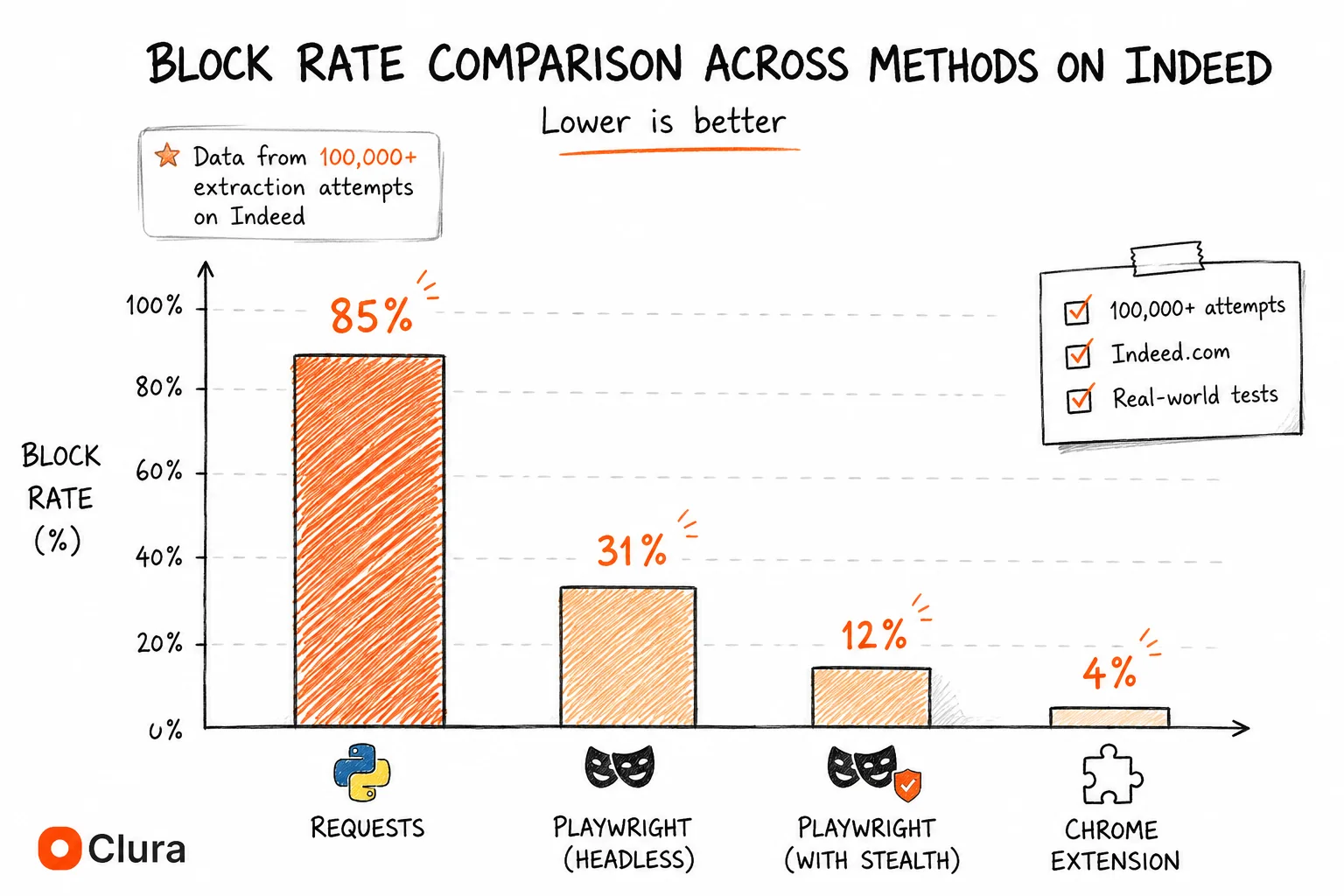
Indeed is the most scraping-friendly job board: most job data is publicly accessible without login, and block rates are the lowest of any major job board (~4% with a Chrome extension, ~31% with Playwright). The primary challenge is JavaScript rendering — indeed.com loads job cards via JavaScript so requests and BeautifulSoup return empty results.
Indeed's job listings are fully public — no login required to scrape job titles, companies, salaries, locations, and URLs. This is the key advantage over Glassdoor and LinkedIn. The only technical requirement is JavaScript rendering: Indeed's React frontend loads job cards 200–500ms after the initial HTML response, so requests returns an empty page. A browser-based tool solves this automatically. See the Indeed scraper guide for the full no-code workflow.
| Approach | Block Rate | Setup Time | Cost |
|---|---|---|---|
| Chrome extension (Clura) | ~4% | 2 min | Free / $29.99 lifetime |
| Playwright + stealth + proxies | ~12% | 4–8 hours | $50–200/mo proxies |
| Apify Indeed Scraper | ~22% | 30–45 min | $49/mo+ |
| Python requests | ~85% | 30 min (fails) | Free |
For developers who need scheduled Indeed automation, the Indeed scraper Python guide covers the working Playwright setup. For GitHub repos specifically, why Indeed scraper repos break is worth reading before cloning anything. Indeed's public API was shut down in 2021 — there is no official programmatic alternative.
Scraping Glassdoor: Login Wall Makes It Harder Than Indeed
Glassdoor is harder to scrape than Indeed specifically because its most valuable data — reviews, salaries, interview questions — requires a logged-in session. Anonymous Python requests get redirected to the login page before seeing any content. Block rates are slightly higher than Indeed (~35% for Playwright headless vs ~31% on Indeed), and CSRF token rotation adds Python maintenance complexity that Indeed doesn't have.
The login requirement is the defining difference. On Indeed, anonymous requests work — you just need to handle JavaScript rendering. On Glassdoor, anonymous requests get a login redirect regardless of JavaScript handling. You need a real authenticated session before you can access any review or salary data. See the Glassdoor Python scraper guide for the storage_state session approach.
| Approach | Block Rate | Login Handling | Cost |
|---|---|---|---|
| Chrome extension (Clura) | ~5% | Automatic — your session | Free / $29.99 lifetime |
| Playwright + stealth + proxies | ~15% | Manual — storage_state + CSRF | $50–200/mo proxies |
| Apify Glassdoor Scraper | ~25% | Managed accounts | $49/mo+ |
| Python requests (anonymous) | ~90% | Fails — login redirect | Free |
Glassdoor's Partner API was shut down in 2023 with no replacement. The four Glassdoor data templates (Company Reviews, Salaries, Interview Questions, Employer Branding) are covered in the Glassdoor scraper guide. For open source repos, Glassdoor GitHub scrapers break faster than any other job board due to CSRF rotation — typically within 1–3 months.
Scraping LinkedIn: Hardest of the Three — Account Bans Change the Risk Profile
LinkedIn is the hardest job board to scrape: almost all data requires login, Playwright headless block rate is ~45% (highest of the three), and LinkedIn restricts accounts rather than just blocking requests. A scraper that runs too fast permanently bans the authenticated account — a risk Indeed and Glassdoor don't impose. Chrome extension block rate (~5%) is comparable to the other platforms, with zero account ban risk.
LinkedIn's account ban risk is what makes it categorically different. On Indeed and Glassdoor, a blocked scraper means a failed run. On LinkedIn, an aggressive scraper means a restricted professional account — potentially your real LinkedIn profile. The rate limit threshold is ~10 profile views/minute. See why LinkedIn Python scrapers get accounts banned for the full breakdown.
| Approach | Block Rate | Account Ban Risk | Cost |
|---|---|---|---|
| Chrome extension (Clura) | ~5% | None | Free / $29.99 lifetime |
| Phantombuster | ~18% | Low | $56/mo+ |
| Playwright + stealth + proxies | ~20% | Medium | $50–200/mo proxies |
| linkedin-api (unofficial) | ~15% per request | Very High — banned in 3–7 days | Free (then account gone) |
LinkedIn also has no accessible API for data extraction. The LinkedIn API covers advertising, job posting, and your own profile — not search or third-party profiles. For the full tools comparison, LinkedIn scraping tools benchmarked covers 6 options with block rates and cost.
Which Job Board Scraper Should You Use for Each Platform?
For one-time or weekly exports from any job board: a Chrome extension (Clura) works on Indeed, Glassdoor, LinkedIn, and Google Jobs with the same 2-minute setup and ~4-5% block rate. For scheduled unattended automation: Playwright + proxies for Indeed and Glassdoor, Phantombuster for LinkedIn, and managed actors or datasets for enterprise-scale runs.
| Use case | Indeed | Glassdoor | Google Jobs | |
|---|---|---|---|---|
| One-time export | Clura | Clura | Clura | Clura |
| Weekly manual export | Clura | Clura | Clura | Clura |
| Scheduled automation (no browser) | Playwright + proxies or Apify | Playwright + proxies or Apify | Phantombuster (not DIY) | SerpApi or Playwright + stealth |
| Enterprise volume | Bright Data | Bright Data | Bright Data | Bright Data or SerpApi |
| Python (learning only) | Playwright guide | Playwright + storage_state guide | Playwright guide (throwaway account) | Playwright guide |
The single-tool answer for most teams: Clura works identically across all major job boards. Install once, use on whichever job board you have open. The browser handles login (you're already logged in), JavaScript rendering (already done), and session management (no files to save). For larger scale automation, see the platform-specific guides: Indeed Python setup, Glassdoor Python + CSRF handling, LinkedIn tools comparison, and Google Jobs scraper workflow.
Frequently Asked Questions
What is the best job scraping tool?
The best job scraping tool for most teams is a Chrome extension like Clura because it works inside your real browser, handles JavaScript-rendered listings, uses your existing login session, and exports to CSV or Excel in about 2 minutes. Developers who need scheduled unattended runs should use Playwright with proxies. Enterprise teams that need pre-collected datasets should evaluate Bright Data.
Are there free job scraping tools?
Yes. Free job scraping tools include browser extensions with free tiers and open-source Python scripts. Browser extensions are usually more reliable for non-technical users because they run inside real Chrome. Free Python scripts often fail on job boards that require JavaScript rendering, login sessions, rotating CSRF tokens, or bot-detection workarounds.
What is the best free job scraping tool?
The best free job scraping tool is one that runs in your browser and exports visible job listings without setup. Clura is free to start and works on Indeed, LinkedIn Jobs, Glassdoor, Google Jobs, ZipRecruiter, and company career pages. Free Python scripts are useful for learning, but they require maintenance when job boards change layout or bot detection rules.
Which job board is easiest to scrape — Indeed, Glassdoor, or LinkedIn?
Indeed is the easiest: most data is publicly accessible without login, and block rates are the lowest (~4% with a Chrome extension, ~31% with Playwright). Glassdoor is harder because reviews and salaries require a logged-in session and CSRF token rotation adds Python complexity. LinkedIn is the hardest — aggressive bot detection blocks Playwright at ~45%, and LinkedIn bans accounts rather than just blocking requests.
Can I use one scraper for Indeed, Glassdoor, and LinkedIn?
Yes — a Chrome extension like Clura works on all three job boards with the same workflow: open the page in your logged-in browser, click Extract, export CSV. It handles login (you're already logged in), JavaScript rendering (the page is already rendered), and bot detection (your real browser session) for all three platforms automatically.
Do Indeed, Glassdoor, and LinkedIn have APIs for job data?
No. Indeed's public API was shut down in May 2021. Glassdoor's Partner API was shut down in 2023. LinkedIn has APIs for advertising, job posting, and profile OAuth but no public API for searching or extracting job data or profiles at scale. All three platforms require browser-based scraping for data extraction in 2026.
What is the block rate difference between job boards?
With a Chrome extension: ~4% on Indeed, ~5% on Glassdoor, ~5% on LinkedIn. With Playwright headless (no stealth): ~41% on Indeed, ~35% on Glassdoor, ~45% on LinkedIn. With Playwright + stealth + residential proxies: ~12% on Indeed, ~15% on Glassdoor, ~20% on LinkedIn. LinkedIn's rates are highest across every method due to more aggressive bot detection investment post the hiQ v. LinkedIn litigation.
Is it legal to scrape job boards?
Scraping publicly visible job board data is generally legal under the hiQ v. LinkedIn ruling (9th Circuit, 2022), which held that accessing public data doesn't violate the CFAA. Each platform's ToS prohibits automated scraping, but ToS violations are civil risk, not criminal. Operating through a real browser session at human speed, not reselling data, and not accessing data behind login walls you haven't been granted access to minimises enforcement risk.
What data can I get from job boards without an API?
From Indeed: job title, company, location, salary (~40% of listings), URL, date posted. From Glassdoor: company reviews (rating, pros, cons, reviewer role), salary benchmarks (range, median, job title), interview questions, employer culture scores — all require login. From LinkedIn: professional profiles (name, title, company, experience), job listings, company pages, Sales Navigator lead data — almost all require login.
Conclusion
Indeed, Glassdoor, and LinkedIn each have distinct scraping profiles — different data, different login requirements, different failure modes. Treating them as interchangeable leads to scripts that work on one platform and fail immediately on another. The API situation is identical across all three: Indeed shut its API in 2021, Glassdoor shut its Partner API in 2023, and LinkedIn never opened its API for data extraction.
For most teams, the practical answer is one Chrome extension across all three. The block rates are consistent (~4–5%), the workflow is identical, and there's no account ban risk. The individual platform guides cover the edge cases: Indeed scraper, Glassdoor scraper, and LinkedIn tools benchmarked. For GitHub repos specifically: Indeed repos break on CloudFront TLS changes, Glassdoor repos break on CSRF rotation, LinkedIn repos break or ban accounts.
For Python setups: Indeed Playwright guide (no login, ~12% block rate with stealth), Glassdoor Playwright guide (login wall + CSRF, ~15% block rate), LinkedIn Playwright guide (account ban risk, use throwaway accounts, ~20% block rate). For B2B lead generation from job data, the hiring signal workflow ties all three together.
Explore related guides:
- Indeed Scraper Guide — full no-code Indeed workflow — job listings to CSV without proxies or code
- Glassdoor Scraper Guide — reviews, salaries, and interview questions — four templates, no Python required
- LinkedIn Scraping Tools — 6 tools benchmarked by block rate and account ban risk
- Indeed API — Indeed shut its API in 2021 — what developers use instead
- Glassdoor API — Glassdoor's Partner API shut down in 2023 — what replaced it
- LinkedIn API — LinkedIn's API landscape — what exists, what's restricted, what developers use instead
- Job Listings Scraper — no-code job scraping from any board — step-by-step workflow
- Google Jobs API — Google for Jobs aggregates Indeed, LinkedIn, and Glassdoor — why there's no API and how to extract the data anyway
- Web Scraping for Lead Generation — how sales teams turn job posting signals into B2B prospect lists — full workflow
One tool for Indeed, Glassdoor, and LinkedIn — ~5% block rate, free to start
Clura works on all three job boards from your real browser session. No proxies, no separate setups, no account ban risk. Open the job board, click Clura, export to CSV.
Add to Chrome — Free →