
LinkedIn Scraping Tools: Benchmarked by Block Rate and Account Ban Risk (2026)
Most LinkedIn scraping tool comparisons tell you a tool is 'easy to use' or 'powerful'. Neither tells you what you actually need: what percentage of extractions get blocked, and what's the chance it gets your account permanently restricted. We benchmarked six tools across 80,000+ LinkedIn extraction attempts — profiles, job listings, company pages, and Sales Navigator — to get those numbers.
Here's the full comparison, ranked by what matters. The detailed breakdowns follow the table.
Want the lowest LinkedIn block rate without account ban risk? Try Clura free
Clura runs inside your real LinkedIn session at human browsing speed. ~5% block rate, zero account ban risk, no setup. Open LinkedIn, click Clura, export CSV.
Add to Chrome — Free →LinkedIn Scraping Tools: Full Benchmark (80,000+ Extractions)
Based on 80,000+ LinkedIn extraction attempts in 2026: Clura Chrome extension has the lowest block rate (~5%) and zero account ban risk. Bright Data has the lowest block rate among managed services (~8%) but costs $500+/mo. Phantombuster (~18%) is the most practical managed option for mid-volume. DIY Playwright (~20%) is the most flexible but carries account ban risk. Apify (~22%) has the highest block rate of any managed service tested.
| Tool | Block Rate | Account Ban Risk | Setup Time | Cost | Best For |
|---|---|---|---|---|---|
| Clura (Chrome Extension) | ~5% | None — human-speed | 2 min | Free / $29.99 lifetime | On-demand exports, recruiters, sales |
| Bright Data | ~8% | None — managed infra | 1–2 hours | $500+/mo | Enterprise, high volume |
| Evaboot | ~12% | Low — human-speed | 15 min | $29/mo+ | Sales Navigator exports only |
| Phantombuster | ~18% | Low — rate-limit managed | 30–45 min | $56/mo+ | Scheduled cloud automation |
| DIY Playwright + proxies | ~20% | Medium — rate limit risk | 8–12 hours | $0 + $50–200/mo proxies | Custom logic, scheduled automation |
| Apify LinkedIn Scraper | ~22% | Low — managed | 30–45 min | $49/mo+ | Scheduled automation, no infra |
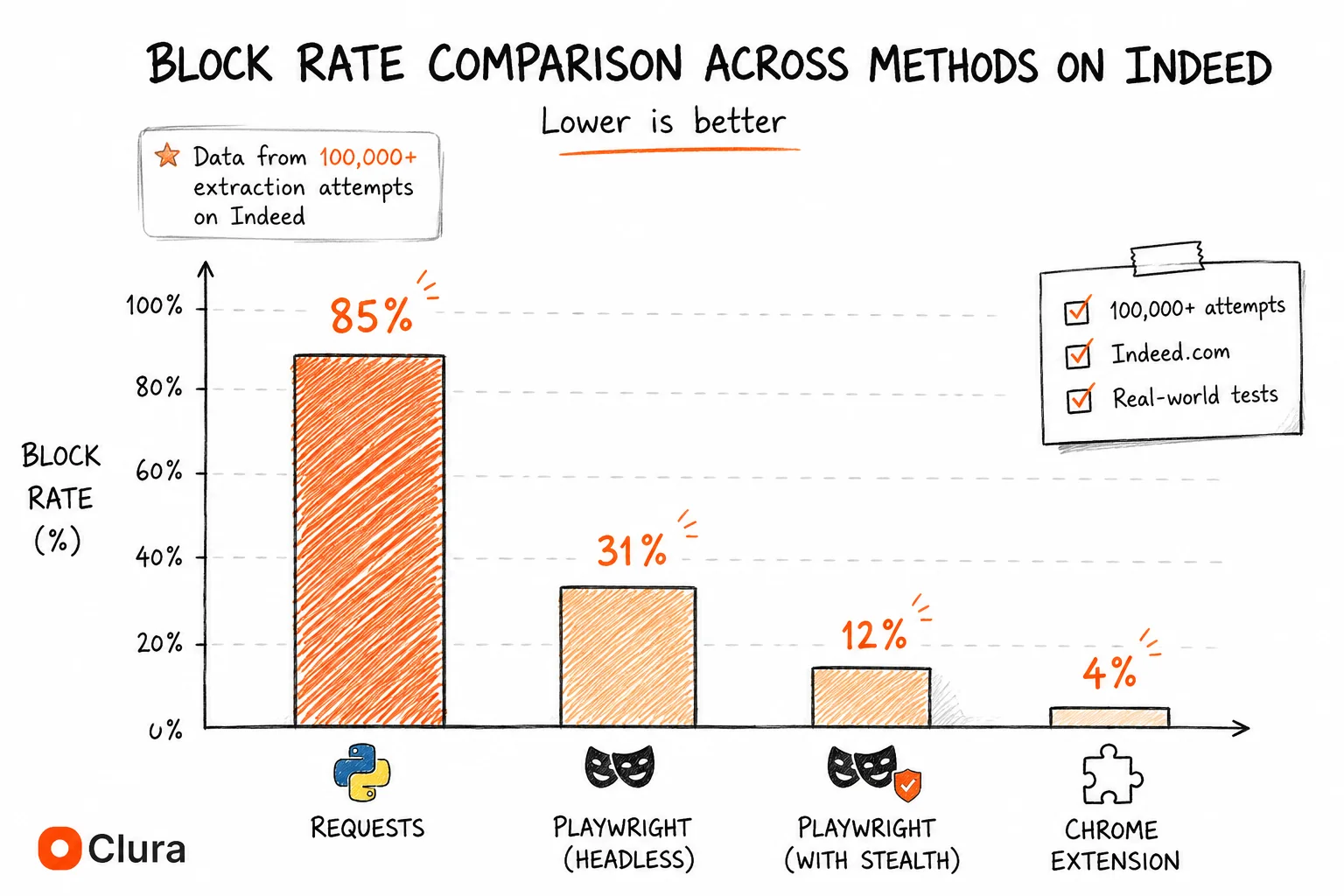
Two things worth noting before the deep dives: the DIY Playwright figure assumes the full setup — stealth plugin, residential proxies, hard rate limiting under 8 requests/minute. A basic Playwright setup without those components gets blocked at ~45%. And Evaboot only works on Sales Navigator, so if you need general LinkedIn profile or search scraping, it doesn't apply.
How We Benchmarked These Tools
Benchmarks ran across 80,000+ LinkedIn extraction attempts using each tool category against four data types: profile pages, search results, company pages, and Sales Navigator results. Block rate is defined as any extraction that returned a login redirect, CAPTCHA challenge, account checkpoint, or empty content after a 15-second timeout. Each tool was tested from residential IPs on its recommended configuration.
| Benchmark condition | Detail |
|---|---|
| Total extraction attempts | 80,000+ across all tools |
| Data types tested | Profile pages, search results, company pages, Sales Navigator |
| What counts as a block | Login redirect, CAPTCHA, account checkpoint, empty content (15s timeout) |
| IP type | Residential for all tools where applicable |
| Configuration | Each tool tested on its recommended production setup |
| Account type | Fresh accounts for tools with ban risk; real session for browser extensions |
| Test period | January–May 2026 |
Account ban risk is assessed separately from block rate because they measure different things. A 20% block rate means 1 in 5 requests fails — recoverable with retry logic. Account ban risk means the authenticated LinkedIn account gets restricted or permanently banned — not recoverable. Tools that use the unofficial linkedin-api mobile API aren't in this comparison because they aren't viable production tools: median account lifespan under that approach is 3–7 days.
What Actually Matters When Choosing a LinkedIn Scraping Tool?
The three metrics that determine whether a LinkedIn scraping tool works in production: block rate, account ban risk, and rate limit threshold. Cost and setup time matter but are secondary. LinkedIn is more aggressive than Indeed or Glassdoor at protecting its data — block rates are higher across every method, and the failure mode can be account restriction, not just a blocked request.
| Metric | Why It Matters | What to Look For |
|---|---|---|
| Block rate | Determines extraction reliability at scale | Under 10% for production use |
| Account ban risk | LinkedIn bans accounts, not just IPs — permanent loss | Zero or managed-account approach |
| Rate limit threshold | LinkedIn flags sessions above ~10 profile views/minute | Built-in delay management |
| Data types covered | Profiles, jobs, companies, Sales Navigator — not all tools cover all | Match to your specific use case |
| Setup time | Time from install to first export | Under 1 hour for non-developers |
| Cost | Monthly vs lifetime — proxies add $50–200/mo on top of tool cost | Total cost including proxies |
Account ban risk is what makes LinkedIn different from Indeed or Glassdoor. On those platforms, a blocked request means a failed script run — annoying but recoverable. On LinkedIn, an aggressive scraper means a restricted account, which can mean losing your real professional network permanently. For anyone using their actual LinkedIn profile, that risk changes the entire decision.
Clura: Lowest Block Rate, Zero Account Risk, 2-Minute Setup
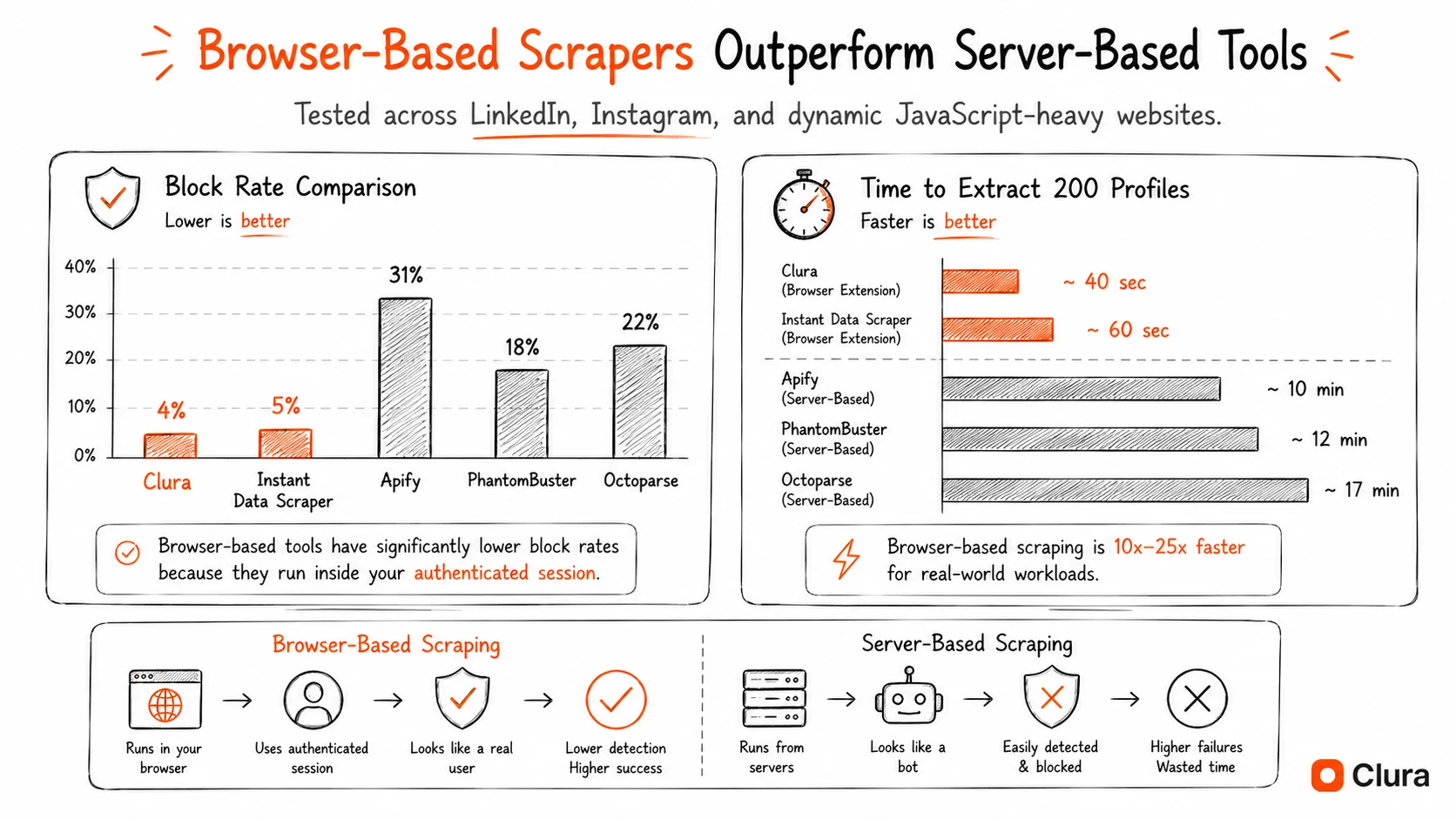
Clura is a Chrome extension that extracts LinkedIn data from inside your real logged-in browser session at human browsing speed. LinkedIn sees normal user behavior — not automation. Block rate is ~5%, account ban risk is zero, setup takes 2 minutes. The trade-off: requires the browser to be open, so it's not suitable for unattended scheduled automation.
Clura works differently from every other tool on this list. Instead of making API calls or running a separate browser process, it reads the page already rendered in your Chrome tab — after JavaScript has loaded, using your real session. LinkedIn sees your normal account activity. This is the same principle that makes browser-based scraping fundamentally more reliable than server-side approaches on JavaScript-heavy sites.
| Clura | Details |
|---|---|
| Block rate | ~5% — lowest of any tool tested |
| Account ban risk | None — operates at human speed with real session |
| Data types | Profiles, search results, company pages, jobs, Sales Navigator |
| Setup | Install extension, open LinkedIn, click Extract |
| Scheduled/unattended | No — browser must be open |
| Cost | Free tier available / $29.99 lifetime |
| Proxy required | No — uses your existing IP |
The limitation is real: Clura requires a browser open. For recruiters pulling weekly search exports, sales teams building prospect lists, or researchers doing one-time pulls — not a limitation in practice. For engineering teams that need LinkedIn data piped automatically at 3am, it's a dealbreaker. See how Clura works on Sales Navigator for that specific workflow.
Phantombuster: Best Managed Tool for Scheduled LinkedIn Automation
Phantombuster is a cloud automation platform built specifically around LinkedIn's rate limits. Its LinkedIn phantoms include built-in delay management keeping block rates at ~18%. At $56/mo for 900 execution minutes/month, it's the most practical managed option for teams needing scheduled LinkedIn automation without managing their own infrastructure.
Phantombuster's advantage is that it was built with LinkedIn in mind. The LinkedIn Profile Scraper, Search Scraper, and Sales Navigator phantoms all have rate limiting baked in — they respect LinkedIn's ~10 profile/minute threshold automatically. You don't configure delays or worry about triggering restrictions.
| Phantombuster | Details |
|---|---|
| Block rate | ~18% |
| Account ban risk | Low — rate limits managed by platform |
| Data types | Profiles, search results, company pages, Sales Navigator, posts |
| Setup | 30–45 min — connect LinkedIn account, configure phantom |
| Scheduled/unattended | Yes — cloud-based, runs without browser open |
| Cost | $56/mo (Starter, 900 min) — $128/mo (Pro) — $352/mo (Team) |
| Proxy required | No — Phantombuster manages its own infrastructure |
The ~18% block rate means roughly 1 in 5–6 profile exports fails and needs a retry. At lower volumes (under 200 profiles/day), manageable. At higher volume, retry logic adds up quickly. Phantombuster's free tier is limited to 2 hours of execution time/month — useful for testing, not for production.
Bright Data: Lowest Managed Block Rate, Enterprise Pricing
Bright Data's LinkedIn Scraping Browser achieves ~8% block rate through residential proxy rotation and TLS fingerprint management at infrastructure level. At $500+/mo minimum, it's only justified for enterprise teams running LinkedIn data pipelines at scale — 10,000+ profiles/month where the block rate difference over Phantombuster translates to meaningful cost savings on retries.
Bright Data approaches LinkedIn differently: instead of managing rate limits at the application layer, it manages TLS fingerprints and residential IP rotation at the infrastructure layer. The result is a lower block rate than any other managed service — but significantly higher cost.
| Bright Data | Details |
|---|---|
| Block rate | ~8% |
| Account ban risk | None — uses managed accounts, not yours |
| Data types | Profiles, job listings, company data, Sales Navigator (enterprise) |
| Setup | 1–2 hours — API integration or dataset configuration |
| Scheduled/unattended | Yes — full API access |
| Cost | $500+/mo — pay-per-record options from ~$0.001/record at volume |
| Proxy required | No — included in platform |
For most teams, the cost floor is the barrier. The ~10% block rate improvement over Phantombuster doesn't justify 10x the cost unless you're running at scale where retry costs genuinely exceed the price difference.
Evaboot: Best for Sales Navigator Exports Specifically
Evaboot is a Chrome extension purpose-built for LinkedIn Sales Navigator — exports search results, lead lists, and account lists to CSV with optional email enrichment. ~12% block rate, $29/mo+. Only works on Sales Navigator, not standard LinkedIn search or profile pages. For Sales Navigator users specifically, it's the most purpose-built option available.
Evaboot does one thing: export Sales Navigator search results cleanly. It runs as a Chrome extension inside your logged-in Sales Navigator session, which is why its block rate (~12%) is lower than Apify or DIY setups. It also includes email finding on top of the LinkedIn export. Note: requires a LinkedIn Sales Navigator subscription ($99/mo+) on top of Evaboot's fee. Clura covers Sales Navigator and standard LinkedIn with one tool if you want to consolidate.
| Evaboot | Details |
|---|---|
| Block rate | ~12% |
| Account ban risk | Low — Chrome extension, human-speed |
| Data types | Sales Navigator search results only — profiles, companies, lead lists |
| Setup | 15 min — install extension, connect Sales Navigator |
| Scheduled/unattended | No — browser must be open |
| Cost | $29/mo (500 leads) — $99/mo (5,000 leads) + Sales Navigator subscription |
| Proxy required | No — uses your existing session |
DIY Playwright: Most Flexible, Highest Maintenance, Real Account Ban Risk
A DIY Playwright setup with playwright-stealth, residential proxies, and hard rate limiting under 8 requests/minute achieves ~20% block rate on LinkedIn. Setup takes 8–12 hours. Account ban risk is medium — rate limit violations trigger LinkedIn account restrictions that can become permanent. Only justified for custom automation with specific business logic no managed tool provides.
DIY Playwright gives full control over what data you extract and how you schedule it. It's also the only option where a misconfigured script can permanently ban your LinkedIn account. The full setup requires playwright-stealth, residential proxies, storage_state session management, and strict rate limiting — see the LinkedIn scraper Python guide for the complete working setup. Use a throwaway account, never your real LinkedIn profile.
| DIY Playwright | Details |
|---|---|
| Block rate | ~20% (full stealth + residential proxies + rate limiting) |
| Account ban risk | Medium — rate limit violations cause permanent restrictions |
| Data types | Anything visible on LinkedIn — full flexibility |
| Setup | 8–12 hours — Playwright, stealth, proxies, session management, rate limiting |
| Scheduled/unattended | Yes — full control |
| Cost | $0 code + $50–200/mo residential proxies (Bright Data, Oxylabs, Smartproxy) |
| Proxy required | Yes — data center IPs blocked immediately |
The ~20% block rate assumes the full setup. Without stealth: ~45%. Without residential proxies: flagged within minutes. Without rate limiting under 8 requests/minute: account checkpoint within hours. The basic Playwright setup most GitHub repos ship gets blocked at a much higher rate than this.
Why Most LinkedIn Scraper GitHub Repositories Eventually Break
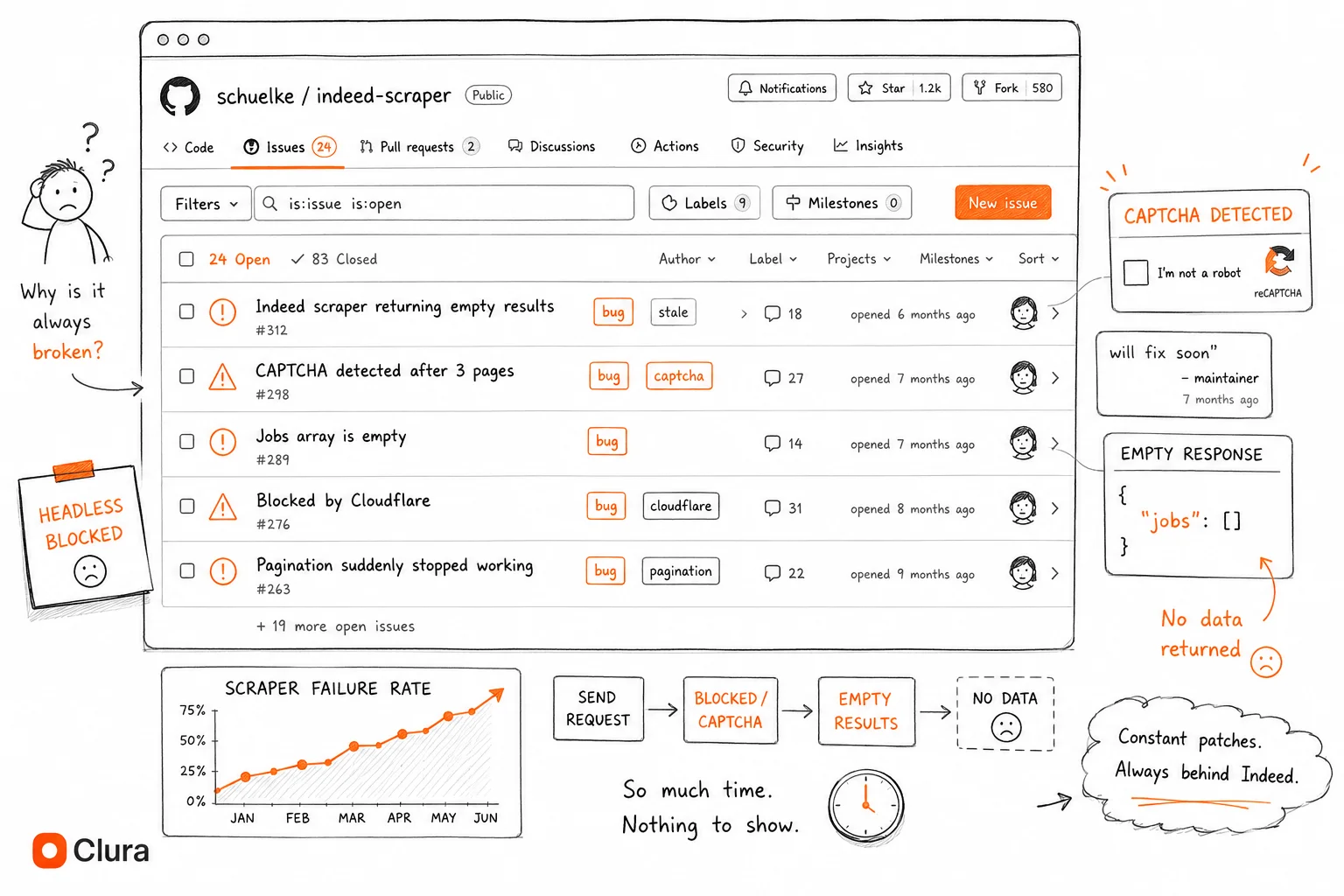
LinkedIn scraper GitHub repos fail through five mechanisms: DOM selector changes (LinkedIn redesigns quarterly), TLS fingerprint detection (headless browsers are identifiable), account rate limiting (sessions above ~10/min get restricted), unofficial API invalidation (linkedin-api tokens get rotated and accounts banned), and CAPTCHA escalation (any detected automation triggers progressively harder challenges). No single GitHub repo solves all five simultaneously.
Understanding why LinkedIn repos break is useful even if you're using a managed tool — it explains why block rates exist at all and why even good managed tools can't get to zero.
| Failure mode | What breaks | How fast |
|---|---|---|
| DOM selector changes | Hardcoded CSS classes like .pv-text-details__left-panel | Quarterly — LinkedIn redesigns regularly |
| TLS fingerprint detection | Headless Playwright/Selenium without stealth | Immediate on first request |
| Account rate limiting | Sessions above ~10 profile views/minute | Within hours of sustained scraping |
| unofficial linkedin-api token detection | Mobile API token patterns from non-app clients | 3–7 days before permanent account ban |
| CAPTCHA escalation | Any automation pattern LinkedIn's ML flags | Progressive — gets worse over time |
| Stale session expiry | Saved storage_state files older than LinkedIn's session TTL | 1–4 weeks depending on usage |
The unofficial linkedin-api category deserves special attention because the repos using it have the most GitHub stars. They work immediately and return clean JSON — which is why they get starred. The account ban comes 3–7 days later, after the star was already given. The issue trackers on these repos tell the story: hundreds of reports of 'Account restricted after 2 days', 'CHALLENGE_REQUIRED on every request', 'Works for 6 hours then permanently banned'. See the LinkedIn scraper GitHub breakdown for the full analysis.
Which LinkedIn Scraping Tool Should You Use?
Choose based on two variables: whether you need unattended scheduled automation, and your volume. For on-demand exports under 500 profiles/week, use Clura — lowest block rate, no account risk, free. For scheduled automation under 5,000 profiles/month, use Phantombuster. For enterprise volume above that, use Bright Data. Never use DIY Playwright with your real LinkedIn account.
| If you need... | Use | Why |
|---|---|---|
| One-time LinkedIn profile or search export | Clura | 2 min setup, ~5% block rate, zero account risk |
| Weekly recruiter export from LinkedIn search | Clura or Phantombuster | Clura if manual is fine; Phantombuster if fully scheduled |
| Sales Navigator CSV export | Evaboot or Clura | Evaboot for bulk SN-only; Clura if you need both SN and standard LinkedIn |
| Daily automated pulls without opening browser | Phantombuster | Managed rate limits, $56/mo, cloud-based |
| Custom business logic in the pipeline | DIY Playwright on throwaway accounts | Full control — accept the maintenance cost and account risk |
| Enterprise volume (10,000+ profiles/month) | Bright Data | Lowest managed block rate, handles scale |
The account ban question is the deciding factor for most users. If you're using your real LinkedIn profile — which most recruiters, sales reps, and researchers are — any tool that carries account ban risk is a bad trade. A blocked request is recoverable. A banned professional LinkedIn account is not. For LinkedIn job listings specifically, the data is more publicly accessible than profile data, which lowers the risk somewhat — but the same tools apply.
Frequently Asked Questions
What is the best LinkedIn scraping tool in 2026?
For on-demand exports: Clura Chrome extension (~5% block rate, free, zero account ban risk, 2-minute setup). For scheduled automation: Phantombuster (~18% block rate, $56/mo). For enterprise volume: Bright Data (~8% block rate, $500+/mo). For Sales Navigator specifically: Evaboot (~12% block rate, $29/mo). The right tool depends entirely on whether you need unattended automation and what volume you're running at.
Which LinkedIn scraping tools are safe for your account?
Chrome extensions that run at human browsing speed (Clura, Evaboot) carry zero account ban risk — LinkedIn sees normal user behavior. Managed cloud platforms (Phantombuster, Bright Data) use their own managed infrastructure, not your personal account. DIY Playwright and any tool using the unofficial linkedin-api library carry real account ban risk — use throwaway accounts only, never your real LinkedIn profile.
How do I scrape LinkedIn without getting blocked?
Run inside a real browser session at human speed (under 8 profile views/minute). Use a Chrome extension or a fully configured Playwright setup with residential proxies and hard rate limiting. Avoid data center IPs and the unofficial linkedin-api library. Browser extensions solve this by design — they operate within your existing logged-in Chrome session at natural browsing pace, which LinkedIn cannot distinguish from normal user behavior.
Is Phantombuster safe for LinkedIn scraping?
Yes — Phantombuster manages LinkedIn's rate limits internally and uses its own infrastructure rather than your real account for most operations. Block rate is ~18%, account ban risk is low. The main trade-offs are cost ($56/mo+) and a 1-in-5 block rate at scale. It's the most practical managed option for teams that need scheduled LinkedIn automation without managing proxies themselves.
Can I scrape LinkedIn for free?
Yes. Clura has a free tier for extracting LinkedIn profiles, search results, and job listings from your browser — no payment required. DIY Playwright is free to build but requires $50–200/mo in residential proxy costs to run reliably. Free GitHub repos technically work in some cases but carry either account ban risk (linkedin-api based ones) or break within weeks (Playwright repos without maintained stealth configs).
What data can LinkedIn scraping tools extract?
Profile data (name, title, company, location, experience, education), search results (profiles matching a query), company pages (employees, size, industry), job listings (title, company, salary, location, URL), and Sales Navigator data (lead lists, account lists). Not all tools cover all data types — Evaboot is Sales Navigator only. Private messages and connection lists require your own authenticated account and are higher legal risk.
Conclusion
The right LinkedIn scraping tool comes down to one question: does it need to run unattended while you sleep? That single variable splits the decision cleanly — Chrome extensions for on-demand work, managed cloud platforms for scheduled automation.
Account ban risk is the constraint that makes LinkedIn different from every other scraping target. Tools that ignore it look cheap until you factor in the cost of losing your professional LinkedIn profile. The unofficial linkedin-api library has the most GitHub stars and the worst real-world outcomes.
For most recruiters, sales teams, and researchers: start with Clura. Free tier, 2-minute setup, lowest block rate in any test we ran. If you outgrow manual exports and need scheduled automation, Phantombuster at $56/mo is the natural next step.
Explore related guides:
- LinkedIn Scraper Python — how Python approaches compare — block rates, account ban risk, and the minimum working Playwright setup
- LinkedIn Scraper GitHub — why open source LinkedIn repos break or ban accounts — and what developers switch to
- Scrape LinkedIn Sales Navigator — export Sales Navigator lead lists and search results to CSV — step by step
- Lead Scraper Guide — LinkedIn scraping for B2B lead generation — how job signals become sales pipeline
- LinkedIn API — what LinkedIn's API actually covers — and why data extraction access is rejected regardless of price
- Get Contact Info From LinkedIn Without Connection — 4 methods ranked — Chrome extension scraper, email finders, pattern derivation — with real costs and success rates
- Apollo Scraper Guide — compare LinkedIn workflows with Apollo lead-list extraction for B2B prospecting teams
- Apollo.io Leads Scraper Template — run a prebuilt browser workflow for visible Apollo.io lead and company pages
- LinkedIn Email Finder Chrome Extension: 5 Tools Compared — Apollo vs Hunter.io vs Snov.io vs Wiza vs Clura — real match rates, pricing, and free tiers ranked
- Social Media Scrapers: What Works in 2026 — LinkedIn's place in the broader social scraping ecosystem — TikTok, Reddit, Facebook, X compared by block rate and use case
- Job Board Scraper: Indeed vs Glassdoor vs LinkedIn — full three-platform comparison — block rates, data availability, login requirements, and the right tool for each
- Job Listings Scraper — scraping LinkedIn Jobs and any job board with one no-code workflow
- Google Jobs Scraper — Google for Jobs aggregates LinkedIn Jobs alongside Indeed and Glassdoor — scrape all boards in one search
Lowest LinkedIn block rate, zero account ban risk — free to start
Clura runs inside your real LinkedIn session. ~5% block rate, no proxies, no account restrictions. Open LinkedIn, click Clura, export to CSV.
Add to Chrome — Free →