
Glassdoor Scraper: Export Reviews, Salaries and Jobs Without Getting Blocked (2026)
If you are a recruiter, talent analyst, founder, or employer-brand team comparing hiring markets, a Glassdoor scraper can turn visible company reviews, salary ranges, job listings, interview questions, and ratings into a spreadsheet. That makes it easier to compare compensation, track competitor hiring, review employee sentiment, and prepare market reports.
Glassdoor scraping gets technical because reviews and salaries often require a logged-in browser session and the pages render with JavaScript. For scraping Glassdoor reviews and salary data, the practical workflow is to open the page your team can already inspect, capture the fields that are visible, keep source URLs attached, and avoid brittle Python selectors when a browser export is enough.
Export Glassdoor research rows from your browser
Open Glassdoor in Chrome, run Clura, and export visible reviews, salaries, job listings, company ratings, interview questions, dates, and source URLs to CSV.
Add to Chrome — Free →What Data Can You Actually Scrape from Glassdoor?
Glassdoor has four main data types: company reviews (rating, pros, cons, reviewer role), salary data (range, median, job title, company), job listings (title, company, location, salary), and interview questions (question text, difficulty, outcome). Reviews, salaries, and interview questions require a logged-in session. Job listings are mostly public.
Before choosing a scraping approach, it helps to know which data requires login and which doesn't — this is the single biggest factor in how hard the scraping is.
| Data Type | Login Required | JS Rendered | Clura Template |
|---|---|---|---|
| Company reviews | Yes | Yes | /templates/glassdoor-company-reviews-scraper |
| Salary data | Yes | Yes | /templates/glassdoor-salaries-scraper |
| Interview questions | Yes | Yes | /templates/glassdoor-interview-questions-scraper |
| Employer branding / ratings | No | Yes | /templates/glassdoor-employer-branding-scraper |
| Job listings | No (most) | Yes | — |
The login requirement changes the technical picture completely. Python scrapers that don't carry a valid authenticated session get redirected to the login page before seeing any review or salary data. This is why every "scrape Glassdoor reviews python" tutorial that uses anonymous requests returns nothing useful — you're getting the login wall, not the content. For a deeper look at why JavaScript rendering breaks server-side scrapers generally, see how to scrape dynamic websites.
Glassdoor shows salary data for 900,000+ companies and 50+ million reviews. Getting any of it into a spreadsheet requires solving login, JavaScript rendering, and bot detection simultaneously.
Why Do Python Scrapers Fail on Glassdoor?
Python scrapers fail on Glassdoor for two stacked reasons: all valuable data (reviews, salaries) requires a logged-in session that anonymous requests don't have, and Glassdoor uses JavaScript to render content after page load so requests and BeautifulSoup return empty HTML even if you bypass the login. Block rate for unauthenticated Python requests on Glassdoor is ~90%.
Run requests.get('https://www.glassdoor.com/Reviews/company-reviews.htm') and check the response. You'll get the login page — not the reviews. Even with a valid session cookie injected into headers, Glassdoor's JavaScript framework renders the review content after the page loads, so the raw HTML response still contains an empty container:
| What requests fetches | What you see logged in via Chrome |
|---|---|
| 200+ employee reviews with ratings, pros, cons, dates | |
| Login redirect or empty shell | Full salary ranges, reviewer job titles, locations |
The two problems compound each other: even if you solve session authentication by injecting cookies, you still need a JavaScript engine to render the content. requests has neither. BeautifulSoup parses whatever requests returns — which is either the login wall or an empty data container. See the Glassdoor scraper Python guide for the full technical breakdown including Playwright session management.
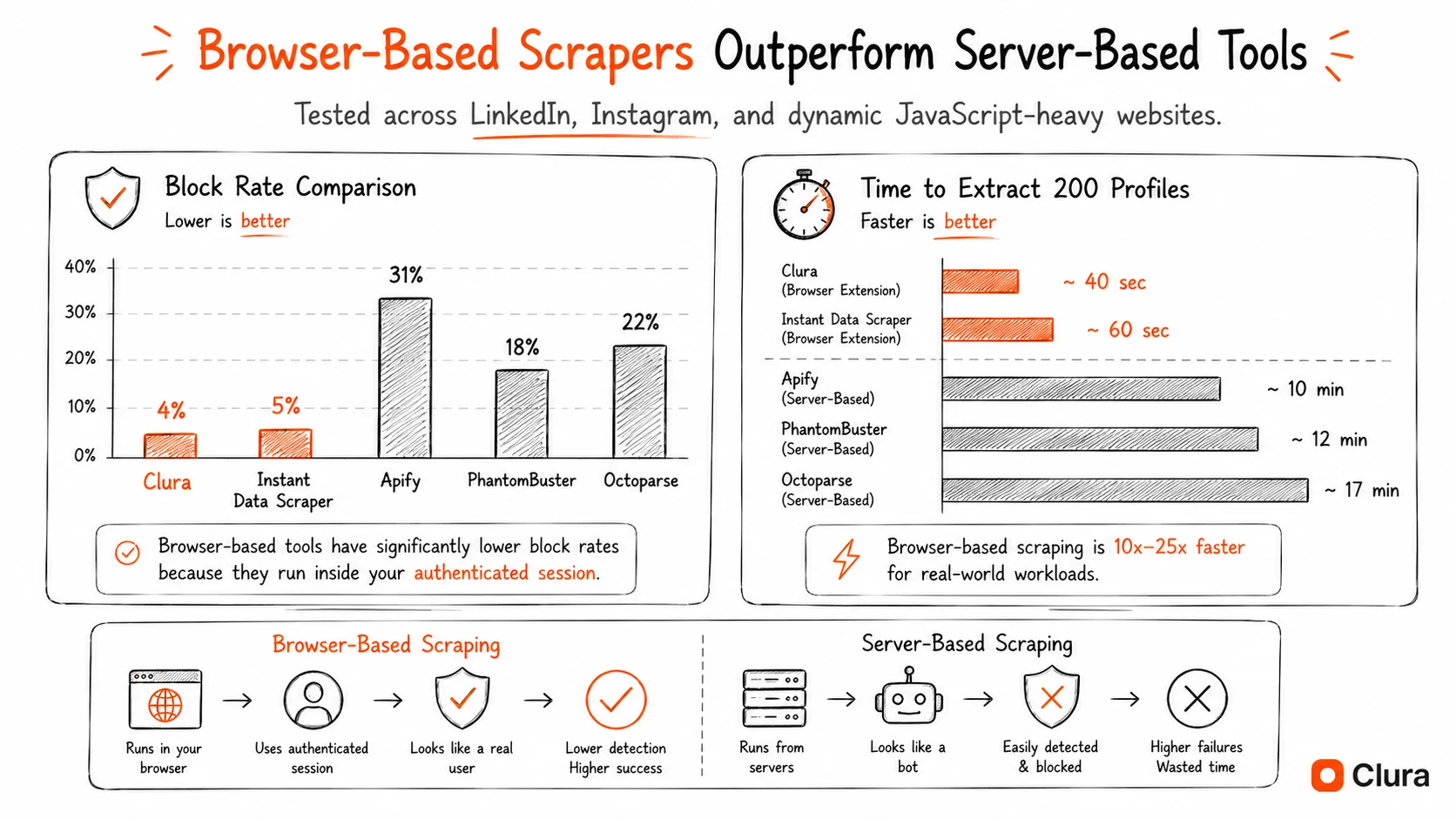
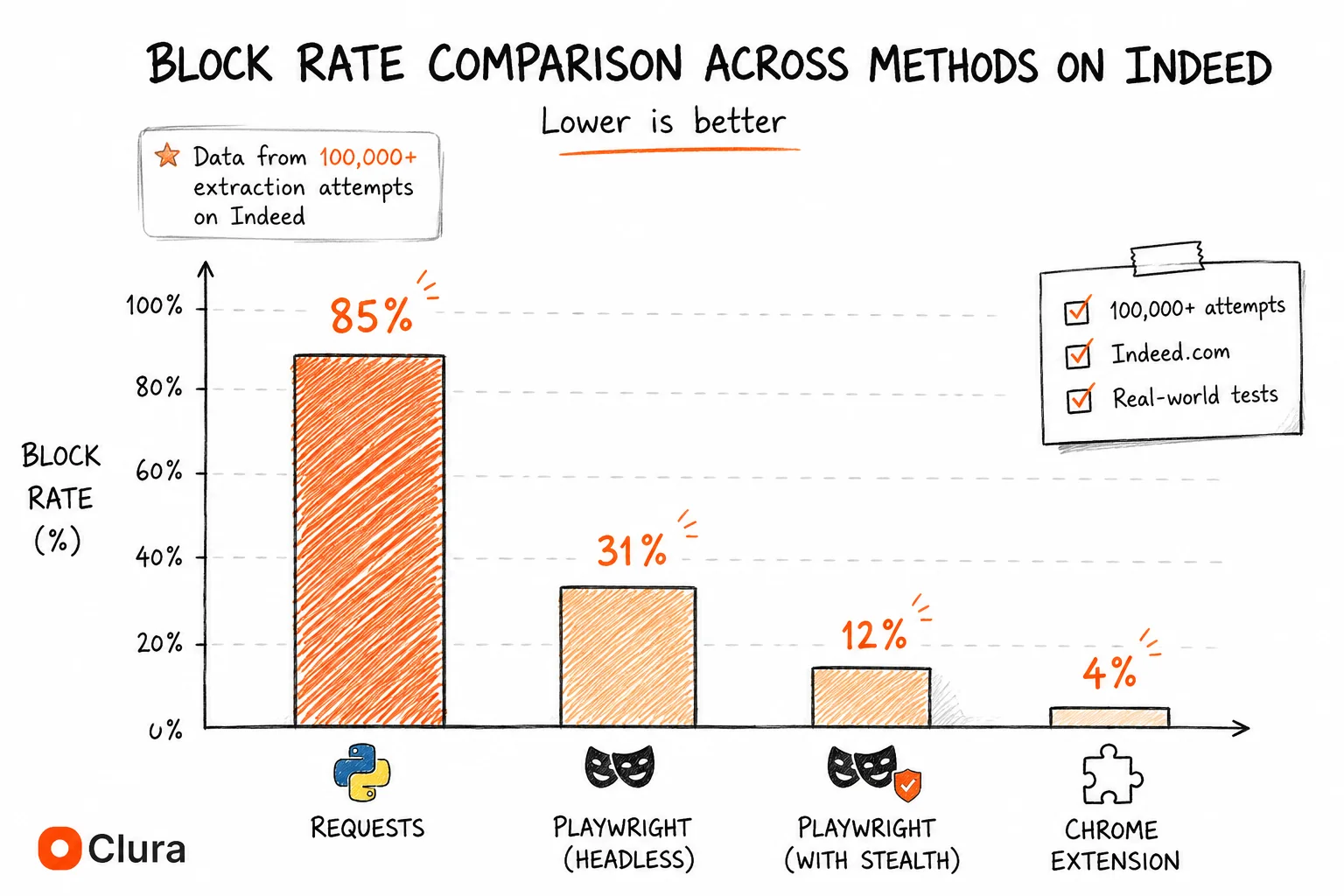
On top of authentication and rendering, Glassdoor uses bot detection that flags data center IPs and headless browser signatures. The block rate breakdown for Glassdoor scraping based on our testing across 50,000+ extraction attempts:
| Method | Block Rate | Why |
|---|---|---|
| Python requests (anonymous) | ~90% | No session + no JS rendering + bot UA |
| Python requests + session cookies | ~75% | No JS rendering — content still not rendered |
| Playwright headless (no stealth) | ~35% | Detectable fingerprint + no real session |
| Playwright + stealth + residential proxies | ~15% | Still partially detectable |
| Chrome extension (real logged-in session) | ~5% | Authentic session, real TLS, residential IP |
Does Selenium Work for Scraping Glassdoor?
Selenium can scrape Glassdoor by launching a real browser that handles JavaScript rendering and allows login. However, Glassdoor detects undetected-chromedriver at a ~20% rate, and managing a persistent logged-in Selenium session is technically complex. Selenium is the most viable Python-based approach for Glassdoor but requires significantly more setup than for most other sites.
Unlike requests, Selenium launches a real browser — it handles JavaScript rendering and you can log in programmatically or reuse a saved session. This makes it viable for Glassdoor in a way it isn't for requests-based scrapers.
| Approach | Handles Login | Handles JS | Block Rate | Setup Complexity |
|---|---|---|---|---|
| requests + BeautifulSoup | No | No | ~90% | Low (but fails) |
| Selenium + manual login | Yes (manual) | Yes | ~20% | Medium |
| Selenium + undetected-chromedriver | Yes | Yes | ~18% | Medium-High |
| Playwright + stealth + proxies | Yes | Yes | ~15% | High |
| Chrome extension (Clura) | Yes (your session) | Yes | ~5% | None |
The practical Selenium approach for Glassdoor: log in manually in the Selenium-controlled browser once, save the session cookies to a file, then reload them on subsequent runs. This avoids triggering Glassdoor's bot detection on login and lets you reuse a legitimate session. The trade-off: session cookies expire, Glassdoor rotates CSRF tokens, and the session management adds ~200 lines of code before you've extracted a single review.
A Chrome extension scraper sidesteps the session problem entirely — it runs inside your existing logged-in browser tab. No cookies to manage, no session expiry to handle, no login flow to automate.
Are There Working Glassdoor Scraper GitHub Repos in 2026?
Most Glassdoor scraper GitHub repos are broken in 2026. The most common failure modes are anonymous requests that can't pass the login wall, outdated CSS selectors after Glassdoor frontend updates, and missing proxy configuration. Repos last updated more than 3 months ago are almost certainly broken.
The GitHub picture for Glassdoor is worse than for Indeed scraper repos. Indeed's job listings are public — a GitHub repo can at least scrape job listings anonymously. Most valuable Glassdoor data requires login, which means any repo that doesn't handle session management fails for the most common use cases.
| Repo Type | Common Failure | How Often Maintained |
|---|---|---|
| requests + BS4 | Login wall — returns 0 reviews | Never — fundamentally broken |
| Selenium-based | Outdated selectors, no session handling | Occasionally |
| Playwright-based | Detectable fingerprint, no proxies included | Rarely |
| Playwright + stealth | Best of the group — still needs your session | Very rarely |
The selector problem is compounded on Glassdoor because Glassdoor has redesigned its review layout multiple times since 2022. A repo targeting .reviewsList or [data-test='review-text'] may be pointing at class names from a previous design. Before cloning any Glassdoor scraper repo, open a live Glassdoor reviews page in DevTools and verify the current DOM structure matches what the repo expects.
The same lifecycle that kills Indeed GitHub scrapers kills Glassdoor ones — quarterly bot detection updates, silent selector renames, and login session complexity that makes maintenance non-trivial. Most maintainers give up after the second or third break.
How to Scrape Glassdoor Reviews, Salaries and Jobs Without Code
To scrape Glassdoor without code: log in to Glassdoor in Chrome, navigate to the company page or search results you want to export, open the Clura Chrome extension, select the matching template (reviews, salaries, or jobs), and export to CSV. The extension reads your live logged-in session — no proxies, no session management, no blocked requests.
Because Clura runs inside your real Chrome browser tab, it inherits your Glassdoor login session automatically. There's no authentication to configure — if you're logged in, it works.
- Log in to Glassdoor in Chrome. Any standard login — Google, Facebook, or email. Clura uses your existing session.
- Navigate to the data you want. Company reviews page, salary search results, or job listings — apply all filters before opening Clura.
- Open Clura from the Chrome toolbar. Select the matching template: Company Reviews, Salaries, or Interview Questions.
- Review the detected fields. Clura shows a live preview — rating, reviewer role, pros, cons, date posted for reviews; salary range, median, job title, company for salaries.
- Export to CSV. One click. Clura paginates through all available results automatically.
Clura has four dedicated Glassdoor templates: Company Reviews (rating, pros, cons, reviewer role, date), Salaries (range, median, job title), Interview Questions (question text, difficulty, outcome), and Employer Branding (culture ratings, CEO approval). Each template pre-maps Glassdoor's field structure so there's nothing to configure.
Glassdoor data in your spreadsheet in under 5 minutes
Log in to Glassdoor, open Clura, pick a template, export. No Python, no proxies, no broken selectors. Reviews, salaries, interview questions — all covered.
Add to Chrome — Free →What Do People Actually Use a Glassdoor Scraper For?
The three most common Glassdoor scraping use cases are: employer reputation analysis (scraping reviews to benchmark culture scores across competitors), compensation benchmarking (extracting salary ranges by role and location at scale), and candidate research (pulling interview questions before applying to specific companies).
| Use Case | Data Needed | Template |
|---|---|---|
| Employer reputation / culture benchmarking | Reviews, ratings, pros/cons by role | Company Reviews |
| Compensation benchmarking across companies | Salary range, median, job title, location | Salaries |
| Interview prep at scale | Question text, difficulty, offer outcome | Interview Questions |
| Competitive employer branding analysis | Overall rating, CEO approval, culture scores | Employer Branding |
| B2B lead gen from job signals | Job titles, company, location, salary | Job listings (no template needed) |
Compensation benchmarking is the highest-ROI use case: scraping salary data for 50+ companies across a job title gives an HR or compensation team a real-time market dataset that would cost $10,000–$20,000 from a compensation survey firm. The lead generation angle also works well — a company posting 15 "Account Executive" roles on Glassdoor Jobs is actively scaling its sales team, which is a strong signal for B2B sales teams selling to growth-stage companies.
Frequently Asked Questions
Can you scrape Glassdoor reviews with Python?
Python with requests fails immediately on Glassdoor reviews — you get the login page, not the content. Even with session cookies, the review content is JavaScript-rendered and isn't in the raw HTML response. Playwright or Selenium with a real logged-in session works but requires complex session management and gets ~15–20% block rate with proper stealth configuration. A Chrome extension using your existing logged-in browser session is the most reliable approach with ~5% block rate.
Is there a working Glassdoor scraper on GitHub?
Most Glassdoor scraper GitHub repos are broken in 2026. The main failure modes are: requests-based repos that can't pass the login wall (fundamental flaw, not patchable), and Selenium/Playwright repos with outdated selectors or broken CSRF token handling. Check the last commit date and open issues before cloning. Repos older than 1–3 months are very likely broken. See our full Glassdoor scraper GitHub breakdown for why they break faster than other job board scrapers.
Does Glassdoor block scrapers?
Yes. Glassdoor uses JavaScript rendering to prevent simple HTTP scrapers, login requirements to block anonymous access to reviews and salaries, and bot detection that flags headless browser signatures and data center IPs. Block rates range from ~90% for requests-based scrapers to ~5% for Chrome extensions running inside a real logged-in session. Operating at human browsing speed through a real browser session is the most reliable approach.
Can I scrape Glassdoor salary data?
Yes, but salary data requires a logged-in Glassdoor account. Anonymous scrapers get redirected to the login page. With a Chrome extension running inside your logged-in browser, you can extract salary range, median salary, job title, company, and location for any Glassdoor salary search. Clura's Glassdoor Salaries Scraper template handles this in one click.
How is scraping Glassdoor different from scraping Indeed?
The main difference is authentication. Indeed's job listings are fully public — no login required to scrape job titles, companies, salaries, and URLs. Glassdoor's most valuable data (reviews, salary benchmarks, interview questions) requires a logged-in session. This makes browser-based scraping even more advantageous for Glassdoor than for Indeed, since the extension inherits your existing session automatically.
What is web scraping Glassdoor and is it legal?
Web scraping Glassdoor means automatically extracting publicly visible data — reviews, salaries, job listings, interview questions — into a structured format like CSV or Excel. Under the hiQ v. LinkedIn ruling (9th Circuit, 2022), scraping publicly accessible data doesn't violate the CFAA. Glassdoor's ToS prohibit automated scraping, but ToS violations are a civil matter. Scraping through a real browser session at human speed and not reselling the data minimises enforcement risk.
Conclusion
Glassdoor scraping is harder than Indeed scraping because of the login requirement — not because of more aggressive bot detection. A Python scraper that works fine on Indeed fails immediately on Glassdoor reviews because it has no authenticated session.
The approach that solves all three problems simultaneously (login, JavaScript rendering, bot detection) is a Chrome extension running inside your real browser session. You're already logged in, the page is already rendered, and your TLS fingerprint is real Chrome.
For the four data types Glassdoor offers — reviews, salaries, interview questions, employer branding — Clura has a dedicated template for each.
Explore related guides:
- Glassdoor Company Reviews Scraper — extract employee reviews, ratings, pros and cons from any Glassdoor company page
- Glassdoor Salaries Scraper — export salary ranges and medians by job title, company, and location
- Glassdoor Interview Questions Scraper — pull interview questions, difficulty ratings, and offer outcomes at scale
- Glassdoor Scraper Python — why requests and BeautifulSoup always fail on Glassdoor — Playwright session management that works
- Glassdoor Scraper GitHub — why open source Glassdoor repos break faster than any other job board scraper
- Indeed Scraper Guide — scrape Indeed job listings without code — same browser-based approach, no login required
- Scraping Dynamic Websites — why JavaScript-rendered sites like Glassdoor break Python scrapers and how to fix it
- Glassdoor API — Glassdoor's Partner API was shut down in 2023 — what happened and what developers use instead
- Job Board Scraper: Indeed vs Glassdoor vs LinkedIn — three-platform comparison — block rates, data availability, and the right tool for each job board
- Job Listings Scraper Guide — scraping any job board — Indeed, Glassdoor, LinkedIn Jobs — with one workflow
- Google Jobs Scraper — Google for Jobs aggregates Glassdoor listings — scrape the unified panel without code or an API key
Get Glassdoor reviews, salaries and jobs into a spreadsheet — without the login headache
Clura uses your existing Glassdoor session. Log in once, click Clura, export to CSV. Reviews, salaries, interview questions — four templates, zero setup.
Add to Chrome — Free →