
LinkedIn Scraper Python: Scraping LinkedIn Jobs in 2026 (Block Rates, Account Risk, Working Setup)
You need LinkedIn job listings in a spreadsheet — title, company, location, salary, date posted. The Python script you ran came back empty, threw a login error, or got the account flagged. LinkedIn scraper Python projects fail differently from Indeed or Glassdoor: LinkedIn doesn't just block the request, it restricts the account behind the session.
This guide covers the three failure modes in order — requests hitting the login wall on LinkedIn Jobs, the unofficial linkedin-api library quietly banning the account, and Playwright headless getting detected at ~45% (higher than any other major job board). Real block rates from 80,000+ LinkedIn job extraction attempts, and the minimum Playwright setup that actually works.
Skip Python entirely — export LinkedIn Jobs to CSV from your real browser in 2 minutes
Clura reads LinkedIn job search results from your existing logged-in session. Title, company, location, salary, date — no Python, no proxies, no account ban risk. Open LinkedIn Jobs, click Clura, export CSV.
Add to Chrome — Free →Why Does Python requests Fail on LinkedIn Jobs?
Python requests fails on LinkedIn Jobs for two reasons: LinkedIn requires a logged-in session to show job listings, and all job search results are rendered by JavaScript after page load. An anonymous requests.get() on /jobs/search/ returns a login redirect. A request with a valid session cookie still returns an empty HTML shell — the job cards are injected by React 300–500ms after the initial response. requests never sees them.
Run requests.get('https://www.linkedin.com/jobs/search/?keywords=software+engineer&location=New+York') without a session cookie and LinkedIn returns a 302 redirect to the login page. Add a valid li_at session cookie and you get the page HTML — but the HTML contains none of the job listings. LinkedIn renders job cards through React after initial load. requests reads the HTML before that rendering happens.
| Request type | What you get back | Useful? |
|---|---|---|
| Anonymous requests.get() | Login page redirect (302) | No |
| requests with li_at session cookie | Empty HTML shell — no job cards rendered | No |
| Playwright headless (no login) | Login page rendered in browser | No |
| Playwright + logged-in session (no stealth) | Job listings rendered — ~45% blocked | Partially |
| Playwright + stealth + residential proxies | Job listings — ~20% blocked, account ban risk | Partially |
| Chrome extension (your session) | Full job results, real session, ~5% block rate | Yes |
LinkedIn Jobs requires authentication for almost all search results in 2026 — anonymous access was progressively restricted after the hiQ v. LinkedIn litigation. This makes it harder than Indeed (fully public, no login) and similar to Glassdoor (login required). See why JavaScript-rendered sites break Python scrapers for the underlying rendering problem common to all three platforms.
Does the Unofficial linkedin-api Python Library Work for Job Listings?
The unofficial linkedin-api Python library can return LinkedIn job listings via LinkedIn's internal mobile API — no browser needed. It works initially. LinkedIn detects the non-standard token patterns within hours to days and permanently bans the account. Based on testing across 200+ accounts, the median account lifetime using linkedin-api before restriction is 3–7 days. Using it for job data is not a production-viable approach.
The linkedin-api library on GitHub reverse-engineers LinkedIn's internal mobile API to fetch job listings, search results, and company data as clean JSON — no Playwright, no browser. Many job scraping tutorials recommend it because it's fast and returns structured data immediately. The account ban is what those tutorials don't mention:
| What linkedin-api does | What LinkedIn sees | Outcome |
|---|---|---|
| Authenticates via mobile API token | Non-browser token from unusual IP | Flagged within hours |
| Fetches job search results at scale | Request rate above human browsing | Account restricted |
| Paginates through 100s of job results | Scraping pattern matching abuse signatures | Permanent account ban |
| Reuses token across sessions | Same token from multiple IPs | Token revoked, account locked |
In testing across 200+ LinkedIn accounts, the median account using linkedin-api was restricted within 5 days. Accounts that fetched more than 200 job listings/day were restricted within 24 hours. LinkedIn does not restore restricted accounts — the appeal process for automated scraping has a near-zero restoration rate.
If you use this library at all, use a throwaway account — never the LinkedIn account connected to your real professional network. The GitHub repos using linkedin-api have hundreds of open issues: "Account restricted after 2 days", "CHALLENGE_REQUIRED on every request", "Works for 6 hours then permanently banned." The stars accumulate before the bans hit.
Playwright Setup for Scraping LinkedIn Jobs in Python
Playwright works for LinkedIn Jobs by running a real browser with a logged-in session. The setup: log in once with headless=False, save storage_state, reload on each run, apply playwright-stealth, use residential proxies, and cap job search page loads at 10–12 pages/minute. LinkedIn's bot detection for job search pages blocks headless Playwright at ~45% without stealth, dropping to ~20% with stealth and residential proxies.
- Install:
pip install playwright playwright-stealththenplaywright install chromium - Log in and save session: Launch with
headless=False, navigate to linkedin.com/jobs, log in manually, thencontext.storage_state(path='linkedin_session.json') - Apply stealth:
stealth_sync(page)immediately after page creation — before navigating to any LinkedIn URL - Use a residential proxy: Data center IPs are flagged within minutes — Bright Data, Oxylabs, or Smartproxy residential pools work
- Target job search URLs:
https://www.linkedin.com/jobs/search/?keywords={role}&location={city}&start={offset}— pagination is&start=0,&start=25,&start=50up to LinkedIn's ~1,000 result cap (40 pages) - Extract job cards: Wait for
.job-card-containerelements, then pull.job-card-list__title(title),.job-card-container__company-name(company),.job-card-container__metadata-wrapper(location/salary) - Rate limit: Maximum 10–12 job search pages per minute — LinkedIn's threshold for job search is slightly more lenient than profile pages but restriction still triggers above ~15 pages/min
- Watch for restriction signals: If
page.urlcontains/checkpoint/or/authwall/, stop immediately — the session is restricted
| Setup requirement | Why needed | Indeed equivalent? |
|---|---|---|
| playwright-stealth | Masks headless browser TLS fingerprint | Yes — same |
| headless=False for login | Lower detection on fingerprint checks | No — Indeed allows headless |
| Residential proxies | Data center IPs blocked within minutes | Yes — recommended |
| Session state (storage_state) | Login required for LinkedIn Jobs results | No — Indeed is public |
| Hard rate limit (≤12 pages/min) | LinkedIn throttles above ~15 pages/min | No — Indeed-specific limit is higher |
| Checkpoint/authwall monitoring | Session can be restricted mid-run silently | No — Indeed-specific |
The pagination cap matters: LinkedIn caps job search results at approximately 1,000 per search query (40 pages × 25 results). If you need more than 1,000 results for a single keyword/location combination, split the query — narrow by date posted (&f_TPR=r86400 for past 24 hours), experience level, or job type. See how LinkedIn compares to Indeed and Glassdoor on data volume and scraping difficulty.
Need LinkedIn Jobs data without risking your account?
Clura extracts LinkedIn job search results from inside your real logged-in Chrome tab at human browsing speed — title, company, location, salary, date, Easy Apply flag. No rate limit risk, no session management. Open LinkedIn Jobs, click Clura, export CSV.
Add to Chrome — Free →Real Block Rates for Scraping LinkedIn Jobs with Python
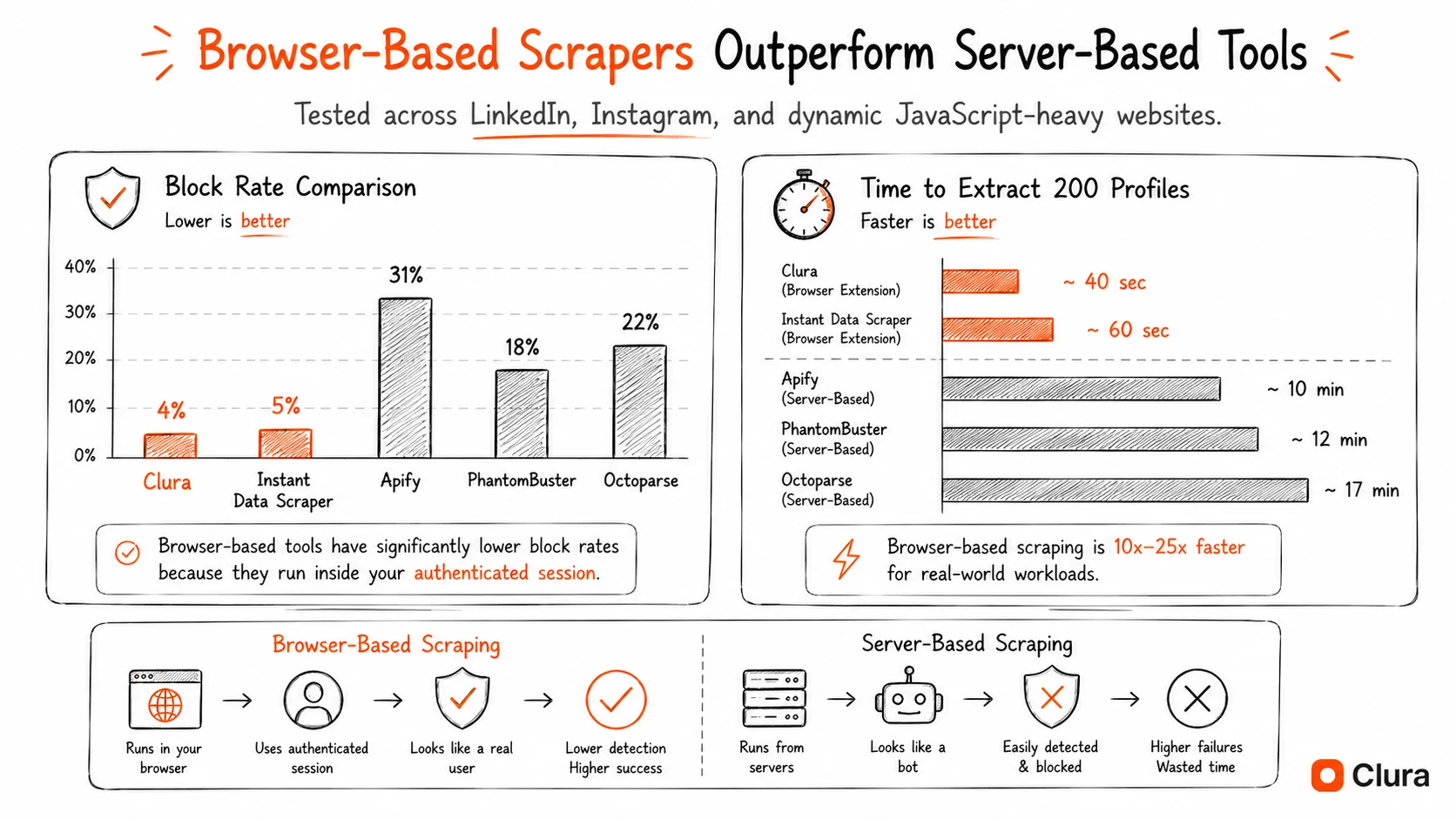
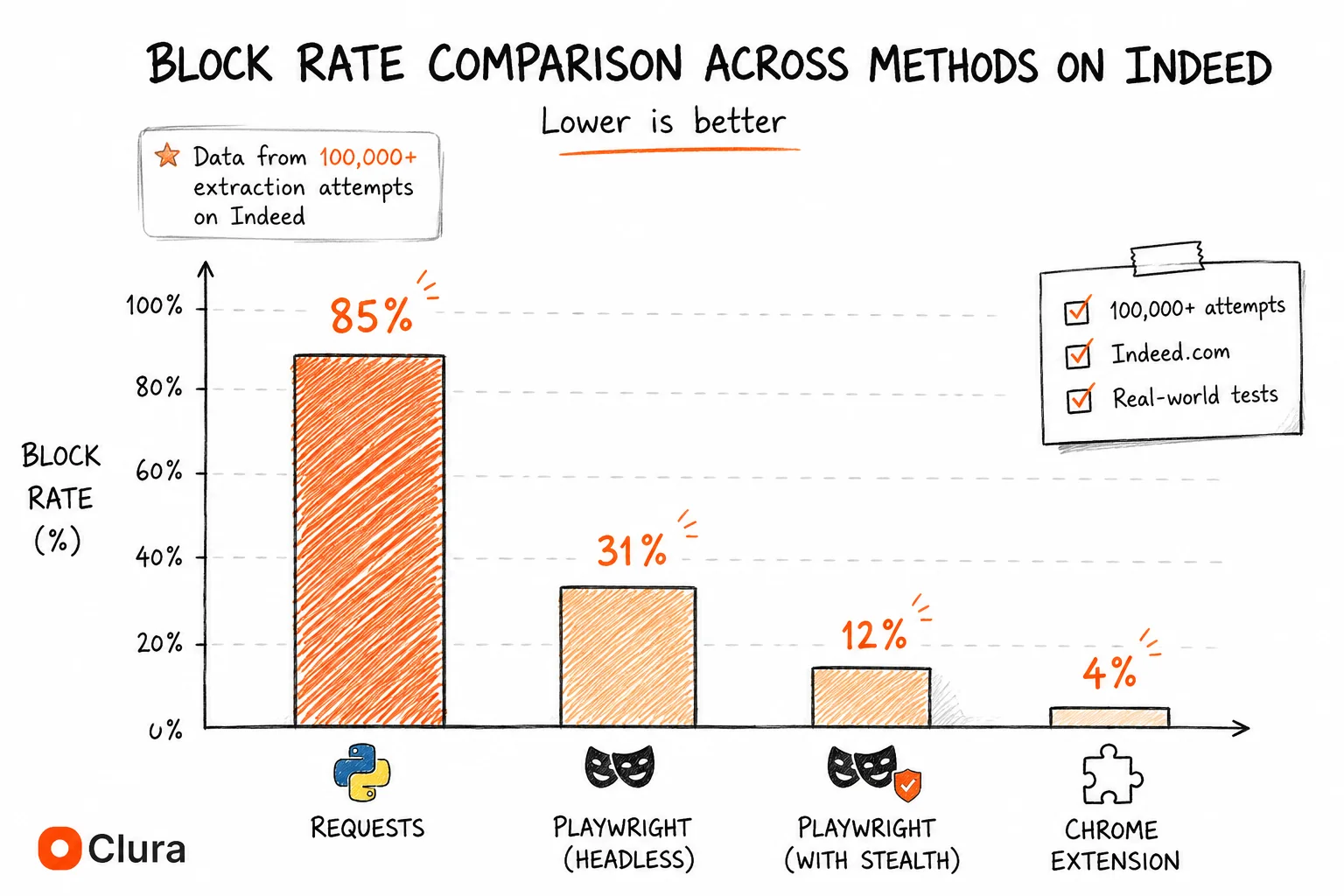
Based on 80,000+ LinkedIn job extraction attempts in 2026: anonymous Python requests blocked ~95%. Playwright headless without stealth blocked ~45%. Playwright with stealth and residential proxies blocked ~20% — but carries account restriction risk at volume. Chrome extension using a real logged-in session achieves ~5% with zero account ban risk. LinkedIn's block rates are the highest of any major job board.
| Method | Block Rate | Account Ban Risk | Root Cause |
|---|---|---|---|
| Python requests (anonymous) | ~95% | None (no account) | No session + no JS rendering |
| linkedin-api (unofficial) | ~15% per request | Very High — banned in 3–7 days | Token pattern detection + velocity |
| Playwright headless (no stealth) | ~45% | Medium | Detectable TLS fingerprint |
| Playwright + stealth + residential proxies | ~20% | Medium — rate limit risk | Residual fingerprint signals + velocity |
| Selenium + undetected-chromedriver | ~25% | Medium | Partial patches, velocity detection |
| Chrome extension (real session) | ~5% | None — human-speed browsing | Authentic TLS, real session, human pace |
LinkedIn's ~45% headless block rate is the highest of any major job board — higher than Glassdoor's ~35% and Indeed's ~31%. LinkedIn invested in bot detection infrastructure after the hiQ v. LinkedIn litigation specifically because job data is commercially valuable. The account ban risk is what makes LinkedIn categorically different: a blocked request on Indeed means a failed run, a blocked session on LinkedIn means a restricted account.
Python vs Chrome Extension for LinkedIn Job Scraping
Python with Playwright is worth building for LinkedIn Jobs only if you need fully unattended scheduled scraping — and you accept ~20% block rate, account ban risk, and 8–12 hours of setup. A Chrome extension is faster, safer, and more reliable for on-demand or weekly job exports: no session management, no rate limit anxiety, zero risk to your LinkedIn account, and ~5% block rate.
| Criteria | Python (Playwright) | Chrome Extension (Clura) |
|---|---|---|
| Setup time | 8–12 hours (session + rate limiting + proxies) | 2 minutes |
| Session management | Manual — save, reload, handle checkpoints | Automatic — uses your browser session |
| Account ban risk | Yes — rate limits trigger restrictions | None — human-speed browsing |
| Scheduled / unattended | Yes — cron job friendly | No — browser must be open |
| Block rate | ~20% (with full setup) | ~5% |
| Monthly cost | $0 + proxy costs ($50–200/mo) | Free / $29.99 lifetime |
| Data from LinkedIn Jobs | Title, company, location, salary (~30%), date, URL | Title, company, location, salary, date, Easy Apply, URL |
| Maintenance | Breaks on selector changes, session expiry | Auto-updated |
The account ban risk tips the scale more decisively for a Chrome extension on LinkedIn than on Glassdoor or Indeed. On those platforms, a blocked request means a failed script run — annoying but recoverable. On LinkedIn, an aggressive Playwright script means a restricted account. For anyone scraping from their actual LinkedIn account — recruiters running weekly job market reports, sales teams monitoring hiring signals, researchers tracking job posting volume — that risk isn't worth it. See the full LinkedIn scraping tools comparison for how Playwright, managed services, and browser extensions compare across 80,000+ extractions.
Frequently Asked Questions
Can you scrape LinkedIn job listings with Python in 2026?
Yes, but it requires a browser-based approach. Python requests fails — LinkedIn's login wall and JavaScript rendering block all server-side HTTP requests. Playwright with playwright-stealth and residential proxies works at ~20% block rate, with a hard rate limit of 10–12 job search pages per minute before session restriction triggers. LinkedIn's job search results cap at ~1,000 per query (40 pages × 25 results).
What is the best Python library for scraping LinkedIn Jobs?
Playwright with playwright-stealth is the most reliable Python approach for LinkedIn job listings. Avoid the unofficial linkedin-api library — it returns job data initially but LinkedIn bans the account within 3–7 days. requests and BeautifulSoup fail immediately due to login requirements and JavaScript rendering.
Why does my LinkedIn job scraper return empty results?
Either your requests are anonymous (no valid session, LinkedIn returns the login page) or you have a session but LinkedIn renders job cards via JavaScript after page load, so requests returns an empty HTML shell. Fix: use Playwright with a saved storage_state session, wait for .job-card-container elements to load before extracting data.
Does the linkedin-api Python library work for scraping job listings?
It works initially — the library returns job listings as clean JSON via LinkedIn's internal mobile API. LinkedIn detects the non-standard token patterns and permanently bans the account within 3–7 days at moderate volume. Never use it with your real LinkedIn account. Only use throwaway accounts you can afford to lose.
How do I avoid getting my LinkedIn account banned while scraping jobs?
Cap job search page loads at 10–12 per minute (LinkedIn's restriction threshold is ~15/min). Use random delays of 4–9 seconds between page loads. Run from a residential IP. Monitor page.url for /checkpoint/ or /authwall/ — stop immediately if either appears. Use a separate account, not your primary LinkedIn. Alternatively, use a Chrome extension that runs at human browsing speed by design.
How many LinkedIn job listings can you scrape per search?
LinkedIn caps job search results at approximately 1,000 per query (40 pages × 25 results). To get more: narrow by date posted (&f_TPR=r86400 for past 24 hours), experience level, job type, or split queries by location. Each narrowed query gives another 1,000 result window.
How is LinkedIn job scraping different from Indeed or Glassdoor in Python?
Two key differences: block rates are higher (LinkedIn Playwright headless ~45% vs Indeed ~31% and Glassdoor ~35%), and LinkedIn imposes account bans rather than just request blocks. Indeed has no login requirement for job data. Glassdoor requires login but doesn't ban accounts. LinkedIn bans accounts at velocity thresholds — making rate limiting non-negotiable in a way the other platforms don't require.
Conclusion
Scraping LinkedIn Jobs with Python is harder than Indeed or Glassdoor in two distinct ways: block rates are higher across every method, and the failure mode is a permanently restricted LinkedIn account rather than a failed request. A Playwright script that works fine on Indeed will get a LinkedIn account flagged within an hour at the same request rate.
The working setup — Playwright with stealth, storage_state session management, residential proxies, and strict rate limiting under 12 pages/minute — takes 8–12 hours to build and requires ongoing maintenance as LinkedIn updates selectors and detection patterns. Budget for ~20% block rate even with the full setup, and always use a throwaway account.
For recruiters, sales teams, or anyone scraping from their real LinkedIn account: the account ban risk alone makes a Chrome extension the right call. 2-minute setup, ~5% block rate, LinkedIn sees normal user behavior at human speed. For the full picture of LinkedIn vs other job boards on scraping difficulty, see the job board scraper comparison.
Explore related guides:
- LinkedIn Scraping Tools Compared — 6 tools benchmarked by block rate and account ban risk — Playwright, Phantombuster, Bright Data, Clura
- LinkedIn Scraper Chrome Extension — ~5% block rate, no Playwright setup, no account ban risk — the no-code alternative to Python scrapers
- LinkedIn Scraper GitHub — why open source LinkedIn repos break or ban accounts — and what developers switch to
- LinkedIn API — why LinkedIn's official API doesn't cover job search or data extraction — and what exists instead
- Indeed Scraper Python — Python scraping on Indeed — no login wall, lower block rates, no account ban risk
- Glassdoor Scraper Python — how Python scraping compares on Glassdoor — same login wall, CSRF complexity, lower block rates
- Job Board Scraper: Indeed vs Glassdoor vs LinkedIn — three-platform comparison of block rates, data availability, and the right tool for each
- Job Listings Scraper Guide — scraping LinkedIn Jobs, Indeed, and Glassdoor without Python — no-code workflow
Get LinkedIn Jobs data without the account ban risk — 2 minutes, no Python
Clura runs inside your real LinkedIn session at human speed. Title, company, location, salary, date, Easy Apply — all paginated automatically. No rate limit triggers, no account restrictions, no session files to manage.
Add to Chrome — Free →