
How to Scrape Google Maps Data Without Code (2026)
Google Maps contains the most accurate and up-to-date database of local businesses on the internet. Every listing includes a business name, phone number, address, star rating, review count, category, and website — exactly what local SEO agencies, sales teams, and researchers need. The problem: Google Maps has no export button.
This guide covers three extraction workflows: business listings from search results (name, phone, address, rating), Google Reviews from individual listing pages (full text, star rating, owner reply), and Google My Business profile data (attributes, Q&A, description). All three work with the same AI web scraper Chrome extension — no code, no API key.
Scrape Google Maps in minutes — no code required
Clura's Google Maps scraper template extracts business name, phone, address, rating, and reviews automatically. Install free and pull your first dataset in under 5 minutes.
Add to Chrome — Free →What Data Can You Scrape From Google Maps?
Google Maps business listings contain name, phone number, address, website URL, star rating, review count, business category, and hours of operation — all extractable without code using a Chrome extension.
Each Google Maps listing is a structured data record. When you search for a business type in a city, every result card contains the same set of fields — which makes it ideal for automated extraction. Here is what you can collect:
- Business name
- Phone number
- Full street address
- Website URL
- Star rating (1–5)
- Review count
- Business category (e.g. plumber, dentist, restaurant)
- Hours of operation
- Google Maps place URL
- Individual Google Reviews — reviewer name, star rating, full text, date, owner reply (from the Reviews tab)
- Google My Business attributes — description, accessibility, parking, payment methods, Q&A (from the business detail panel)
For local SEO agencies, this dataset powers territory analysis and prospecting. For sales teams, it is a ready-made outreach list. For researchers, it is a ground-truth business directory — updated continuously by business owners themselves.
Google Maps is the highest-ROI free dataset for local business data. No other source combines accuracy, coverage, and real-time updates at scale.
How to Scrape Google Maps Using a Chrome Extension (Step-by-Step)
To scrape Google Maps with a Chrome extension: search for your target business type and city, open Clura, select the Google Maps scraper template, let the AI extract all listings, then export to Excel or CSV.
The fastest way to scrape Google Maps without code is using a Google Maps scraper template inside a browser extension. The extension runs inside Chrome, so it sees the fully rendered map results — including listings that load dynamically as you scroll.
- Search Google Maps — go to maps.google.com and search for your target business type and location. Example: "roofing contractors Austin TX" or "dentists in Miami FL".
- Open Clura — click the Clura Chrome extension icon in your toolbar.
- Select the Google Maps template — choose the Google Maps Places Scraper template. The AI recognises the listing layout and maps fields automatically: name, phone, address, rating, reviews.
- Run the extraction — Clura scrolls through the results list and collects every visible listing. For searches with hundreds of results, the agent paginates automatically.
- Export to Excel or CSV — when the run completes, click Export. You get a clean spreadsheet: one row per business, one column per field.
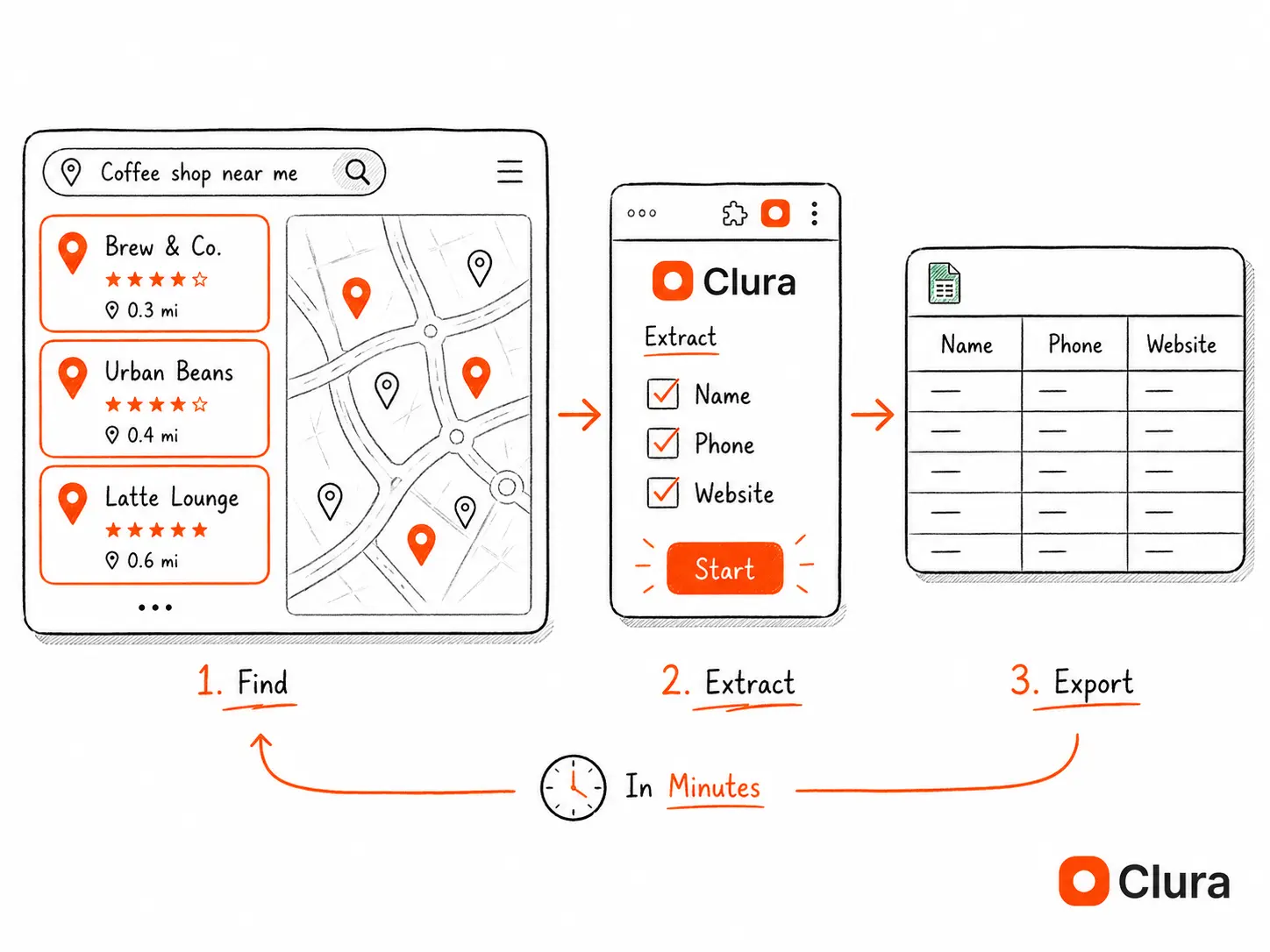
A local SEO agency can build a full prospect list for a city — 300+ business names, phones, and addresses — in under 10 minutes. The same task done manually takes 4–6 hours.
Google Maps Scraping Use Cases — Agencies, Sales Teams, Local SEO
Google Maps scraping is used by local SEO agencies to find prospects, sales teams to build outreach lists, and researchers to audit local business density in a target market.
Local SEO agencies
Agencies scrape Google Maps to identify businesses without a website, with low review counts, or with outdated information — all strong signals that the business needs SEO help. A single search across 5–10 categories per city generates a qualified prospect list in minutes. For niche campaigns, start with the HVAC Google Maps Lead Generator, Lawyer & Attorney Google Maps Lead Generator, Dental & Healthcare Google Maps Lead Generator, or Home Services Google Maps Lead Generator, then schedule the matching Clura templates for recurring exports. For long-tail workflows, see personal injury lawyer leads, immigration lawyer leads, home improvement contractor leads, and the best way to get HVAC leads.
Sales teams and BDRs
Field sales reps use Google Maps scraping to build territory lists by zip code or city. Restaurant supply companies, commercial cleaning services, and B2B SaaS targeting local businesses all use this workflow to replace expensive list providers.
Google Maps is one of many lead sources a sales team can scrape. For a complete lead scraper guide covering LinkedIn, Yelp, industry directories, and company websites, see the full workflow.
Market researchers
Analysts scrape Google Maps to measure business density in a target market, track competitor locations, or benchmark review scores across a category. The data is more current than any paid database because business owners update it themselves.
Recruiters
Healthcare and hospitality recruiters use Google Maps to find businesses in a category and then identify hiring managers through LinkedIn — starting with the business name and location scraped from Maps.
| Use Case | What to Search | Fields to Extract |
|---|---|---|
| Local SEO prospecting | Business category + city | Name, website, phone, rating |
| Sales territory list | Business type + zip code | Name, address, phone |
| Competitor audit | Competitor name + region | Rating, reviews, locations |
| Market sizing | Category + metro area | Count, rating distribution |
How to Export Google Maps Data to Excel or CSV
After scraping Google Maps with Clura, click Export and choose Excel (.xlsx) or CSV. The file downloads immediately — one row per listing, column headers matching the fields you extracted.
Once Clura finishes the extraction, the dataset appears in the extension panel. You can review the rows before downloading. Click Export and select your format: Excel (.xlsx) for spreadsheet workflows, CSV for CRM imports, or use Connectors for downstream workflows. The output is clean — no extra formatting, no empty rows, no merged cells. If you need to export scraped data to Excel directly, Clura handles that in one click.
For sales teams, the next step is enrichment. After exporting business names and websites from Maps, use Enrichment (coming soon) to append missing company details, LinkedIn URLs, and contact-ready fields before sending the list to your CRM.
- Excel (.xlsx) — opens directly in Microsoft Excel or Google Sheets
- CSV — compatible with any CRM, database, or data pipeline
- Column headers match the field names you selected
- One row per business listing
- No manual cleanup required
For large datasets — searches with 500+ results — Clura batches the export automatically. The file is complete when the progress indicator reaches 100%.
How to Scrape Google Reviews for Any Business Listing
Google Places API charges $17 per 1,000 review requests. Browser-based scraping of the same public review data — reviewer name, star rating, full review text, date, and owner reply — is free from the Maps listing page. Block rate via Chrome extension: ~6%. The Reviews tab on any Maps business profile loads the complete review list, paginated and filterable by star rating.
Every Google Maps business listing has a Reviews tab — visible to any browser without login — that displays reviewer name, star rating (1–5), full review text, relative date, helpful vote count, and the owner's response. This is the same data the Google Places API returns for reviews, except the API charges $17 per 1,000 requests. The public listing page is free.
What you can extract from Google Reviews
- Reviewer name and Google profile URL
- Star rating (1–5) per review
- Full review text — not truncated, including long comments
- Review date (relative: '2 weeks ago' — exact date visible on hover)
- Helpful vote count
- Owner reply text and reply date, if the business responded
Google review scraper workflow
- Open Google Maps and navigate to the specific business listing you want to scrape.
- Click on the Reviews tab in the business panel — the review list loads in the left sidebar.
- Sort by 'Newest' or 'Most relevant' depending on your research goal.
- Click Clura. It detects the repeating review card structure automatically: reviewer name, rating stars, text, date, helpful count.
- Scroll down to load more reviews — Google loads them in batches of 10. Clura handles the scroll with natural timing.
- Export to CSV. Each row is one review, columns for reviewer, star rating, text, date, and owner reply.
**Google review scraper use cases:** Reputation monitoring — pull all reviews for your business or a competitor's and run sentiment analysis on the text to identify recurring themes. Product and service research — scrape reviews across 20–50 competitors in a category to find common complaints and feature gaps that your offer can address. Local SEO audit — analyze review velocity (reviews per month) and average rating across competitors in your target market. Franchise benchmarking — compare review scores and sentiment across all your locations from a single export. For the equivalent review dataset from a different source, our Yelp scraper guide covers the same workflow — Yelp reviews tend to be longer and more detailed for restaurant and service categories.
Google My Business Scraper: Extracting Full GMB Profile Data
Google My Business (now called Google Business Profile) public profiles contain data that doesn't appear in search result cards: business description, attributes (wheelchair accessible, accepts credit cards), the customer Q&A section, photo count, and verification status. All of this is scrapable from the business detail panel without an API key. Block rate via Chrome extension: ~6%.
When you click a listing on Google Maps and the business panel expands, you're viewing the Google Business Profile — the public-facing version of what business owners manage in Google My Business. This panel contains 3–5x more structured data than the search result card: a full description, business attributes, customer Q&A, photo counts by category, and popular times by day and hour. Most scrapers only hit the search results list view; opening the business panel adds fields that meaningfully change what you can do with the data.
GMB profile data not in the search results list
- Full business description (the 'About' text field — up to 750 characters)
- Business attributes: accepts credit cards, wheelchair accessible, free parking, has WiFi, kid-friendly, outdoor seating, etc.
- Customer Q&A: community questions and business owner answers — often more specific than review text
- Photo count and photo categories (exterior, interior, team, food, product)
- Verification badge status (verified vs unverified listing)
- Popular times data (busiest hours by day of week)
- Services list and menu items (for service businesses and restaurants)
**Google My Business scraper use cases:** Local SEO profile auditing — scrape the GMB profiles of 50 competitors to see which attributes they've filled in that your listing is missing. Attribute completeness is a documented local ranking factor; a competitor with 12 attributes set vs. your 3 has a structural advantage. Citation consistency checking — verify that NAP (name, address, phone) data matches across the GMB profile, Maps listing, and the business website. Customer research — the Q&A section is an underrated source of real customer objections; scrape Q&A from competitors in your category to find the questions your content and sales copy should answer. Lead qualification — for agencies pitching local SEO services, a business with an unverified profile, no description, and under 10 reviews is a strong prospect signal — all visible without visiting the business.
A business with no GMB description, no attributes, and an unverified profile is a warm lead for any local SEO agency. Scraping profile completeness signals across a city's businesses takes 20 minutes — building that prospect list manually would take days.
Frequently Asked Questions
Is scraping Google Maps legal?
Scraping publicly visible data from Google Maps is generally legal for research and business purposes. The data — business names, addresses, phone numbers — is publicly accessible to anyone who visits the site. Users should avoid scraping at a rate that disrupts Google's servers and should review Google's Terms of Service. Personal data (individual names, private contact details) is subject to GDPR and CCPA regulations.
Does Google block Chrome extension scrapers?
Chrome extension scrapers run inside your browser session at human-like speeds, which makes them much harder for Google to detect and block compared to server-side bots. Clura operates within your normal browsing session, so it behaves like a regular user scrolling through search results.
How many listings can I scrape from Google Maps?
Google Maps typically shows up to 120 listings per search query (20 results per page, up to 6 pages). To get more coverage for a city or region, run multiple searches with different category keywords or narrow the geographic area — for example, by neighborhood or zip code — and combine the exports.
Can I scrape Google Maps reviews — including full review text?
Yes. Open the business listing on Google Maps, click the Reviews tab, and run Clura on that page. It extracts reviewer name, star rating, full review text, date, helpful vote count, and owner reply for every review in the loaded list. Google loads reviews in batches of 10 as you scroll — Clura handles the scrolling automatically. Export to CSV gives you one row per review. The Google Places API returns the same data but charges $17 per 1,000 requests; the browser-based approach is free.
What is a Google My Business scraper and what data can it extract?
A Google My Business (now Google Business Profile) scraper extracts the full business profile data that appears when you click a listing in Maps — not just the search result card. This includes the business description, attributes (wheelchair accessible, accepts credit cards, free parking), customer Q&A section, photo count by category, verification status, and popular times by hour. This data is only visible on the business detail panel, not in the search results list view. Local SEO agencies use GMB scraping to audit profile completeness for prospects and benchmark competitor profiles.
What is the fastest way to build a local business list from Google Maps?
The fastest method is to use a Chrome extension with a pre-built Google Maps template. Search for your target business type and location, run the extension, and export. The entire process — from search to spreadsheet — takes under 10 minutes for most searches.
What is the best Google Maps scraper extension?
The best Google Maps scraper extension is one that runs inside Chrome, reads the rendered Maps results, handles scrolling, and exports clean CSV rows. Clura works well for Google Maps data scraper extension workflows because it can extract visible business listings, then enrich business websites for public emails, contact pages, and social links where available.
Can I use a GMB data scraper extension?
Yes. A GMB data scraper extension can collect visible Google Business Profile fields from Maps, including name, address, phone, website, category, rating, reviews, profile description, attributes, Q&A, and profile URL where those fields are visible in your browser.
Conclusion
Google Maps is a free, continuously updated database of local businesses. The only missing piece is an export function — and a Chrome extension fills that gap completely.
Whether you are building a prospect list for a sales territory, auditing local competitors, or sizing a market, the workflow is the same: search, run the scraper, export. No code, no API key, no data vendor subscription.
Start with one city and one category. You will have a usable dataset in under 10 minutes.
Explore related guides:
- AI Web Scraper Chrome Extension — how to scrape any website with AI — no code required
- Google Maps Scraper Template — pre-built template for extracting Google Maps business listings
- Scrape Website Data — export any scraped data into a clean Excel spreadsheet
- Enrich Google Maps Leads (Coming soon) — turn business listings into fuller company and contact datasets
- Send Scraped Maps Data to Your Tools — export Google Maps rows to spreadsheets, CRMs, and workflows
- Extract Data From Websites — the complete guide to no-code data extraction workflows
- Web Scraping for Lead Generation — how to build full prospect lists from Google Maps, LinkedIn, Yelp, and job boards
- Yelp Scraper — same workflow for Yelp — extract local business leads filtered by category and city
- Google Scraper — scraping Google Search and Google Shopping — block rates, SerpApi vs Clura, and when Python fails
- Social Media Scrapers: What Works in 2026 — TikTok, Reddit, Facebook, X, Instagram — block rates by method and platform-specific lead gen workflows
- Facebook Scraper: Pages and Groups — Facebook as a lead enrichment layer — follower count, post activity, and business info to verify Maps leads
- Facebook Marketplace Scraper — local pricing and listing data to enrich Maps leads — useful for real estate, services, and vehicle research
- Twitter/X Scraper — find founders and decision-makers by keyword search on X — no $100/month API required
Scrape Google Maps in 10 minutes — free
Install Clura, search Google Maps for your target business type and city, and export a structured list of names, phones, addresses, and ratings. No code. No configuration.
Add to Chrome — Free →