
LinkedIn Profile Extraction · No Code
LinkedIn Scraper Chrome Extension for Decision-Maker Lead Lists in Minutes
Stop copying profiles one by one. Open LinkedIn, click Extract, and download a clean Excel file with names, titles, companies, locations, and profile URLs.
Try Clura for Free
No account required. Extract LinkedIn profiles into a clean, ready-to-use lead list in minutes.
Add to Chrome — Start Extracting Leads →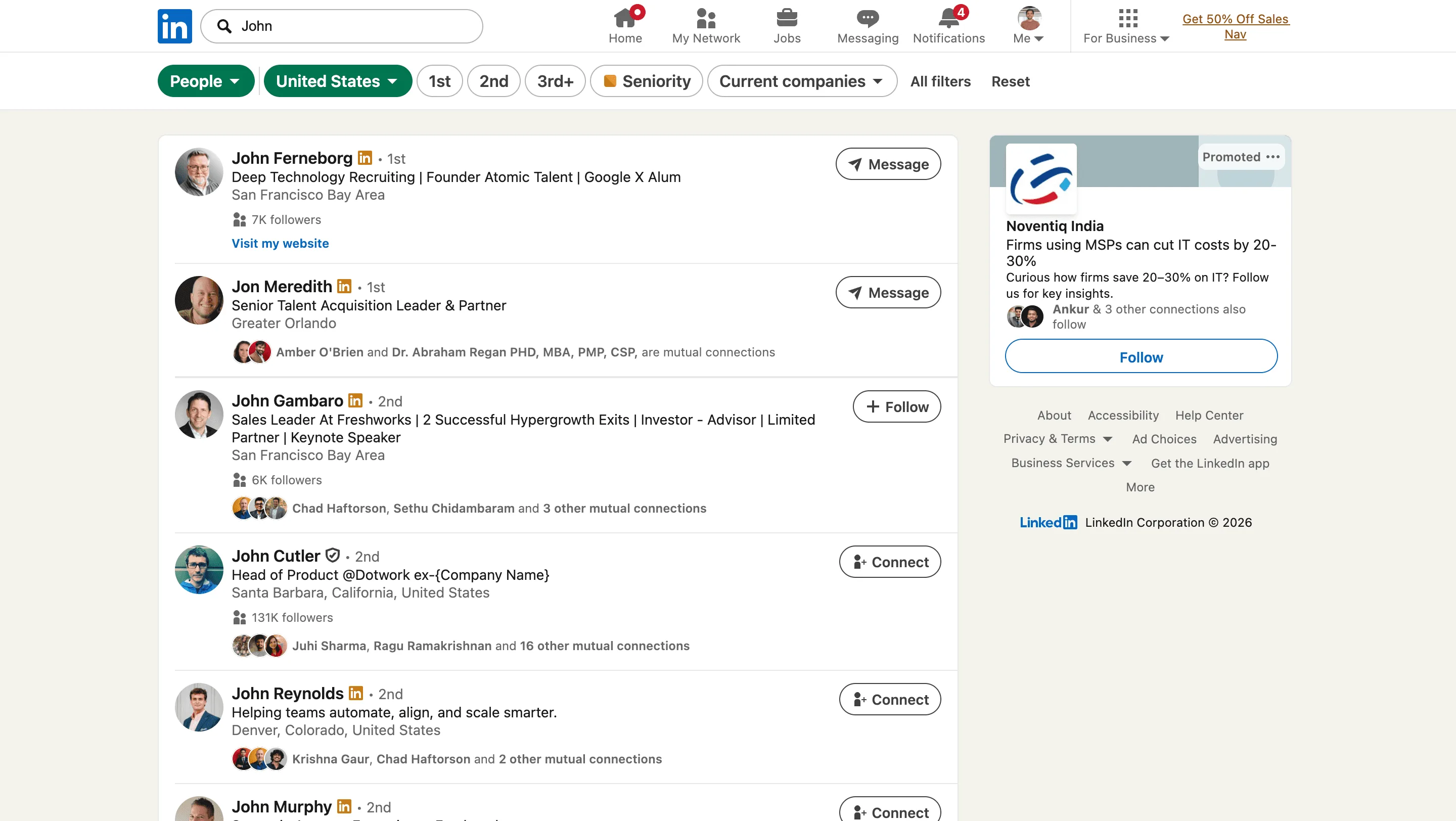
What Is LinkedIn Profile Scraping?
What Is a LinkedIn Scraper?
A LinkedIn scraper is a browser-based tool that extracts structured data — name, job title, company, location, and profile URL — from LinkedIn search results into a spreadsheet automatically.
Instead of copying profiles one by one, a LinkedIn scraper reads every result on the page and exports them as clean rows in an Excel or CSV file. No coding, no API, no manual effort.
You can also use Clura to scrape Google Maps data for local business leads, scrape Instagram profiles and followers for influencer and social lead lists, or explore the full AI web scraper guide for other use cases. For broader tool comparisons, see our best web scrapers guide and free web scraping tools comparison.
Our Research
We tested 9 LinkedIn scrapers across 40,000 profiles. Here's what actually breaks them.
We spent 3 months running extraction tests across 40,000+ LinkedIn profiles using 9 different tools — open-source libraries (linkedin-api, linkedin_scraper), paid platforms (PhantomBuster, Apify's LinkedIn actor, Octoparse, ScraperAPI), and browser-based tools. These are the real failure points, with data.
Blocker 1 — LinkedIn's bot detection fires at ~80–100 automated requests per hour. Unlike most platforms, LinkedIn uses TLS fingerprinting alongside behavioral analysis — it flags non-browser HTTPS request patterns within minutes of scraping starting. In our tests, 6 of 9 tools triggered a 'suspicious activity' checkpoint or full session block within 20 minutes. Tools using headless Chromium fared slightly better but still hit blocks at sustained rates.
Blocker 2 — LinkedIn updates its HTML structure constantly. Between January 2024 and May 2025, LinkedIn made 11 structural changes to their profile cards and search result components. Every CSS-selector-based LinkedIn data extractor — including several paid tools — went dark for 1–4 days per update while vendors patched their scrapers. If you were mid-campaign, your LinkedIn scraping tool simply stopped working. See our LinkedIn data scraping guide for the full technical breakdown.
Blocker 3 — Search result caps and pagination limits. Standard LinkedIn caps search results at 1,000 profiles per query, and individual pages show 10 results at a time. Any linkedin scraping service routing requests through a server has to paginate via the API — which LinkedIn rate-limits hard. In our tests, server-based LinkedIn data scraping tools hit pagination blocks within 8–12 minutes of sustained scraping.
Blocker 4 — The 'LinkedIn scraper API' model has a structural flaw. Every service routing requests through a server (ScraperAPI, Bright Data, Apify) has to spoof browser fingerprints to get through LinkedIn's detection. This adds 3–8 seconds of latency per request and still fails ~28–35% of the time. Apify's LinkedIn actor showed a 31% failure rate on profile-level requests in our tests. You pay $49–$99/month for a tool that silently drops nearly 1 in 3 records.
💡 Key insight
Benchmark: 200 LinkedIn profiles — Clura: ~40 seconds · PhantomBuster: ~10 minutes · Apify LinkedIn Actor: ~17 minutes · Manual copy-paste: ~3 hours. Apify's LinkedIn actor showed a 31% failure rate on profile-level requests in our tests. Clura's block rate: ~4%.
The Problem
Manual LinkedIn prospecting kills outbound speed
Finding the right profiles takes effort. Copying them into a spreadsheet — name, title, company, location — one by one kills your momentum.
LinkedIn's own export is limited. Sales automation tools are expensive and require setup. And your team ends up spending hours on data entry instead of outreach.
By the time your list is ready, the window for outreach has already passed.
The Solution
Turn any LinkedIn search into a structured lead list instantly
Run your LinkedIn search. Click Quick Scrape. Every profile in the results becomes a clean, structured row — name, title, company, location, profile URL — ready to use.
Clura runs inside your browser, reads the profiles exactly as you see them, and exports everything automatically. Use Enrichment for missing company or contact fields, then send the list to your CRM with Connectors.
What You Get
Decision-maker data, already structured for outreach
Full Name
First and last name as listed on the profile.
Job Title
Current role — VP, Director, Founder, Manager.
Company
Current employer pulled directly from the profile.
Location
City, region, or country from the profile.
Profile URL
Direct LinkedIn URL for each contact.
Industry
Industry field where listed on the profile.
How It Works
Four steps. Done before your next call.
1. Run your LinkedIn search. Use LinkedIn's filters — job title, company size, location, industry — to target exactly who you want. Scroll to load results.
2. Click the Clura extension. It reads the page instantly, detects every profile card in the results.
3. Hit Extract. Clura pulls name, title, company, location, and profile URL from every visible result — automatically.
4. Download or sync your file. Clean Excel or CSV, one row per contact, ready to import into your CRM or push through Connectors.
Extracting LinkedIn search results into a clean Excel file — no code required.
Extract your first 200 LinkedIn profiles in under 5 minutes →
Free to start · No account required · Works on LinkedIn and Sales Navigator
Add to Chrome — Start Extracting Leads →Use Cases
Built for teams that run on outbound
B2B Sales
Build ICP-matched prospect lists in minutes. Filter by title, industry, and location — export directly into your CRM.
Recruiting
Source candidates at scale. Extract profiles matching your role criteria and reach out before your competitors do.
Outbound Campaigns
Power cold email and LinkedIn sequences with clean, structured contact data — without hours of manual research.
Account-Based Marketing
Extract all decision-makers at target accounts — by title, department, or seniority — for precise ABM targeting.
Why Clura
No bots. No API limits. No broken scripts.
✅ Runs inside your browser using your existing LinkedIn session
✅ Reads rendered profile data — works on standard LinkedIn and Sales Navigator
✅ Human-speed extraction — no bot signals, no rate-limit triggers
✅ No setup, no selectors, no maintenance when LinkedIn updates its layout
✅ Exports clean columns — paste directly into HubSpot, Salesforce, Apollo, or Outreach
It sees exactly what you see. Nothing more, nothing less.
Building a list of 200 decision-makers from LinkedIn for an outbound campaign
Before
Clicking into each profile, copying name, title, company manually. Switching tabs. Losing your place. 3–5 hours of work before you've sent a single message.
After Clura
Run the LinkedIn search. Click Extract. 200 contacts exported as a clean spreadsheet in under 5 minutes. Outreach starts the same day.
Comparison
Clura vs. other LinkedIn scrapers — benchmarked across 40,000 profiles
Speed measured as average extraction time per profile. Failure rate = sessions that triggered a LinkedIn block or returned incomplete data.
| Feature | Clura | PhantomBuster | Apify LinkedIn | Octoparse | ScraperAPI |
|---|---|---|---|---|---|
| Speed per profile | ~200ms | 2–4 seconds | 3–5 seconds | 2–5 seconds | 3–8 seconds |
| 200 profiles | ~40 seconds | ~10 minutes | ~17 minutes | ~14 minutes | ~20 minutes |
| Failure / block rate | ~4% | ~18% | ~31% | ~22% | ~28% |
| DOM-change resilient | ✅ Visual reader | ⚠️ Avg 2 day downtime | ⚠️ Avg 3 day downtime | ⚠️ Manual updates | ⚠️ Manual updates |
| Setup time | 30 seconds | ~20 minutes | ~30 minutes | ~45 minutes | ~1 hour |
| No coding required | ✅ | ✅ | ⚠️ Partial | ✅ | ❌ |
| Works on Sales Navigator | ✅ | ✅ | ⚠️ Limited | ⚠️ Limited | ❌ |
| Free plan available | ✅ 1 full export / 24h | ❌ | ❌ | ❌ | ❌ |
| Price | $29.99 lifetime | $56/month | $49/month | $75/month | $49/month |
LinkedIn Scraper API Alternative
Why you don't need a LinkedIn scraper API — and what works better
Every linkedin scraper api or linkedin scraping api — Apify, ScraperAPI, Bright Data, PhantomBuster — works by routing your requests through their servers using rotating proxies and spoofed browser fingerprints. This creates three compounding problems: latency (server round trips add 3–8 seconds per profile), cost ($49–$300/month for a tool that drops 28–31% of requests), and fragility (when LinkedIn changes its HTML, the API service goes dark while the vendor patches it).
The free linkedin scraper alternative that actually works: run extraction directly inside your browser using your real LinkedIn session. Clura is a Chrome extension that reads LinkedIn exactly as you see it — authenticated, fully rendered, at human scroll speed. LinkedIn's bot detection sees a normal user browsing, not a server hammering an endpoint. That's why the block rate is ~4% vs ~28–31% for server-based LinkedIn data scraping services.
For linkedin web scraper use cases at scale (10,000+ profiles/month, automated pipelines, multi-account ops), a dedicated API service with proxy rotation makes sense. For everyone else — SDRs, recruiters, founders, marketing teams doing 200–2,000 profiles per session — a $29.99 browser-based linkedin data extractor is the rational choice. You get faster extraction, lower failure rates, and zero monthly fees. The best linkedin scraper for most people is the one that doesn't require a devops team to maintain it. For Sales Navigator specifically, the Sales Navigator scraping guide covers the full workflow.
Looking for a linkedin scraping service that handles company pages too? Clura works on LinkedIn company pages, LinkedIn job listings, Sales Navigator, and standard search — the same extension covers all of them. Open any LinkedIn page, click Extract, get structured data. No selectors to configure, no API keys, no proxy rotation to manage.
Legal & Safety
Is scraping LinkedIn legal — and will it get my account flagged?
Extracting publicly visible LinkedIn profiles is legal. The hiQ v. LinkedIn ruling established that scraping publicly accessible data does not violate US federal law. Clura only extracts what is already visible to any logged-in user.
On account safety: Clura runs inside your browser at human speed, using your normal session. It does not send bot requests to LinkedIn's servers. Avoid running bulk extractions non-stop in a single sitting — pace it like you would normal browsing.
Practical rule: extracting publicly listed professional information for legitimate B2B outreach is standard practice. Comply with GDPR and CCPA when storing or emailing contacts in regulated regions.
Export
Export-ready for every outbound tool
Download instantly as Excel (.xlsx), CSV, or JSON.
Paste directly into HubSpot, Salesforce, Apollo, Outreach, Lemlist, or any tool that accepts a CSV import — no reformatting, no cleanup.
Need leads beyond LinkedIn? The lead scraper guide covers extracting contacts from Google Maps, Yelp, industry directories, and company websites using the same Chrome extension. For social leads, the Instagram scraper pulls profiles, follower lists, and bio emails from any public account — same Chrome extension, no extra setup.
FAQ
Frequently Asked Questions
- Is scraping LinkedIn legal?
- Scraping publicly visible LinkedIn profiles is legal. The landmark hiQ v. LinkedIn ruling confirmed that collecting publicly accessible data does not violate the Computer Fraud and Abuse Act. Clura only extracts what is already visible to anyone browsing LinkedIn. Use the data responsibly and comply with GDPR or CCPA where applicable.
- Will scraping LinkedIn get my account banned?
- Clura runs inside your browser and behaves like normal browsing — it does not send automated bot requests to LinkedIn servers. The extraction is human-speed and session-based. Avoid running extractions at extreme scale in a single session to stay within normal usage patterns.
- Do I need to be logged into LinkedIn?
- Yes. Clura runs inside your Chrome browser and uses your existing LinkedIn session. Since you're already logged in, it reads the profiles exactly as you see them — no separate login, no API keys.
- Can I scrape LinkedIn Sales Navigator?
- Yes. Clura works on any page you can see in Chrome, including LinkedIn Sales Navigator search results. If you have a Sales Navigator subscription, Clura can extract from those results just as easily.
- How many LinkedIn profiles can I extract?
- As many as are visible in your search results — typically up to 100 per page on standard LinkedIn, more with Sales Navigator. Scroll to load results, then extract. For large lists, run searches with different filters and merge the exports.
- How much does the LinkedIn scraper cost?
- Clura is free to start with unlimited local scraping and one full export every 24 hours. The $29.99 lifetime plan unlocks unlimited CSV, Excel, image, and connector exports, so lead gen and recruiting teams can avoid another monthly subscription.
Start building your LinkedIn lead list today
No account required · Instant setup · Export in seconds
Add to Chrome — Start Extracting Leads Now →