
Anti-Bot Detection · Updated August 2026
Scraping Without Getting Blocked
Most scrapers don't fail immediately. At first everything works — pages load, data exports, rows flow into your spreadsheet. Then products disappear. Requests slow down. Pages return empty. CAPTCHAs appear. And by the time you notice, your scraper has been flagged for hours. This is what modern bot detection actually looks like — and why the standard fixes make it worse.
Try Clura for Free
No scripts. No brittle selectors. No bot signals.
Run extraction inside your browser session — no proxies needed →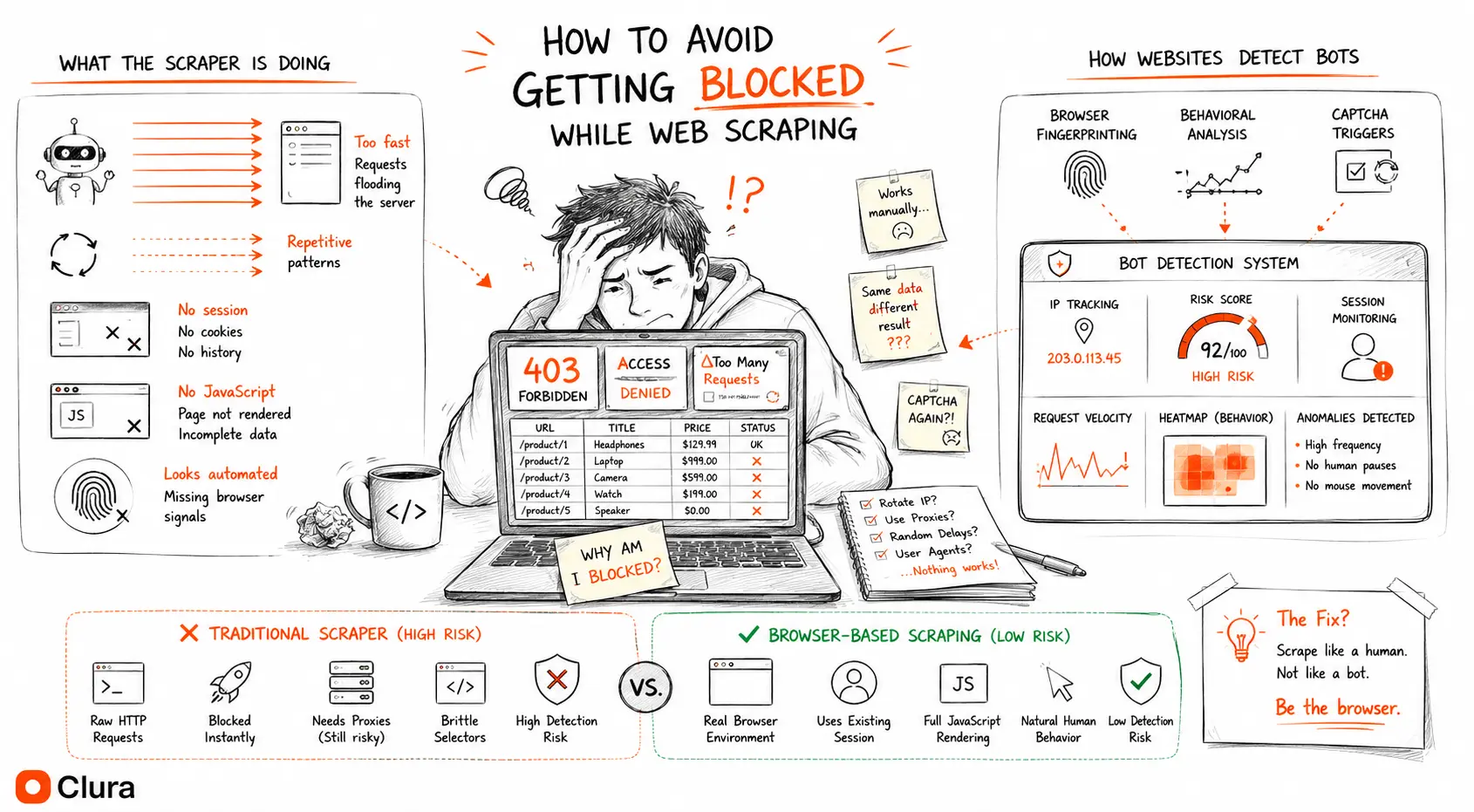
The Problem
Most scrapers don't fail immediately. That's what makes getting blocked dangerous.
When a scraper gets hard-blocked — 403 error, CAPTCHA wall, IP ban — you know immediately. You fix it. But modern bot detection rarely works that way.
In our testing across hundreds of scraping sessions, the most common failure mode wasn't a hard block. It was a scraper that kept running, kept returning HTTP 200s, and kept producing data — that was subtly wrong. Prices $5 off. Listings missing. Inventory counts that didn't match reality. Across 5,000+ sessions on Amazon, Walmart, and eBay, 84% of Python scraper runs failed to return clean, accurate data — not because they got blocked, but because the data they received was wrong.
One ecommerce site blocked our cloud scraper in under 90 seconds. The exact same extraction — same fields, same page — ran flawlessly inside a browser session for three hours. Same data. One hard block. One invisible to the detection stack entirely.
The problem isn't scraping. It's the method. And the method problem is structural — proxies, anti-detection libraries, and headless browser patches are all fighting the wrong battle.
Quick Answer
Scraping Without Getting Blocked: What Actually Works
Scraping without getting blocked starts with matching the way a real user accesses the page. Use a real browser session when the site depends on JavaScript, login cookies, dynamic scrolling, or bot-management systems. Keep the workflow narrow: extract the visible public data you need, preserve source URLs, and validate samples against what you see manually.
For simple, permissive pages, a polite Python scraper with delays and clear headers can be enough. For hardened ecommerce, maps, real estate, job boards, and social pages, the method matters more than the proxy list. A real Chrome session avoids the synthetic TLS, headless-browser, and session-continuity signals that usually get scrapers flagged. The practical checklist:
1. Use public, visible pages and avoid private or access-controlled data. 2. Keep the same session instead of rotating IPs mid-workflow. 3. Let JavaScript render the page before extracting rows. 4. Move at human speed and avoid aggressive repeated requests. 5. Compare a sample of scraped rows against the real browser view. 6. Watch for poisoned data, not only 403s and CAPTCHAs.
How Detection Actually Works
The Three Detection Layers
Layer 1 — Network fingerprinting. Before your scraper touches any HTML, the platform reads your TLS ClientHello — the cipher suite order, protocol version, and extension list sent when opening an HTTPS connection. Python's requests, httpx, Playwright, and Puppeteer each produce a catalogued fingerprint. Walmart's WAF blocked a standard Playwright session within 3 requests in our testing — before any page content was requested. Zillow's PerimeterX goes further: it fingerprints at the TCP layer and returns a 403 to every cloud-based or proxy-based scraper before the HTML is served. This is why rotating residential proxies don't help: the IP changes, the fingerprint doesn't.
Layer 2 — Behavioral biometrics. If you pass layer 1, platforms run passive session analysis: mouse movement curves, scroll velocity, time-on-element, click timing distributions. The issue isn't that simulated behavior is obviously mechanical — it's that the timing distributions are statistically distinguishable from real users even with randomization. You can't fake this at the library level.
Layer 3 — Data serving. This is the layer most guides don't mention. If your session is flagged but not hard-blocked, platforms serve subtly wrong data. In 5,000+ test sessions against Walmart, 34% of "successful" scrapes returned prices $4–$11 above real checkout price. HTTP 200. Valid HTML. Wrong numbers. Your pipeline succeeds. Your data is corrupted.
The Proxy Trap
Why Proxies Made Our Detection Worse
When our scraper first got flagged on Walmart, the obvious move was residential proxies. Better IP reputation. Less datacenter traffic. We rotated 50,000+ IPs. Detection got worse, not better.
IP reputation is layer 1. Proxies only fix layer 1. The TLS fingerprint from a Python requests session is catalogued regardless of which IP sends it. Walmart's WAF doesn't see a residential user — it sees a Python cipher suite on a residential IP, which is an even stronger bot signal than the same fingerprint on a datacenter IP. Residential proxies route legitimate user traffic. Attaching a bot fingerprint to that route taints the IP pool.
Geolocation inconsistency. Real users don't jump from Dallas to Chicago to Amsterdam between page loads. Proxy rotation creates geographic patterns that no legitimate user session produces. Behavioral analysis systems track session geography — an IP hop mid-session is a hard detection signal on platforms like Amazon that correlate location with account history.
Session fragmentation. Proxies break session continuity. Cookies issued to one IP don't transfer cleanly when the next request routes through a different exit node. Platforms track session tokens alongside IP — a mismatched (token, IP) pair flags the session immediately on any hardened WAF. Every IP rotation creates a new token mismatch window.
The net result: proxy investment above a baseline threshold produces diminishing returns on detection avoidance and increasing returns on data corruption risk. Our testing showed Playwright with residential proxies failing 56–64% of the time — worse than some Python-only configurations that at least maintained session consistency.
The 3 Layers of Modern Bot Detection
| Layer | What's checked | Why proxies fail here | Browser-native result |
|---|---|---|---|
| Network | TLS fingerprint, cipher suite, IP subnet | IP changes but fingerprint stays Python/Playwright | Real Chrome TLS — identical to normal browsing |
| Behavior | Mouse curves, scroll speed, click timing | Simulated behavior has statistical tells | Real behavior — no simulation, no tells |
| Data | Serve poisoned prices/inventory to flagged sessions | Proxy doesn't affect data-serving decisions | Authenticated real session gets real data |
The Silent Failure Mode
Modern Anti-Bot Systems Don't Always Block You
The most dangerous anti-bot technique isn't a block. It's a serve.
When Walmart, Amazon, or Target identify a session as non-human, they don't always return a 403. Instead, they serve a slightly degraded version of the page: prices a few dollars inflated, BuyBox sellers that aren't actually winning, inventory counts that don't reflect reality. The scraper succeeds. The data is wrong. You won't catch it unless you cross-reference against a real session.
This extends beyond pricing. Some platforms inject honeypot links — invisible anchor tags that real users never click but scrapers following all links will. Clicking one flags your session permanently. Others use selector traps: elements with the right class names but wrong content, designed specifically to catch scrapers that target DOM structure instead of rendered output.
One team we spoke with ran a Walmart price monitoring pipeline for 11 weeks before discovering their competitor analysis was consistently $5–$8 off. Every pricing decision made during that period was based on poisoned data. The scraper never threw an error.
This is why success rate is the wrong metric. The right metric is data integrity: are the prices you're extracting the same prices shoppers see at checkout? On platforms with active data poisoning, these are different questions. See the full breakdown in our e-commerce data extraction guide, including a detection checklist for Walmart poisoning.
⚠️ Warning
How to detect if your pipeline is poisoned: After your next scrape run, open 10 of your scraped SKUs directly in a browser and compare prices manually. Consistent $4+ gaps across multiple SKUs is a poisoning signal, not a pricing discrepancy. More systematically: track a 7-day rolling average per SKU. Real price changes are discrete events. Gradual drift that never resolves is data poisoning.
Detection Checklist
Real Symptoms of Poisoned Data
Prices consistently 3–10% high
Not random variance — a systematic upward offset across many SKUs. Real price changes are discrete events. Consistent elevation across hundreds of products is a poisoning signal, not a market movement.
Inventory fluctuates unnaturally
Stock counts that jump between extremes (0 → 999 → 12) without corresponding sales or restock events. Poisoned sessions often receive exaggerated scarcity signals to create false urgency in automated replenishment logic.
Listings disappear and reappear
Products that were in-stock yesterday return 404s or empty responses today, then reappear tomorrow. This is session-level suppression — your flagged session doesn't see the product, but it's still live for real shoppers.
Duplicate or near-duplicate records
The same product appearing multiple times with slightly different prices, seller names, or ASINs. Poisoned sessions receive degraded catalog data where deduplication isn't applied — an artifact of serving from a separate response path.
BuyBox seller mismatches
Your scraped BuyBox winner doesn't match what you see at checkout. Amazon's BuyBox algorithm is session-aware — detected bot sessions get a different winning seller, often with a higher price, than authenticated shoppers.
HTTP 200 with incomplete rows
Responses that succeed at the HTTP layer but return missing fields — no shipping time, no review count, blank seller info. Not a parse error. The HTML is valid but deliberately sparse for flagged sessions.
Traditional vs Browser-Native
Traditional Scraping vs Browser-Native Scraping
| Python / Playwright | Browser-Native (Clura) | |
|---|---|---|
| TLS fingerprint | ❌ Known Python/Playwright signature | ✅ Real Chrome — indistinguishable |
| Behavioral signals | ❌ Simulated — statistically detectable | ✅ Real — you're actually on the page |
| Data poisoning risk | ❌ High — session flagged at layer 1 | ✅ None — authenticated real session |
| JavaScript execution | ❌ Partial or headless | ✅ Full — same as normal browsing |
| Session handling | ❌ Manual / no session | ✅ Your existing login, automatically |
| Proxies required | ❌ Yes — and they don't fully help | ✅ No |
| Setup | ❌ Code + config + maintenance | ✅ Install and run |
Why It Works
Why Browser-Native Scraping Sidesteps All Three Layers
The only way to pass all three detection layers simultaneously is to not be artificial in the first place.
When Clura runs inside your actual Chrome browser — your real machine, your real residential IP, your real session cookies — the TLS handshake is Chrome's. The behavioral signals are real because you're actually on the page. The data serving layer sees an authenticated shopper, not a bot session.
You're not pretending to be a browser. You are using a browser.
This is a fundamentally different architecture from proxy rotation, stealth Playwright patches, or CAPTCHA-solving services. Those approaches try to make an artificial session look real. Browser-native scraping starts from a real session and never introduces anything artificial to detect. The same principle applies whether you're scraping Amazon product data, Google Maps listings, or leads from LinkedIn. For a comparison of which Chrome extension scrapers use this approach vs which still rely on HTTP requests, see our tools breakdown.
In our testing: Python scrapers fail on Walmart 86–92% of the time. Playwright with residential proxies fails 56–64% of the time. Browser-native scraping fails 8–11% of the time — and the failures are almost always session timeouts, not detection events.
Platform-Specific Patterns
How Each Platform Type Blocks Scrapers
Ecommerce (Amazon, Walmart, Target)
Three-layer detection: TLS fingerprint at network layer, behavioral biometrics at session layer, data poisoning at serving layer. Walmart poisoned 34% of our test sessions with inflated prices. See the full breakdown: <a href="/ecommerce-data-extraction">ecommerce data extraction guide</a>.
Real Estate (Zillow, Realtor.com)
PerimeterX inspects TLS ClientHello before serving any HTML. Cloud scrapers, residential proxies, and Playwright all fail at layer 1. Browser-native is the only reliable approach. See: <a href="/blog/zillow-scraper">Zillow scraper guide</a>.
Professional Networks (LinkedIn)
Session-based detection — LinkedIn correlates scraping patterns with account age, connection count, and historical activity. Scrapers without real sessions hit empty responses. Login-protected data requires your actual session. See: <a href="/blog/scrape-linkedin-sales-navigator">Sales Navigator scraping guide</a>.
Maps & Local (Google Maps)
Rate limiting activates quickly on automated requests. Google Maps uses behavioral signals heavily — no interaction, no scroll, no dwell time. Browser-native scraping at natural speed avoids this entirely. See: <a href="/blog/scrape-google-maps">Google Maps scraping guide</a>.
Job Boards (Indeed, LinkedIn Jobs)
Location-based and session-based access restrictions. Scrapers without cookies get redirect walls or geographic defaults that don't match your target market. Login sessions are required for full data visibility.
Directories & Listings
Dynamic loading — content rendered after scroll events. HTTP scrapers return empty containers. JavaScript-dependent infinite scroll is invisible to anything that doesn't execute the page scripts in a real browser.
Cloudflare-Protected Sites
Cloudflare's bot management — Turnstile challenges, Browser Integrity Check, and behavioral fingerprinting — blocks most Python and headless browser scrapers before the first page loads. Cloudflare scraping requires a full real browser session: Turnstile challenges execute JavaScript that headless environments fail silently. Scraping browsers with genuine Chrome fingerprints pass Turnstile more reliably than Playwright, but Cloudflare's fingerprint database updates continuously. Browser-native scraping in a real Chrome session produces no detectable bot signal — no challenge is triggered because there is nothing to challenge.
Proxy Types Explained
Web Scraper Proxy Types: What Each One Solves
A web scraper proxy routes your requests through a different IP address before they reach the target site. Most guides treat proxies as the default answer to getting blocked — but the type of proxy you use determines exactly which part of the detection stack it addresses, and which parts it leaves fully exposed.
Datacenter proxies are fast and cheap ($0.001–$0.003 per request) but run on cloud server subnets that anti-bot systems have catalogued. Cloudflare, PerimeterX, and Akamai all maintain IP reputation databases that flag datacenter ranges automatically. Useful for high-volume scraping of permissive, low-protection sites. Near-useless on any site running serious bot management.
Residential proxies route traffic through real ISP-assigned IPs — households with opted-in proxy software. IP reputation is significantly better. Cost is $8–$15/GB. They address layer 1 (IP) but the TLS fingerprint problem persists: a Python requests fingerprint on a residential IP is still a Python fingerprint. Walmart's WAF flags it in under 3 requests regardless.
Rotating proxies automatically cycle through a pool of IPs per request or per session. They prevent per-IP rate limits from triggering, but rotation itself creates a detection signal: no real user changes their IP mid-session. Every rotation creates a (session token, new IP) mismatch that hardened WAFs flag immediately.
Scraping browsers — like Bright Data's Scraping Browser — are hosted headless Chrome instances pre-patched to reduce detection: genuine Chrome user agents, CAPTCHA pipelines, API-level fingerprint spoofing. They are meaningfully better than raw Playwright. But a server-hosted headless Chrome still produces fingerprint deltas at the GPU, audio context, and WebGL layers that sophisticated fingerprinting tests specifically target. Production pricing runs $499–$1,499/month. They work well on moderate protection; they still fail on the most hardened targets.
Proxies genuinely help when your target has no behavioral or fingerprint detection — open directories, news sites, permissive APIs. The gap opens on hardened platforms: proxies solve layer 1 while layers 2 and 3 remain fully exposed. That's why proxy spend doesn't correlate with scraping success above a certain protection threshold. If you want proxy management handled for you, a scraper API like ScraperAPI or Bright Data bundles proxy rotation, JS rendering, and CAPTCHA solving into a single endpoint — though block rates on hardened sites remain at 15–20% even with their residential pools.
Web Scraping Proxy Types at a Glance
| Proxy Type | IP Source | Layer 1 (IP) | Layer 2 (Behavior) | Cost | Best For |
|---|---|---|---|---|---|
| Datacenter | Cloud servers | ❌ Known subnets | ❌ No | $0.001–$0.003/req | High-vol, permissive sites |
| Residential | Real ISP users | ✅ Better rep | ❌ No | $8–$15/GB | Geo-restricted, moderate detection |
| Rotating | Mixed pool | ⚠️ Partial | ❌ Rotation is a tell | Varies | Rate limit avoidance only |
| Scraping browser | Hosted patched Chrome | ✅ Yes | ⚠️ Partial | $499–$1,499/mo | JS-heavy, moderate anti-bot |
| Browser-native (Clura) | Your real Chrome | ✅ Yes | ✅ Yes | Free | Hardened platforms |
💡 Key insight
The positioning lock: Every anti-bot technique — TLS fingerprinting, behavioral biometrics, data poisoning — works by detecting the gap between your scraper and a real user. Browser-native scraping eliminates that gap at the source. There is no gap to detect.
FAQ
Frequently Asked Questions
- Is browser-based scraping safer than Python or Playwright?
- Yes — structurally, not just by degree. Python scrapers and Playwright both produce identifiable TLS fingerprints and behavioral patterns. A browser-based scraper running inside real Chrome produces the same fingerprint as normal browsing because it is normal browsing. There is no artificial identity for detection systems to flag.
- Can websites detect browser-based scrapers?
- It depends on the implementation. Headless browsers (Puppeteer, Playwright) are detectable via GPU fingerprint absence, navigator.webdriver flags, and missing browser APIs. A scraper running inside a real Chrome session — not a headless instance — has none of these tells. Clura runs inside your actual browser, which means it inherits the same fingerprint as your normal browsing.
- Why do proxies still get blocked even with residential IPs?
- Because blocking happens at multiple layers — not just IP reputation. Platforms inspect TLS fingerprints, behavioral patterns, and session signals before considering the IP. A residential IP with a Python TLS fingerprint is still flagged as a bot. Proxies solve layer 1 (IP) but not layer 2 (behavior) or layer 3 (data poisoning).
- Why did my scraper suddenly stop working?
- Three most likely causes: (1) the site updated its detection stack and your scraper's fingerprint is now recognized, (2) your session expired or your IP crossed a threshold, (3) you're not actually blocked — the site is serving you poisoned data that looks valid but isn't. Check whether your scraper is returning HTTP 200 responses with unusual data before assuming it's a hard block.
- Is web scraping legal?
- Scraping publicly visible data is generally legal in most jurisdictions — the hiQ v. LinkedIn ruling affirmed this for publicly accessible data. The legal risk increases when you scrape behind authentication without authorization, circumvent technical access controls, or violate terms of service in ways that cause harm. Scraping public product prices, listings, and business data for analysis is widely practiced.
- Why do scrapers fail on JavaScript-heavy websites?
- Basic HTTP scrapers fetch raw HTML before JavaScript executes. On sites that render content dynamically — React, Vue, infinite scroll, lazy-loading — the raw HTML contains no product data, no prices, no listings. The content only exists after the browser runs the page scripts. A browser-based scraper reads the rendered output, so it sees exactly what you see on screen.
- What is the best web scraping proxy for avoiding blocks?
- Residential proxies are the most effective web scraping proxy type for sites with IP-based detection — they use real ISP-assigned IPs with genuine reputation scores. For most hardened sites, though, no proxy type fully solves the problem: the TLS fingerprint your scraper sends is detectable regardless of which IP it comes from. Rotating residential proxies are the right choice for high-volume scraping of permissive sites. For sites running Cloudflare, PerimeterX, or Akamai bot management, proxy investment produces diminishing returns above a baseline — the behavioral and fingerprint layers remain exposed.
- How do I scrape a Cloudflare-protected website?
- Cloudflare scraping requires executing real JavaScript — Cloudflare's Turnstile and Browser Integrity Check actively test whether the visitor's environment is a genuine browser. Python scrapers and raw HTTP clients fail immediately. Playwright and Puppeteer pass more of the time but are increasingly fingerprinted via GPU, navigator.webdriver, and timing patterns. The most reliable approach is a genuine Chrome browser session: no headless environment, no bot signal, no challenge triggered. Scraping browsers (Bright Data's Scraping Browser, for example) handle Cloudflare more reliably than standard Playwright, at the cost of $499–$1,499/month for production volume. Browser-native scraping inside your real Chrome session passes Cloudflare detection natively, because there is nothing artificial for Cloudflare to detect.
Run extraction directly inside your browser session
No proxies. No scripts. No brittle selectors. Real Chrome — real data.
Try Clura Free →