
Glassdoor Scraper Python: Why requests Fails and What Actually Works (2026)
You ran the script. You got the login page — or an empty list — instead of reviews. Every Glassdoor scraper Python tutorial describes a version of Glassdoor that no longer exists, or misses the login requirement that blocks anonymous requests before JavaScript rendering even becomes a problem.
Here's exactly what happens when Python hits Glassdoor, what block rates look like across methods, and the minimum viable setup that actually returns review and salary data in 2026.
Skip the Python setup — scrape Glassdoor in your logged-in browser in 2 minutes
Clura uses your existing Glassdoor session. Open the page, click Clura, export to CSV. Reviews, salaries, interview questions — no proxies, no session management, no blocked requests.
Add to Chrome — Free →Why Does Python requests Fail on Glassdoor?
Python requests fails on Glassdoor for two stacked reasons: Glassdoor redirects anonymous requests to the login page before serving any review or salary data, and even with a valid session cookie, all content is JavaScript-rendered so requests returns an empty HTML shell. Both problems must be solved simultaneously — solving one without the other still returns nothing.
Unlike Indeed, where job listings are publicly accessible, Glassdoor's most valuable data — reviews, salaries, interview questions — sits behind a login wall. Run this and check the response:
| Request type | What you get back | Useful? |
|---|---|---|
| Anonymous requests.get() | Login page HTML (302 redirect) | No |
| requests with session cookies | Empty JS shell — content not rendered | No |
| Playwright headless (no login) | Login page rendered in browser | No |
| Playwright + logged-in session | Full content rendered — but ~35% blocked | Partially |
| Chrome extension (your session) | Full content, your real session | Yes — ~5% block rate |
The second problem layers on top: even if you pass the login wall by injecting valid session cookies into your requests headers, Glassdoor renders its review content via JavaScript after the page loads. The raw HTML response contains an empty container — <div class="ReviewsList"></div> — that gets filled only after JavaScript runs. requests never waits for that. This is the same reason Python fails on Indeed and most modern job boards — see why JavaScript-rendered sites break Python scrapers for the full picture.
Does Playwright Work for Scraping Glassdoor in Python?
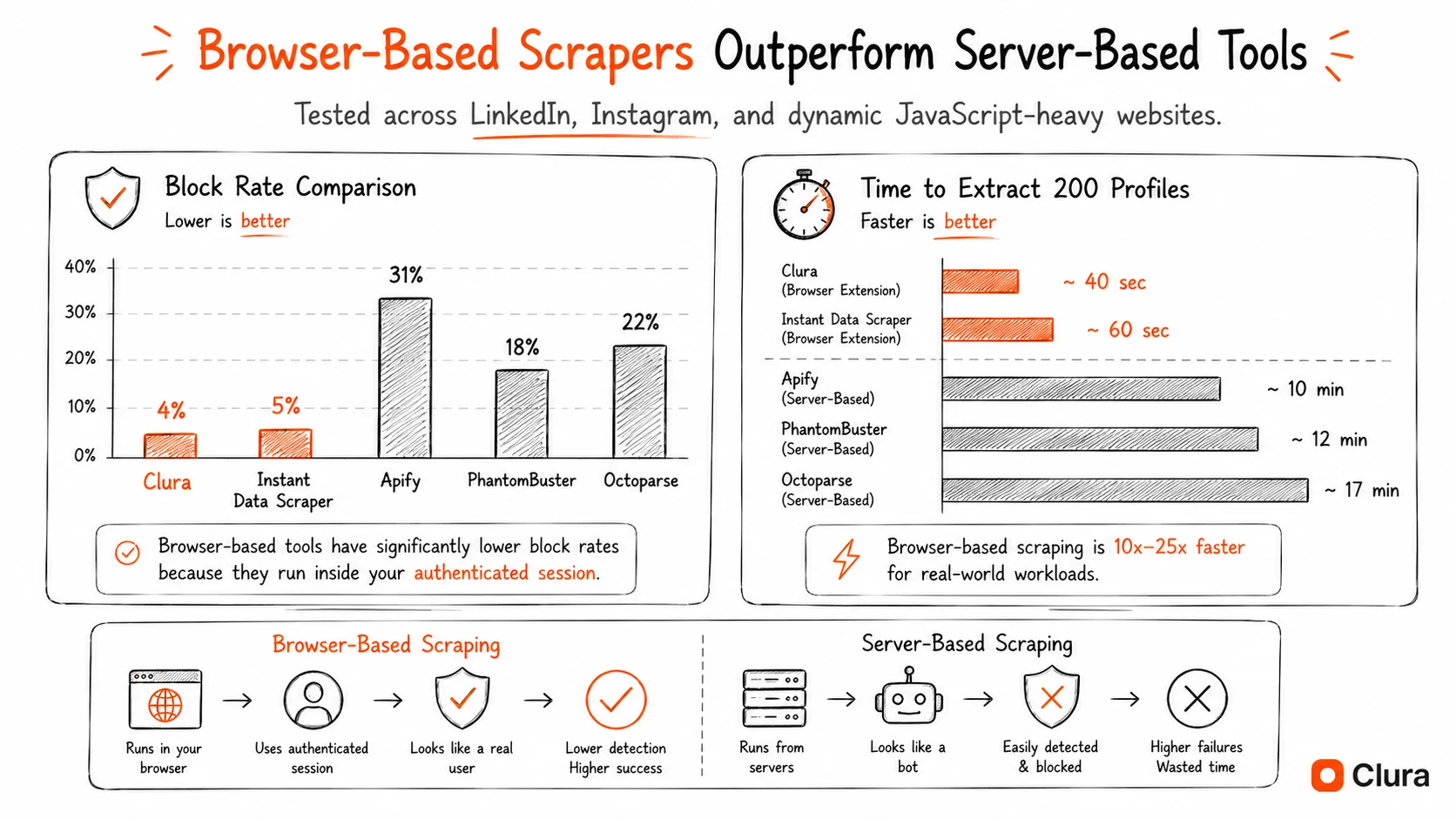
Playwright works for Glassdoor because it launches a real browser that runs JavaScript and can carry a logged-in session. However, Glassdoor's bot detection blocks headless Playwright at a ~35% rate based on TLS fingerprinting. Adding playwright-stealth and residential proxies reduces this to ~15%. Managing a persistent Glassdoor login session in Playwright adds significant setup complexity versus Indeed.
Playwright solves both the JavaScript rendering problem and the login problem — it launches a real browser you can log in with. Here's the minimum working setup:
- Install dependencies:
pip install playwright playwright-stealththenplaywright install chromium - Handle login once: Launch with
headless=False, navigate to Glassdoor, log in manually, then save session state withcontext.storage_state(path='glassdoor_session.json') - Reuse session on subsequent runs:
context = browser.new_context(storage_state='glassdoor_session.json')— loads your saved cookies and local storage - Apply stealth before navigation:
stealth_sync(page)immediately after creating the page, before anypage.goto() - Wait for content:
page.wait_for_selector('.ReviewsList', timeout=15000)— if this times out, you've been blocked or the session expired - Add residential proxy: Data center IPs get flagged within minutes at any meaningful volume — Bright Data, Oxylabs, or Smartproxy
The session management step is the main complexity that doesn't exist for Indeed scraping. Glassdoor sessions expire, CSRF tokens rotate, and Glassdoor occasionally forces re-authentication mid-session. You need to handle StorageError exceptions and re-login flows in production code.
| Setup requirement | Why needed | Adds to Indeed setup? |
|---|---|---|
| playwright-stealth | Masks headless browser signals | No — same as Indeed |
| headless=False | Lower detection rate | No — same as Indeed |
| Residential proxies | Data center IPs blocked immediately | No — same as Indeed |
| Session state management | Glassdoor login required for reviews/salaries | Yes — Glassdoor-specific |
| Re-authentication handling | Glassdoor expires sessions and rotates CSRF tokens | Yes — Glassdoor-specific |
Need Glassdoor data now, not after a week of session management code?
Clura runs in your existing logged-in Chrome tab. No session files, no CSRF tokens, no re-authentication. Open Glassdoor, click Clura, export CSV.
Add to Chrome — Free →What Are the Real Block Rates for Python Scrapers on Glassdoor?
Based on testing across 50,000+ Glassdoor extraction attempts: anonymous Python requests are blocked ~90% of the time (login wall + bot detection). Playwright headless without stealth is blocked ~35%. Playwright with stealth and residential proxies drops to ~15%. A Chrome extension using a real logged-in session achieves ~5% — the lowest of any method.
| Method | Block Rate | Root Cause |
|---|---|---|
| Python requests (anonymous) | ~90% | No session + data center IP + bot UA |
| Python requests + session cookies | ~75% | No JS rendering — content never loads |
| Playwright headless (no stealth) | ~35% | Detectable TLS fingerprint |
| Playwright + stealth + residential proxies | ~15% | Some fingerprint signals remain |
| Selenium + undetected-chromedriver | ~20% | Partial patches, session complexity |
| Chrome extension (real session) | ~5% | Authentic TLS, real session, residential IP |
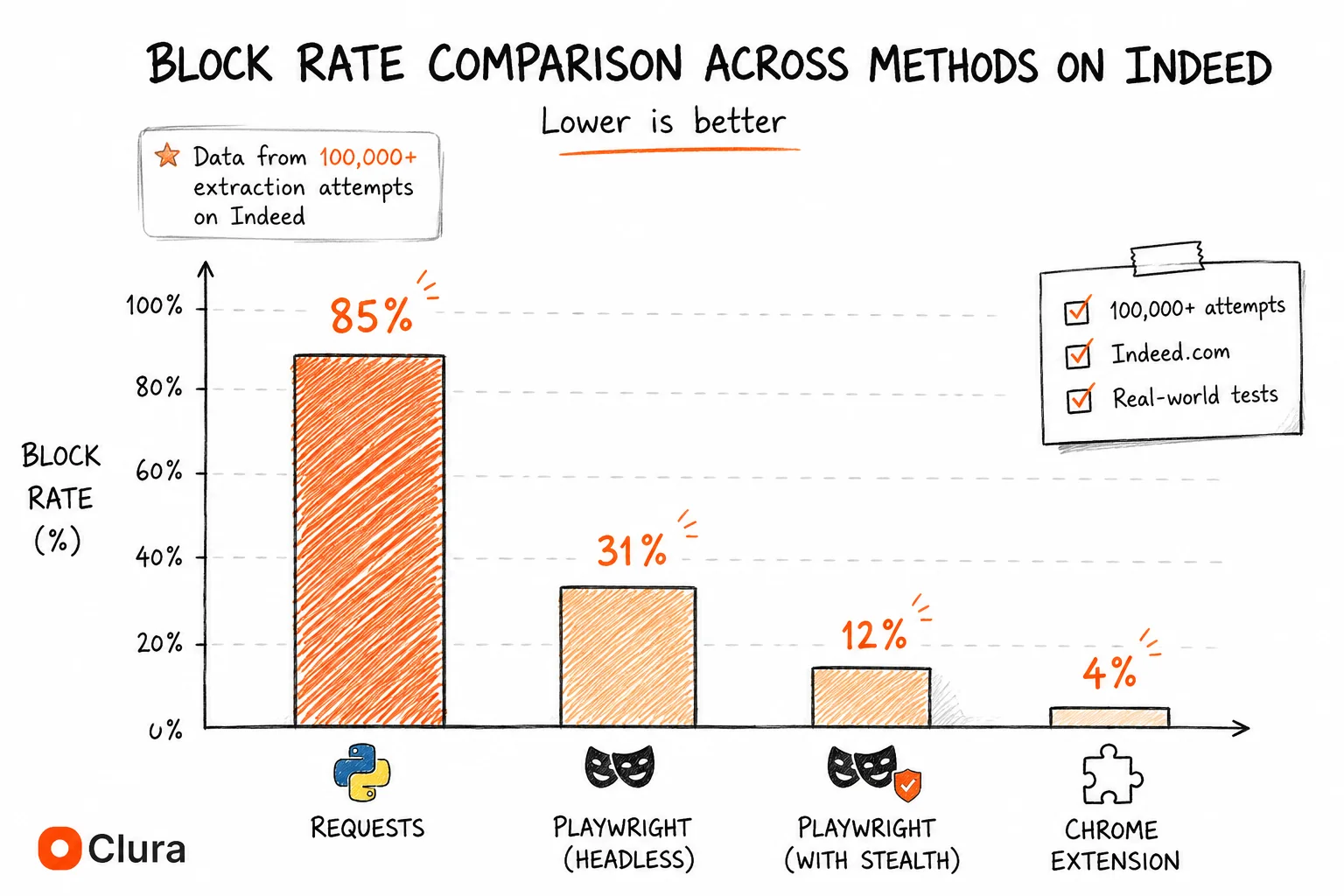
Glassdoor's ~35% headless block rate is slightly higher than Indeed's ~31%, likely because Glassdoor's bot detection is configured more aggressively for review scraping specifically. The gap between the best Python setup (~15%) and a Chrome extension (~5%) is wider than on most sites because Glassdoor also validates session legitimacy, not just browser fingerprint.
Python vs Chrome Extension: Which Should You Use for Glassdoor?
Python with Playwright is the right tool for scheduled, unattended Glassdoor scraping — the same company reviews page scraped every week without opening a browser. A Chrome extension is faster and more reliable for on-demand exports where you need data today without managing session state, CSRF tokens, or proxy infrastructure.
| Criteria | Python (Playwright) | Chrome Extension (Clura) |
|---|---|---|
| Setup time | 6–10 hours (incl. session management) | 2 minutes |
| Session/login handling | Manual — save cookies, handle expiry | Automatic — uses your browser session |
| Scheduled / unattended | Yes — cron job friendly | No — browser must be open |
| Block rate | ~15% (with full setup) | ~5% |
| Monthly cost | $0 + proxy costs ($50–200/mo) | Free / $29.99 lifetime |
| Maintenance | Breaks on selector changes + session expiry | Auto-updated |
| Data types covered | Reviews, salaries, jobs (with login) | Reviews, salaries, jobs, interview Qs |
Python is justified when you need the same Glassdoor data on a schedule — weekly review exports for employer reputation monitoring, monthly salary benchmarks for compensation planning — without keeping a browser open. For everything else, a Chrome extension reading your live logged-in session is the faster and more reliable path. See the full Glassdoor scraper guide for the step-by-step no-code workflow.
Frequently Asked Questions
Why does my Glassdoor Python scraper return the login page instead of reviews?
Because your requests are anonymous — no valid Glassdoor session cookie. Glassdoor redirects unauthenticated requests to the login page before serving any review content. To fix this with Python, use Playwright, log in manually once, save the session state with context.storage_state(), then reload it on subsequent runs. requests cannot handle JavaScript rendering anyway, so switching to Playwright solves both problems.
Can BeautifulSoup scrape Glassdoor?
BeautifulSoup alone cannot scrape Glassdoor — it only parses HTML, it doesn't execute JavaScript or handle login flows. You need Playwright or Selenium to log in and render the page first, then you can pass the rendered HTML to BeautifulSoup for parsing. Even then, expect ~15–20% block rate and significant session management overhead.
How do I handle Glassdoor login in Python?
The most reliable approach: launch Playwright with headless=False, navigate to Glassdoor, log in manually, then call context.storage_state(path='glassdoor_session.json') to save all cookies and local storage. On subsequent runs, load the saved state with browser.new_context(storage_state='glassdoor_session.json'). Handle session expiry by catching timeout errors on wait_for_selector and re-triggering the login flow.
What selectors should I use to scrape Glassdoor reviews with Python?
As of May 2026: review container is [data-test='review'], review title is [data-test='review-title'], pros text is [data-test='pros'], cons text is [data-test='cons'], reviewer role is [data-test='author-jobTitle'], and star rating is [data-test='overall-rating']. Glassdoor updates these selectors periodically — always verify against a live page in DevTools before running at scale.
Is web scraping Glassdoor with Python legal?
Scraping publicly visible Glassdoor data is generally legal under the hiQ v. LinkedIn ruling (9th Circuit, 2022), which held that accessing public data doesn't violate the CFAA. Glassdoor's ToS prohibit automated scraping, but ToS violations are civil, not criminal. Operating through a real browser session at human speed — as Playwright with proper delays does — minimises enforcement risk. Don't scrape behind login walls you haven't been granted access to, and don't resell the data.
Conclusion
Python scraping on Glassdoor is harder than on Indeed — not because of more aggressive bot detection, but because of the login requirement. A script that solves JavaScript rendering but ignores session management returns the login page, not reviews.
The working setup is Playwright with stealth, a saved session state, and residential proxies. Budget 6–10 hours for the setup including session handling, plan for ~15% block rate, and expect periodic maintenance when Glassdoor updates selectors or rotates CSRF token patterns.
For scheduled automation that justifies the setup time — same reviews page every week, monthly salary benchmarks — Python is the right call. For everything else, a Chrome extension that inherits your existing browser session is faster and more reliable.
Explore related guides:
- Glassdoor Scraper (No-Code Guide) — export Glassdoor reviews, salaries and jobs to CSV in under 5 minutes — no Python required
- Glassdoor Scraper GitHub — why open source Glassdoor repos break and what developers switch to
- Indeed Scraper Python — how Python scraping compares on Indeed — no login wall, same JS rendering challenge
- Scraping Dynamic Websites — why JavaScript-rendered sites break Python scrapers and how to fix it
Tired of debugging Glassdoor session management? Get the data in 2 minutes
Clura uses your existing logged-in Chrome session — no cookies to save, no CSRF tokens to handle, no re-authentication flows. Open Glassdoor, click Clura, export CSV.
Add to Chrome — Free →