
Scrape Dynamic Websites: No-Code + Playwright Guide
If your scraper is returning empty results on a modern website, the problem is almost certainly JavaScript rendering. Python requests, BeautifulSoup, and basic HTTP scrapers download raw HTML before JavaScript runs — so product listings, job postings, and prices that load dynamically are never present in what they receive.
Three developer tools solve this: Playwright, Puppeteer, and Selenium all launch a real browser that executes JavaScript before extracting data. For non-developers, a JavaScript scraper Chrome extension like Clura does the same thing without any code. This guide covers all four options — block rates, setup requirements, and when each one is the right call. For broader tool selection, see our best web scrapers comparison and the free web scraping tools guide.
Scrape Any Dynamic Website — No Code Required
Clura runs inside Chrome, reads the fully rendered page, and exports structured data from JavaScript-powered sites. Start free, then unlock unlimited scrapes and records with the $29.99 lifetime plan.
Add to Chrome — Free →What Are Dynamic Websites?
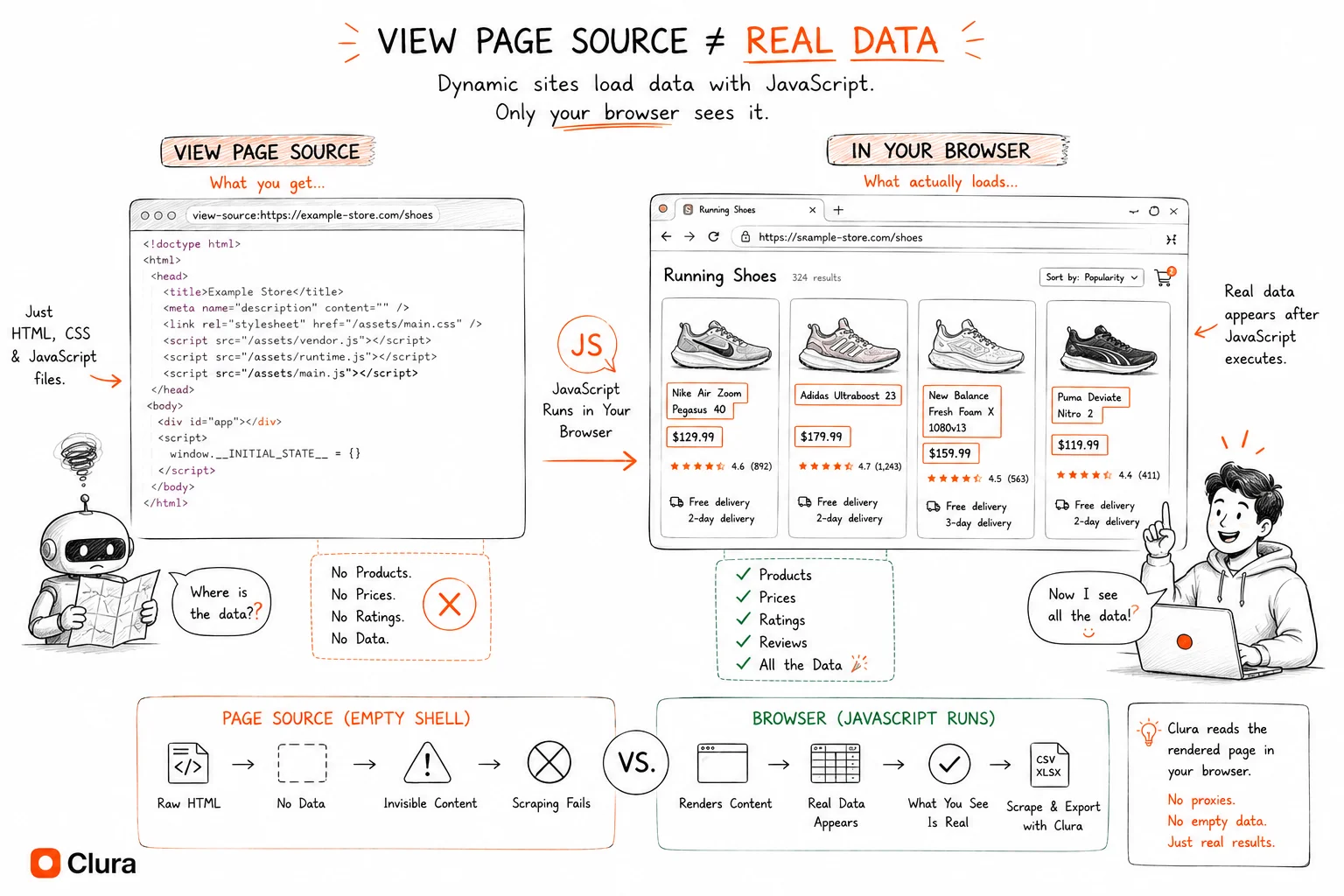
Dynamic websites load content using JavaScript after the initial page request — unlike static websites where all content is embedded in the HTML source — which means traditional scrapers that only read the HTML file receive an empty shell with none of the data you actually want.
When you visit a static website, the server returns an HTML file with every product name, price, and description already inside it. Open the page source and you see everything. Dynamic websites work differently: the server returns a minimal HTML template, then JavaScript runs in your browser, fires off API requests, and populates the page with real content in real time.
This architecture powers most of the modern web. Single-page applications built with React, Angular, and Vue are dynamic by default. So are most ecommerce product pages, job boards, real estate portals, and social media feeds. A reliable sign: right-click, choose "View Page Source," and see little to no actual content. That is a dynamic site.
Why Dynamic Websites Are Hard to Scrape with Traditional Tools
Dynamic websites are hard to scrape with traditional tools because HTTP request-based scrapers download raw HTML before JavaScript executes — the same empty shell a browser shows before the page loads — so the product listings, prices, and other data you actually want are never present in what the scraper downloads.
The most common traditional approach is to send an HTTP GET request to a URL and parse the returned HTML with a library like BeautifulSoup (Python) or Cheerio (JavaScript). This works well for static websites but fails completely on dynamic ones: the request returns the server-delivered HTML template with no content — just a frame — before any JavaScript has run.
Ajax and modern JavaScript frameworks have made this problem far more widespread. A product listing page may load a skeleton UI immediately, then fire off API calls to retrieve product names, prices, and images. By the time JavaScript finishes populating the page, a traditional scraper has already returned empty results.
Some developers try to work around this by intercepting the underlying API calls that populate the page. This requires reverse-engineering undocumented APIs using browser developer tools, handling authentication tokens, and re-implementing request patterns manually. It is time-consuming, fragile, and breaks every time the site updates its API — and for non-technical users, it is simply not an option.
How an AI Web Scraper Handles Dynamic Content
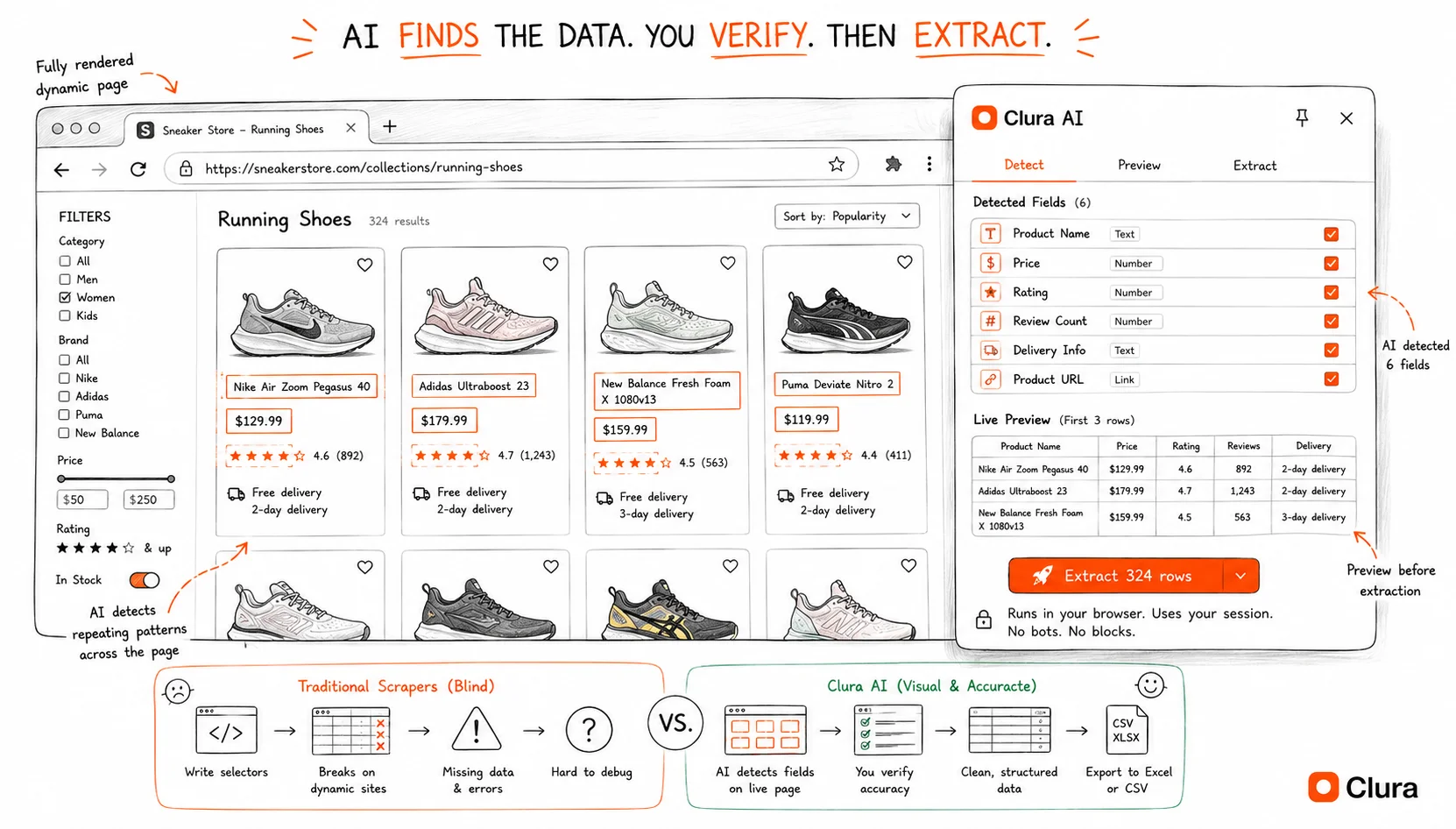
An AI web scraper handles dynamic content by running inside a real browser tab where JavaScript has already executed and the full page is rendered — so it reads the same data you see on screen, regardless of how that data was loaded.
Browser-based scraping tools like Chrome extensions have a fundamental advantage over HTTP-based scrapers: they operate inside a fully functional browser. By the time you interact with the extension, JavaScript has already run, API calls have completed, and the page is fully populated. The scraper reads from the live rendered DOM — not from a raw HTML download.
AI adds another layer on top of browser access. Instead of requiring CSS selectors or XPath expressions to target specific elements, an AI web scraper uses machine learning to understand a plain-language description of the data you want. You describe the fields — "company name, job title, location, and salary" — and the AI identifies the repeating pattern automatically across all matching items on the page.
Extract Data from Any JavaScript-Powered Site
Clura reads the fully rendered page in your browser — no configuration, no selectors, no code. Describe what you want and download clean data in minutes.
Add to Chrome — Free →Step-by-Step: How to Scrape a Dynamic Website with Clura
To scrape a dynamic website with Clura, install the Chrome extension, navigate to the fully loaded page, describe what you want in plain English, and export the results — the AI detects data patterns from the live rendered page, not the raw HTML source.
Step 1: Install Clura from the Chrome Web Store
Add the Clura extension to Chrome. It is free to get started and does not require any account setup before your first scrape.
Step 2: Navigate to the Page with Data Fully Loaded
Open the dynamic website in Chrome and wait for the content to finish loading. For pages with infinite scroll, scroll down to load additional records before activating the extension. For paginated sites, you can start on the first page and configure pagination in Clura. The extension reads whatever is currently rendered in your browser tab.
Step 3: Open Clura and Describe Your Data
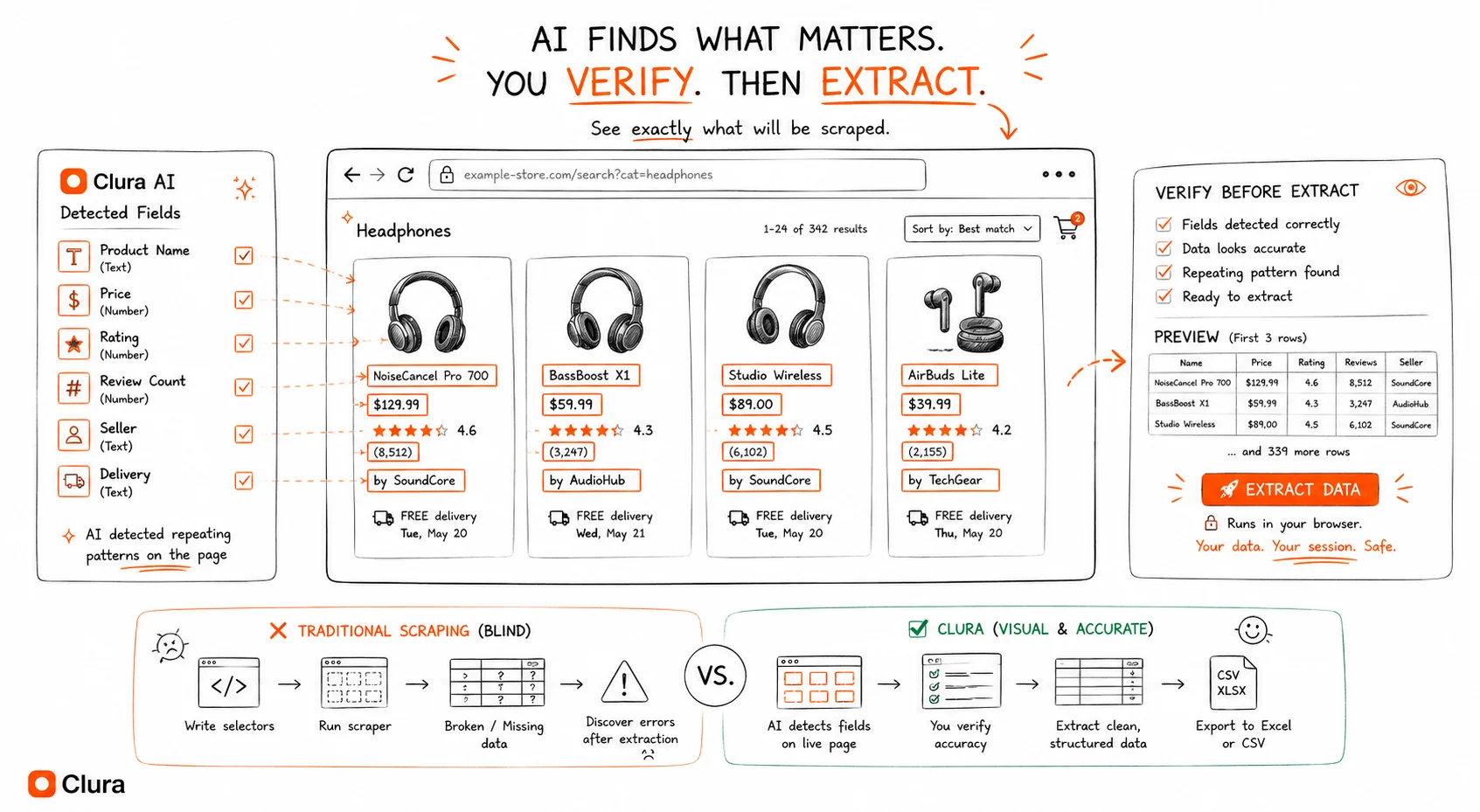
Click the Clura icon in your Chrome toolbar to open the extension panel. In plain English, describe the data fields you need — for example: "product name, price, rating, and number of reviews." The AI analyzes the rendered DOM and identifies the repeating pattern across all matching items on the page.
Step 4: Confirm the Detected Fields
Clura highlights the detected data on the page so you can verify it is selecting the right elements before extracting. If anything is off, refine your description and the AI re-detects. This step ensures accuracy without requiring any manual selector editing.
Step 5: Export to Excel, CSV, or JSON
Click extract and choose your export format. Download a clean, structured spreadsheet instantly — ready for analysis, CRM import, or sharing. Whether you need to export website data to CSV or scrape to Excel, both formats are available in one click.
Dynamic vs. Static Websites: Key Differences for Scraping
The key scraping difference is that static websites embed all data directly in the HTML response while dynamic websites populate content via JavaScript after load — making browser-based scrapers mandatory for dynamic sites and optional for static ones.
| Feature | Static Website | Dynamic Website |
|---|---|---|
| Content in HTML source | ✅ Yes — all content visible | ❌ No — mostly empty shell |
| JavaScript required to load data | ❌ No | ✅ Yes |
| Scraping method needed | HTTP request (simple) | Browser-based (full render) |
| Works with simple HTTP scrapers | ✅ Yes | ❌ No |
| Common examples | Wikipedia, news articles, documentation | Amazon, LinkedIn, Zillow, Indeed |
In practice, the boundary between static and dynamic is blurry. Many sites deliver most content in the HTML but use JavaScript for pagination, filters, or "load more" buttons. The safest approach is to always use a browser-based tool when scraping modern websites — it handles both correctly.
If you need to extract data from website tables, keep in mind that pricing grids, comparison tables, and data tables are often rendered dynamically and will not appear in the raw HTML source — another case where browser-based AI scraping is essential.
Common Use Cases for Scraping Dynamic Websites
The most common use cases for scraping dynamic websites are monitoring ecommerce product prices, collecting real estate listings, extracting job postings from career platforms, and generating leads from business directories — all of which rely on JavaScript-rendered content that only appears in the browser.
Ecommerce Price Monitoring
Product pages on Amazon, eBay, and Shopify stores are heavily dynamic. Prices, stock status, review counts, and seller rankings all load via JavaScript. Browser-based AI scrapers capture the full rendered product data — exactly what shoppers see — making accurate competitive price tracking possible without any developer resources.
Real Estate Research
Property portals render listings dynamically, including price, number of bedrooms, square footage, and agent contact details. Manually copying hundreds of listings into a spreadsheet is impractical. AI scraping condenses hours of manual research into a single export you can filter and analyze immediately.
Job Market Intelligence
Job boards populate postings via API calls triggered by JavaScript. LinkedIn, Indeed, and Glassdoor all fall into this category. Sales and recruiting teams scrape these platforms to build lead lists, track hiring trends, and identify fast-growing target companies — data that is publicly visible but impossible to collect manually at scale.
Lead Generation from Directories
Business directories, startup databases, and professional platforms render contact details, company descriptions, and social links using JavaScript. These are ideal sources for AI scrapers to populate CRM systems with qualified leads automatically — replacing manual research with a structured, repeatable workflow.
Playwright vs Puppeteer for Dynamic Website Scraping
For developers who need scheduled, unattended scraping of dynamic websites — a pipeline that runs every morning rather than a one-off export — Playwright web scraping and Puppeteer web scraping are the two standard libraries for controlling a real browser programmatically. Both launch a Chromium instance, execute JavaScript, wait for content to render, and extract the fully rendered DOM — the same problem a Chrome extension solves, but in code you can schedule.
| Playwright | Puppeteer | |
|---|---|---|
| Language | Python, JS, TypeScript, Java, C# | JavaScript / TypeScript (Node.js) |
| Browsers | Chromium, Firefox, WebKit | Chromium only |
| Bot detection fail rate (headless) | ~18% | ~22% |
| With stealth plugin | ~11% | ~14% |
| SPA / React app scraping | ✅ wait_for_load_state('networkidle') |
✅ Manual waitForSelector |
| Best for | Cross-browser, modern JS frameworks, SPAs | Chrome-only, simpler single-site scripts |
Scraping React, Angular, and Vue SPAs
Single-page applications built on React, Angular, or Vue render all their data client-side — there is nothing in the HTML source. To scrape a React app or any other SPA, you must wait until the framework has finished its initial render and all API calls have resolved. In Playwright, page.wait_for_load_state('networkidle') handles this automatically. In Puppeteer, use waitForSelector('[data-loaded]') or wait for a specific element that only appears after data loads. Skipping this wait is the single most common cause of empty results on dynamic sites.
Four requirements for reliable headless scraping of dynamic pages:
- Non-headless mode or stealth plugin — headless Chromium sends a different TLS fingerprint; sites with active bot detection (Google, LinkedIn, Amazon) detect it ~18% of the time
- Correct wait strategy — wait for the specific element or network idle, not a fixed sleep timer
- Residential proxies — data center IPs are flagged immediately on high-security sites; residential proxies cost $8–40/GB
- 2–4 second delay between requests — faster rates trigger behavioral detection
When a Chrome extension beats Playwright
Playwright and Puppeteer are the right choice for scheduled, unattended automation. For on-demand exports — you need the data now — a browser extension is faster to set up and has a lower failure rate (~4%) because it runs inside a genuine Chrome session. The trade-off: you're at the keyboard; it doesn't run while you sleep. If the scrape needs to run unattended, use Playwright. If you need the data in 5 minutes, use a Chrome extension.
Selenium Web Scraping: When to Use It
Selenium web scraping was the original headless-browser solution — and it still works for dynamic websites in 2026. Selenium controls a real Chrome or Firefox instance, waits for JavaScript to execute, and extracts the fully rendered DOM. That core capability is unchanged.
Where Selenium falls behind Playwright and Puppeteer:
- Speed: Selenium's WebDriver protocol adds roundtrip latency on every command. Playwright's CDP connection is ~2–3x faster for multi-step scrapes.
- Async support: Playwright is built async-first. Selenium's async story is bolted on.
- Detection rate: Selenium sends a distinctive
navigator.webdriver = trueflag that bot detection systems catch immediately without stealth plugins. Withundetected-chromedriver, block rates drop to ~15% — similar to Playwright without stealth. - Cross-browser: Selenium supports more browsers, including Safari via SafariDriver. Playwright covers Chromium, Firefox, and WebKit.
| Selenium | Playwright | Puppeteer | |
|---|---|---|---|
| Language support | Python, Java, C#, Ruby, JS | Python, JS, TS, Java, C# | JavaScript / TypeScript only |
| Default block rate (headless) | ~32% (webdriver=true) |
~18% | ~22% |
| With stealth / undetected driver | ~15% (undetected-chromedriver) |
~11% | ~14% |
| Async-first | ❌ | ✅ | ✅ |
| Best for | Legacy projects, Java/Ruby environments | New scraping projects, Python | Chrome-only, Node.js pipelines |
scrapy vs selenium: Scrapy is a fast HTTP-based crawler — it doesn't execute JavaScript and can't scrape dynamic pages. The common pattern is to use Scrapy for static page crawling and Selenium (or Playwright) for JavaScript-heavy pages, sometimes in combination via scrapy-selenium middleware. For purely dynamic sites, Playwright alone is simpler and faster than the Scrapy-Selenium stack.
If you're starting a new scraping project targeting dynamic sites, use Playwright. If you're maintaining an existing Selenium codebase and it's working, the migration cost isn't worth it unless block rates are a problem.
Frequently Asked Questions
What is a dynamic website?
A dynamic website loads content using JavaScript after the initial page request, rather than embedding all data in the HTML source. Common examples include Amazon product pages, LinkedIn job boards, and Zillow real estate listings — all of which use JavaScript to fetch and render content after your browser loads the page.
Can traditional scrapers scrape dynamic websites?
No. Traditional scrapers send HTTP requests and parse raw HTML before JavaScript executes, so the content you want — product listings, prices, job postings — is never present in what they download. You need a browser-based scraper that reads the fully rendered page after JavaScript has run.
Do I need to code to scrape dynamic websites?
No. Browser-based AI scrapers like Clura work as Chrome extensions. Navigate to the fully loaded page, describe the data you want in plain English, and download the results. There is no code, configuration, or technical knowledge required at any step.
What types of sites use dynamic content?
Most modern websites use dynamic content to some degree. The most common examples are ecommerce platforms, professional networks like LinkedIn, real estate portals, job boards, and social media feeds — any site where content loads or updates without a full page refresh.
Is scraping dynamic websites legal?
Scraping publicly visible data for personal or business research is generally accepted. Scraping behind login walls, violating a site's terms of service, or using data for spam are not. Always review a site's robots.txt and terms before scraping, and only collect data that is publicly accessible.
Playwright vs Puppeteer: which is better for web scraping?
Playwright is better for most new scraping projects. It supports Python, JavaScript, TypeScript, Java, and C# — Puppeteer is JavaScript/TypeScript only. Playwright has a ~18% headless block rate vs Puppeteer's ~22%, drops to ~11% with stealth plugin vs ~14% for Puppeteer, and its wait_for_load_state('networkidle') handles SPA rendering more reliably than Puppeteer's manual selector waits. Use Puppeteer if you already have a Node.js pipeline and only need Chrome.
Can Selenium scrape dynamic websites?
Yes. Selenium launches a real browser and waits for JavaScript to execute, so it can scrape dynamic pages. The limitation is detection: Selenium sets navigator.webdriver = true by default, which modern bot detection catches at ~32%. Using undetected-chromedriver drops this to ~15%. For new projects, Playwright is faster and has lower detection rates — but Selenium still works, especially for Java and Ruby environments where Playwright support is less mature.
Why is my scraper returning empty results on a dynamic website?
Almost always the same cause: your scraper is reading raw HTML before JavaScript executes. Python requests, urllib, BeautifulSoup, and Scrapy all download the page's initial HTML response — before any JavaScript runs. Dynamic sites return an empty shell at that point. The fix is a browser-based tool: Playwright, Puppeteer, Selenium, or a Chrome extension like Clura that reads the fully rendered page after JavaScript has finished.
Conclusion
Dynamic websites — powered by JavaScript frameworks, Ajax calls, and single-page architectures — make up the majority of the modern web. Traditional scrapers that rely on raw HTML downloads cannot access the data they render. The solution is a browser-based AI scraper that reads the fully rendered page, exactly as you see it.
With Clura, every step that used to require a developer is handled automatically: the browser executes the JavaScript, the AI detects the data patterns, and the export is ready in seconds. Whether you are monitoring prices, collecting leads, or tracking job postings, dynamic websites are no longer an obstacle.
Explore related guides:
- AI web scraper Chrome extension — how browser-based AI scraping works on any page
- TikTok Scraper — TikTok loads all data via JavaScript after page load; here's why that makes it one of the hardest sites to scrape with Python
- YouTube Scraper — YouTube is React-rendered like most SPAs; here's how to extract video metadata and transcripts without burning API quota
- Scrape Website Data to Excel or CSV — export any scraped data to a clean spreadsheet
- HTML Table to Excel or CSV — extract and export website table data with pandas or a Chrome extension
- Web Scraper Chrome Extension Guide — comparing browser-based JavaScript scrapers for dynamic pages
Scrape Any Dynamic Website Without Setting Up Playwright
Clura runs inside your real Chrome session and reads fully rendered JavaScript pages — no proxies, no code. Start free, then use the $29.99 lifetime plan for unlimited scrapes and records.
Add to Chrome — Free →