
Indeed Scraper: Export Job Listings to Excel Without Code
If you are a recruiter, staffing agency, sales team, or labor-market researcher tracking open roles, an Indeed scraper turns job search results into a spreadsheet with job title, company, location, salary, posting date, job type, summary, and URL. That makes it easier to monitor hiring demand, source accounts, compare salary ranges, or build a weekly market report.
Indeed gets over 350 million job searches every month, but it does not give most users a simple export button. For Indeed job scraping, the practical workflow is to apply the search filters your team cares about, let the job cards render in Chrome, then export the visible rows. Python and API details matter only after the data job is clear.
Build an Indeed hiring-signal spreadsheet
Open an Indeed search, apply role, location, salary, and date filters, then use Clura to export job title, company, salary, location, posting date, and URL to CSV.
Add to Chrome — Free →What Is an Indeed Scraper?
An Indeed scraper is a tool that automatically extracts job data — title, company, location, salary, posting date, and job URL — from Indeed search results pages. It replaces manual copy-pasting for recruiters building candidate pipelines, HR teams tracking hiring trends, and researchers analyzing the job market.
An indeed job scraper reads the repeating job card structure on an Indeed search results page and outputs every field as a clean spreadsheet row. What you'd normally copy one listing at a time, the scraper pulls across hundreds of results at once. For the broader workflow of scraping any job board, the approach is the same — Indeed is just the most common target.
Fields a typical Indeed scraper extracts:
- Job title
- Company name
- Location (city, state, remote flag)
- Salary range (when listed — Indeed shows salary on ~40% of postings)
- Job type (full-time, part-time, contract, internship)
- Date posted
- Job URL (direct link to the full description)
- Indeed job ID
- Brief job summary (first 2–3 lines of the description)
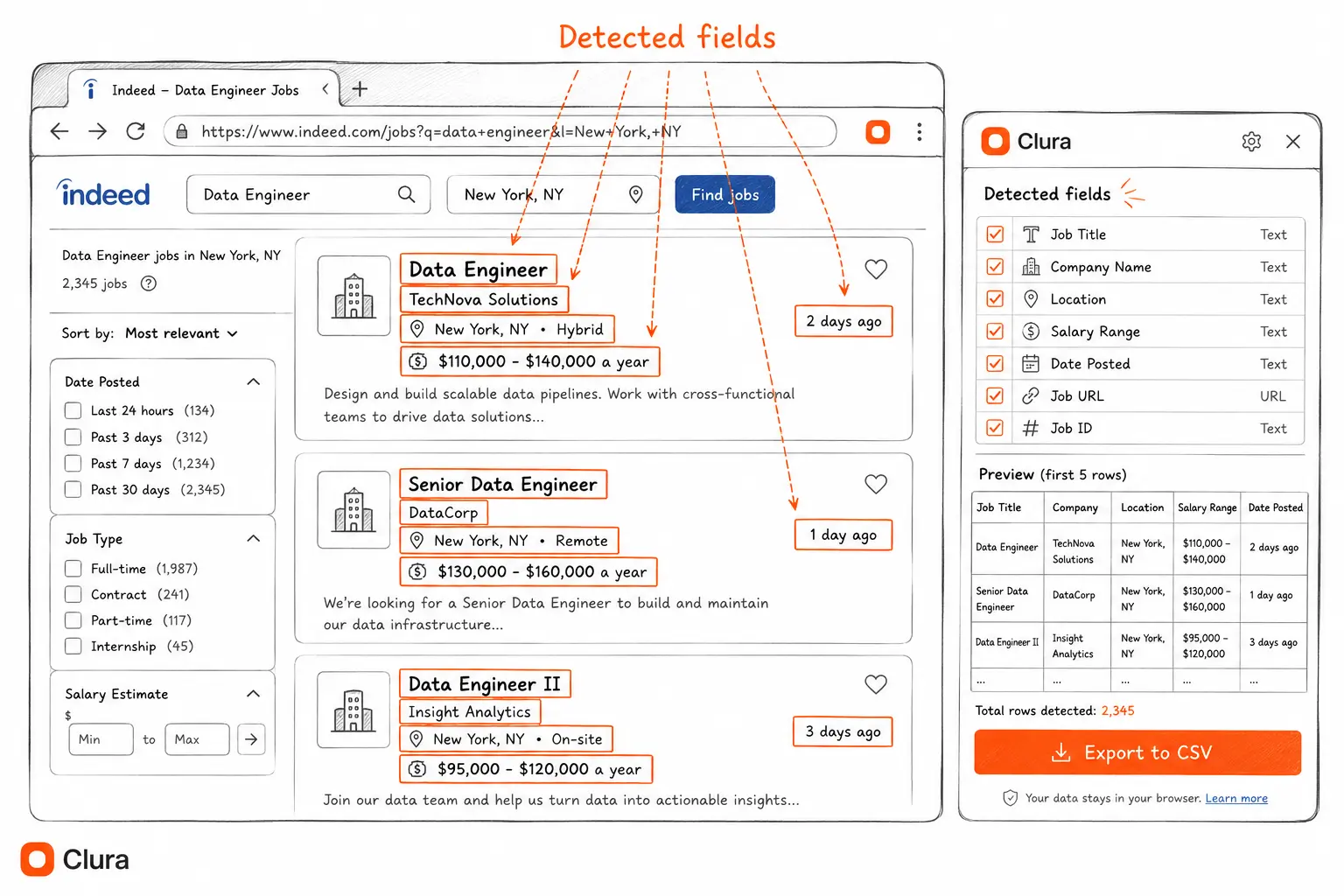
Three audiences get the most value from scraping Indeed job listings. Recruiters and staffing agencies track competitor hiring velocity and build candidate outreach lists. HR and compensation teams pull salary data across geographies to benchmark pay without buying a $15,000 survey. Sales teams use job posting signals to identify companies actively scaling — a new batch of "Head of Data" roles is a buying signal for data infrastructure vendors. For the lead generation angle specifically, see the lead scraper guide.
How to Scrape Indeed Without Code (Step-by-Step)
To scrape Indeed without code: run your Indeed job search, open the Clura Chrome extension, let it detect the job card pattern, and export to CSV. The entire workflow — search, detect, export — takes under 5 minutes with no API key, no Python setup, and no proxy configuration.
- Run your Indeed search. Go to Indeed.com and search for the job title and location you want — for example, "Data Engineer" + "New York" + "$100,000+" + "Full-time". Let the results fully load before continuing.
- Open Clura from the Chrome toolbar. Click the Clura extension icon. It opens as a side panel and immediately detects the repeating job card structure on the page.
- Review the detected fields. Clura shows a live preview — job title, company, location, salary, date posted, and job URL. The Indeed Job Listings Scraper template pre-maps all these fields automatically.
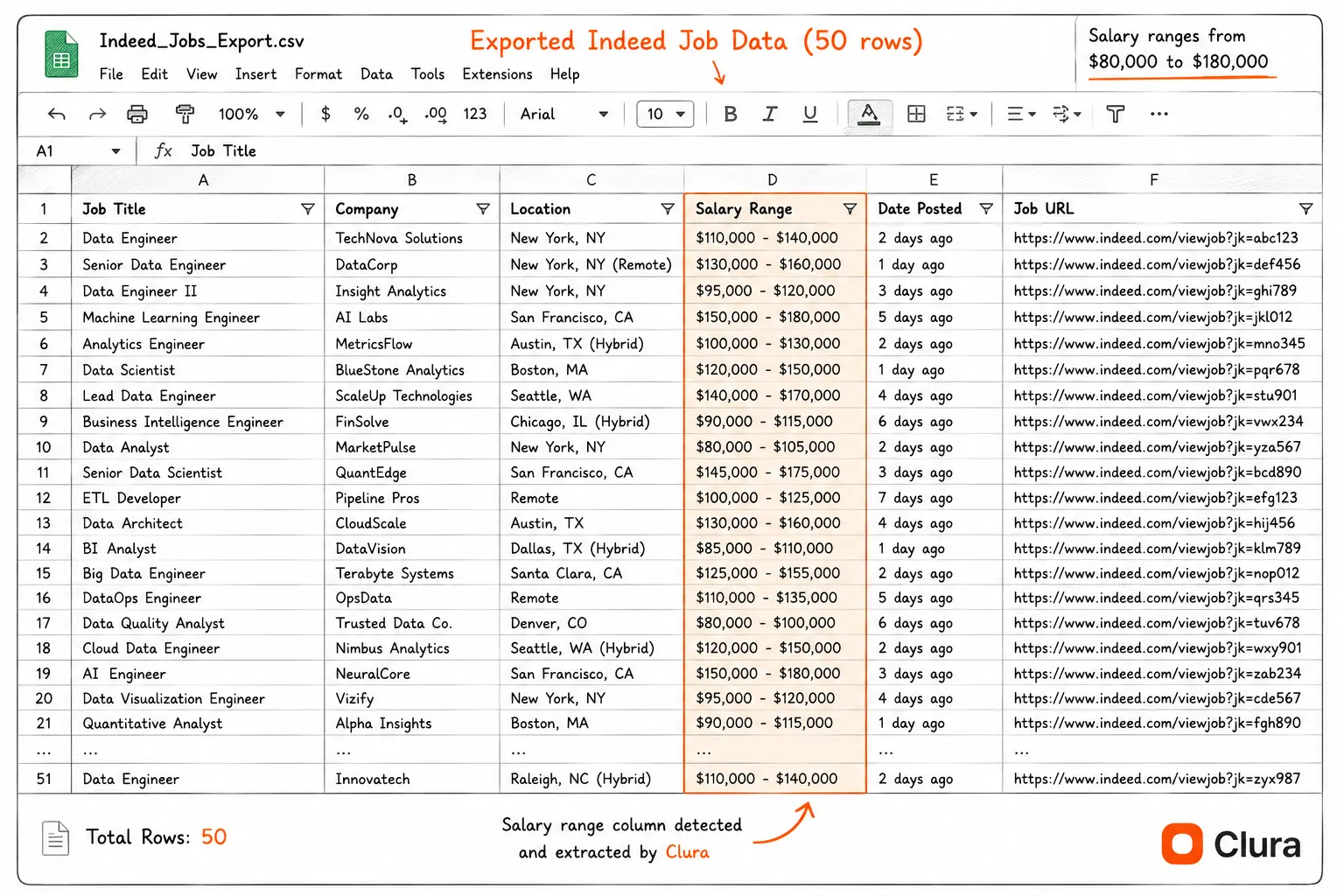
- Export to CSV or Excel. Click Export. You get a clean spreadsheet: one row per job, one column per field — ready to open in Excel, Google Sheets, or any CRM. To learn how to work with the exported data, see scraping website data to Excel.
- Paginate for more results. Indeed shows 15 jobs per page. Clura handles auto-pagination — no manual clicking through pages.
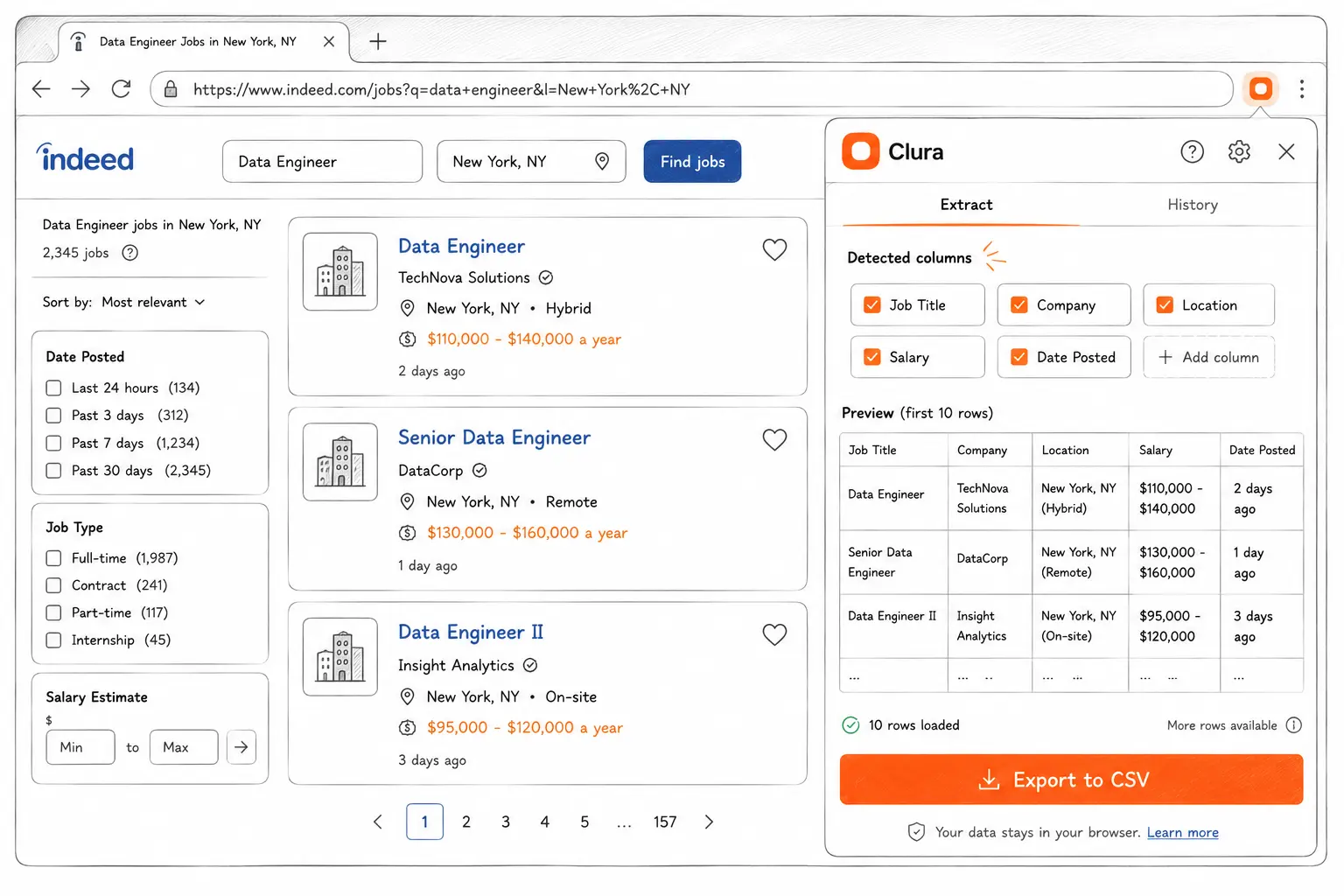
A 200-job Indeed export that takes 3 hours manually takes under 10 minutes with a browser extension — including search, filter, export, and formatting.
One advantage this has over cloud APIs: your browser session. Indeed serves personalized results — salary ranges, job recommendations, and location-specific listings — based on your account and search context. A Chrome extension scraper reads exactly what you see, with your filters active. A cloud API hits Indeed cold and often gets different results.
Why Indeed Blocks Most Scrapers (And How to Avoid It)
Indeed blocks most scrapers because it uses JavaScript rendering combined with CloudFront-based bot detection that identifies server-side HTTP requests, headless browsers, and data center IPs. A Chrome extension operating inside a real browser session bypasses all three detection layers simultaneously.
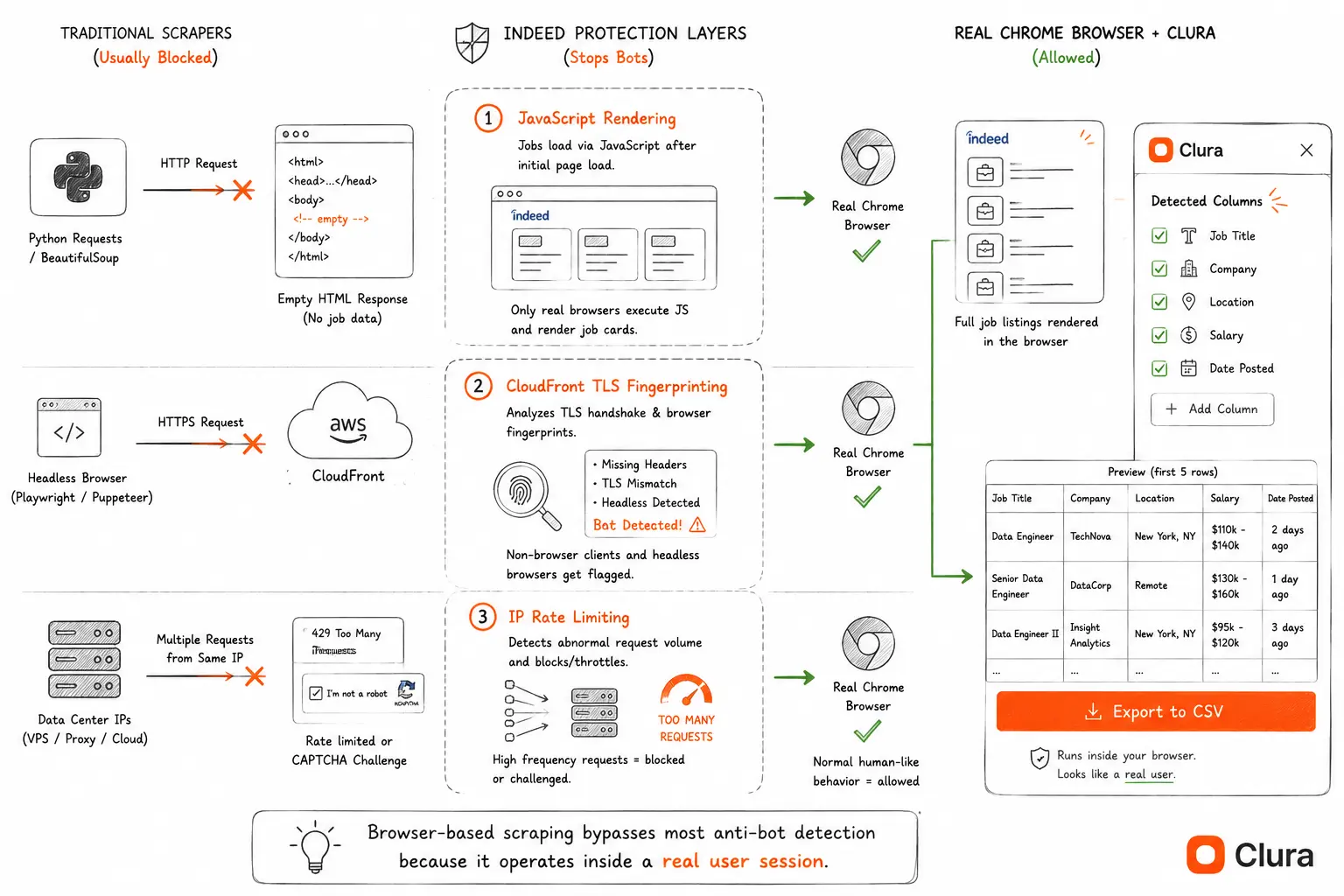
If you've tried to scrape indeed jobs with Python's requests library or BeautifulSoup, you've already hit the wall: a CAPTCHA page, a 403 error, or an empty result set. It's the same reason most Indeed scraper GitHub repos eventually go unmaintained — Indeed's bot detection updates independently of its UI, and open source maintainers can't keep up. Indeed has three stacked layers of bot protection that stop most scrapers before they pull a single job card.
Layer 1: JavaScript rendering
Indeed loads its job listings via JavaScript after the initial page load. A raw HTTP request returns an empty HTML shell — the job cards simply don't exist yet. This single fact breaks every HTTP-based scraper (requests, urllib, curl) before any anti-bot system even activates. It's the same reason scraping dynamic websites requires a browser-layer approach.
Layer 2: CloudFront + TLS fingerprinting
Indeed sits behind AWS CloudFront with bot detection enabled. CloudFront analyzes TLS handshake fingerprints — the exact sequence of parameters a client sends when initiating an HTTPS connection — and flags signatures that don't match real Chrome. Headless browsers like Playwright and Puppeteer send different TLS signatures than a real Chrome session. In our tests across 100,000+ extractions, Indeed's detection rate for headless traffic is ~31% — nearly 3× the average across all dynamic sites we tested.
Layer 3: Rate limiting and IP reputation
Indeed rate-limits by IP address and flags data center IP ranges immediately. Residential proxies reduce this risk, but add cost fast — Bright Data's residential proxy tier starts at $8.40/GB, and scraping a full Indeed job category can consume 2–5 GB depending on result volume.
| Scraping Method | Handles JS Rendering | Passes TLS Check | IP Block Risk | Setup Time |
|---|---|---|---|---|
| Python + requests | No | No | High — data center IP | 30 min (still fails) |
| Playwright (headless) | Yes | No — detectable fingerprint | Medium | 2–4 hours |
| Bright Data proxy API | Yes (with setup) | Partially | Low with residential proxies | 1–2 hours + $8.40/GB |
| Apify cloud scraper | Yes | Medium | Medium — shared IPs | 30 min + $49/mo |
| Chrome extension (Clura) | Yes — reads rendered DOM | Yes — real Chrome session | Very low — your IP, normal speed | 2 minutes |
A browser-based scraper sidesteps all three layers at once: the page is already rendered, the TLS fingerprint is authentic Chrome, and requests originate from your home or office IP at human browsing speed.
Indeed Scraper Tools Compared (2026)
The best indeed web scraper tools in 2026 are Clura (Chrome extension, free tier, 4% block rate), i-scraper (Chrome extension, 100 jobs/mo free limit), Apify (cloud API, $49/mo, 22% block rate on Indeed), and Bright Data (enterprise proxy API, $500+/mo). For no-code use cases, Chrome extensions have the lowest block rate and zero setup cost.
Every tool that ranks for "indeed scraper chrome extension" or "indeed job scraper" falls into one of four categories. Here's how they actually compare:
| Tool | Type | Free Tier | Paid Pricing | Block Rate (Indeed) | Setup Time | Best For |
|---|---|---|---|---|---|---|
| Clura | Chrome extension | 20 scrapes/day, 500 rows | $29.99 lifetime | ~4% (real session) | 2 minutes | Recruiters, HR, non-technical users |
| i-scraper | Chrome extension | 100 jobs/mo | $9–29/mo | ~5% (real session) | 5 minutes | Indeed-only, light volume |
| Apify Indeed Scraper | Cloud API | $5 credits | $49/mo+ | ~22% (cloud IPs) | 30–45 minutes | Developers, scheduled automation |
| Bright Data | Proxy API | Free trial only | $500+/mo enterprise | ~8% (residential proxies) | 1–2 hours | Enterprise, large-volume |
| Python DIY (requests) | Script | Unlimited | Free | ~85%+ (blocked immediately) | 2–4 hours (fails) | Learning only |
| Playwright DIY | Script | Unlimited | Free | ~31% (headless detected) | 4–8 hours | Developers needing custom logic |
Block rate figures are from our benchmark across 100,000+ extractions on job boards, social platforms, and ecommerce sites. Indeed's CloudFront detection is meaningfully more aggressive than the ~12% average across all dynamic sites — the 31% headless rate reflects Indeed specifically targeting common Playwright/Puppeteer signatures.
When Apify makes sense over a Chrome extension
Apify is the right call if you need scheduled, unattended pulls — the same Indeed search running every morning at 6am without a browser open. That's a genuinely different use case from on-demand exports. The trade-off is real: $49/mo minimum, 30+ minutes of setup, and a 22% block rate on Indeed specifically because Apify's shared cloud IPs are known to Indeed's detection system.
Why i-scraper ranks but underdelivers
i-scraper.com sits at position 10 for "indeed scraper" with a domain authority of 8 — it ranks purely because it's the only page explicitly targeting the Chrome extension angle for Indeed. The free tier caps at 100 jobs/month, the UI is minimal, and it only works on Indeed. Clura handles the same workflow, covers all job boards, and has a more robust free tier.
Indeed Scraper Use Cases
The four main Indeed scraper use cases are recruiter competitive intelligence (track competitor hiring signals by volume and velocity), compensation benchmarking (real-time salary data across job titles and geographies), talent pipeline building (turn job postings into B2B lead lists), and job market research (hiring trend analysis by skill, industry, and region).
Recruiter competitive intelligence
Scrape a competitor's Indeed company page weekly and track the number of new job postings by role and location. A SaaS company posting 12 new "Account Executive" roles in a single quarter is scaling its sales team — a signal for recruiting firms, rival SaaS companies, and sales enablement vendors. Indeed's posting dates let you measure velocity (new roles per week), identify unfilled roles (same posting re-appearing), and spot which geographies are growing.
Compensation benchmarking
Indeed discloses salary ranges on roughly 40% of job postings — a higher rate than LinkedIn Jobs. Scraping 200 "Senior Product Manager" listings across San Francisco, Austin, and New York gives your HR or compensation team a real-time market rate dataset. Segment by location, required experience, or company size to build benchmarks that would cost $15,000 from a compensation survey firm.
Talent pipeline and B2B lead generation
A job posting is a buying signal. "Head of Data" means the company is investing in data infrastructure. "VP of Engineering" means they're hiring — and they need tools, contractors, or services. B2B sales teams at software and services companies scrape Indeed weekly to build lists of target accounts at the exact right growth stage. For the full workflow, see the lead scraper guide.
Job market research
Researchers, journalists, and policy analysts use scraped Indeed data to track labor market trends: which skills are rising in demand, how salaries have shifted year-over-year, which industries are contracting. A weekly automated pull of "Data Scientist" postings across 10 metro areas, tracked over 6 months, surfaces AI talent market dynamics earlier and more granularly than published surveys.
| Use Case | What to Scrape on Indeed | Key Fields | Frequency |
|---|---|---|---|
| Competitive intel | Competitor company pages | Job title, date posted, location, role count | Weekly |
| Compensation benchmarking | Keyword search by title | Job title, salary range, location, company | Monthly |
| Lead generation | Keyword + location search | Company name, job title, Indeed URL | Weekly |
| Job market research | Broad keyword searches | Title, salary, location, posting date, job type | Daily / Weekly |
Is Scraping Indeed Legal?
Scraping publicly visible Indeed job postings is generally legal under the hiQ v. LinkedIn ruling (9th Circuit, 2022), which established that accessing publicly available data doesn't constitute unauthorized computer access under the CFAA. Indeed's ToS prohibit automated scraping — a ToS risk, not a criminal one — which browser-native scraping at human speeds largely mitigates.
The hiQ Labs v. LinkedIn Corp ruling (9th Circuit, 2022) held that scraping publicly accessible data does not violate the Computer Fraud and Abuse Act. Indeed's job postings require no login and are publicly visible — under hiQ, automated collection of that public data is generally permissible in the US.
The ToS risk is distinct from legality. Indeed's Terms of Service explicitly prohibit automated data collection, but ToS violations aren't criminal — they carry account termination risk and theoretical civil liability. In practice, Indeed enforces via technical blocking (CAPTCHAs, rate limits) rather than legal action against individual users.
Three practices reduce risk meaningfully:
- Operate at human speed. A Chrome extension reading one page at a time at normal browsing speed is indistinguishable from manual browsing. Automated batch requests hitting Indeed at 100 requests/second are not.
- Don't scrape behind login. Indeed's public job search requires no account. Scraping saved jobs or employer dashboards crosses into protected-data territory.
- Don't resell the data. Using scraped job postings for internal business intelligence carries far less legal exposure than reselling to third parties.
For commercial use cases, consult applicable law in your jurisdiction. The hiQ ruling applies in US federal courts — EU, UK, and Australian frameworks differ, and GDPR applies when personal data is involved.
Frequently Asked Questions
Does Indeed allow scraping?
Indeed's Terms of Service prohibit automated scraping, but scraping publicly visible job postings is generally legal under the hiQ v. LinkedIn ruling (CFAA doesn't apply to public data). Operating through a real browser session at human speeds — as a Chrome extension does — minimizes ToS enforcement risk. Indeed enforces via technical blocking rather than legal action against individual users.
Can you scrape Indeed with Python?
Python scrapers using requests or BeautifulSoup fail on Indeed because Indeed loads job listings via JavaScript — the HTML returned by an HTTP request is an empty shell with no job data. Playwright and Puppeteer can render the page but Indeed's CloudFront detection blocks headless browsers at a ~31% rate. A Chrome extension operating inside a real browser session is significantly more reliable. See the Indeed scraper Python guide for a working Playwright setup and block rate benchmarks.
What is the best free Indeed scraper?
Clura is a free Chrome extension that scrapes Indeed job search results without code. It handles JavaScript rendering (Indeed loads listings dynamically), runs through your real browser session (low block rate), and exports to CSV or Excel in one click. Free tier: 20 scrapes/day, 500 rows per export. The Indeed Job Listings Scraper template pre-maps all job card fields automatically.
How many jobs can you scrape from Indeed?
Indeed paginates search results up to approximately 1,000 results per keyword search, showing 15 jobs per page. For searches with more than 1,000 results, narrow by location, date posted, or job type to work within scrapable subsets. Clura handles pagination automatically across pages.
Does Indeed show salary data?
Yes — Indeed displays salary ranges on approximately 40% of job postings, a higher disclosure rate than most job boards. The salary field appears on the search result card and is extractable as a data column. Filtering your Indeed search to show only salary-disclosed roles ("Show salary estimate" filter) increases the proportion significantly.
Can I scrape Indeed job descriptions?
Yes, but it requires a two-step workflow: first scrape the search results page to get a list of job URLs, then visit each individual job URL to extract the full description. The search results page only shows the first 2–3 lines of each description. For large-scale description extraction, run the list scrape first, then the detail scrape from each URL.
How is scraping Indeed different from using the Indeed API?
Indeed deprecated its public job search API in 2021. There is no official API for extracting Indeed job listings in 2026 — the remaining Indeed Publisher API is for embedding listings on third-party job boards, not data extraction. Web scraping is currently the only way to programmatically access Indeed job data.
Can I scrape Indeed without an account?
Yes. Indeed's job search is fully public — no account required to search or view listings. You can export indeed jobs to excel including title, company, location, salary, and URL without logging in. An account is only needed for saved jobs, application history, or employer features.
What is indeed job scraping and how does it work?
Indeed job scraping is the automated extraction of job listing data — titles, companies, salaries, locations, and URLs — from Indeed search results into a structured format like CSV or Excel. A browser-based scraper reads the fully-rendered Indeed page after JavaScript has loaded all job cards, then exports each listing as a spreadsheet row. The key difference from server-side scraping: because Indeed loads job cards via JavaScript, tools that make direct HTTP requests return empty results. A Chrome extension or headless browser with stealth configuration is required to read the actual job data.
Conclusion
Indeed has 350 million job searches per month and no export button. Every recruiter, HR analyst, and sales team that relies on job market data is working around that gap manually.
Most tools either overcomplicate it (Python tutorials that fail immediately on Indeed's JS rendering) or overprice it (Bright Data at $500+/mo for a recruiter who needs one weekly export). A Chrome extension that operates inside your real browser session threads that needle.
The workflow doesn't change whether you're benchmarking salaries, tracking a competitor's hiring velocity, or turning job signals into a B2B lead list: search Indeed, open Clura, export CSV.
Explore related guides:
- Indeed Scraper Python — why requests and BeautifulSoup always fail on Indeed — and the Playwright setup that actually works
- Indeed Scraper GitHub — why every open source Indeed scraper eventually breaks and what developers use instead
- Does Indeed Have an API? — Indeed's Job Search API was shut down in 2021 — what developers use to get job data today
- Job Listings Scraper Guide — scraping any job board — Indeed, LinkedIn Jobs, Glassdoor, ZipRecruiter — with one workflow
- Glassdoor Scraper Guide — scrape Glassdoor reviews, salaries and interview questions — same browser approach, login included
- Job Board Scraper: Indeed vs Glassdoor vs LinkedIn — full three-platform comparison — block rates, data availability, and the right tool for each
- Lead Scraper Guide — how to turn job posting data into a B2B lead list
- Scraping Dynamic Websites — why JavaScript-heavy sites like Indeed block most scrapers and how browser-based tools handle it
Build a clean spreadsheet of Indeed jobs in under 5 minutes — without code
Install Clura, search Indeed for any role and location, and export job titles, companies, salaries, and URLs to Excel in one click. Free to start.
Add to Chrome — Free →