
LinkedIn Email Finder: 6 Chrome Extensions (2026)
A LinkedIn email finder does one thing: take a LinkedIn profile — name, title, company — and return a verified work email. The Chrome extension versions do it without leaving your browser, overlaying the email directly on the profile page or exporting it alongside scraped profile data. In 2026, six tools dominate this category: Apollo, Hunter.io, Snov.io, Wiza, SmartReach.io, and Clura.
They are not interchangeable. Apollo has the largest database (275M contacts) but costs $49/mo minimum. Snov.io has the best free tier (50 credits/month). Wiza is pay-per-credit with no monthly commitment. Clura doesn't find emails directly — it extracts LinkedIn profile data at scale from search results, which you then run through any email finder at a fraction of the per-profile cost. This guide breaks down exactly what each tool gets you, what it costs, and when to use which.
Extract LinkedIn profiles in bulk — then enrich with any email finder
Clura scrapes names, titles, companies, and profile URLs from any LinkedIn search result. Export to CSV, upload to Apollo or Hunter.io, and get emails at scale — for free.
Add to Chrome — Free →How LinkedIn Email Finder Tools Actually Work
LinkedIn email finders use two methods: (1) database lookup — matching a name + company against a proprietary database of scraped and verified emails, and (2) pattern generation + SMTP verification — guessing the email format (firstname.lastname@company.com) and verifying it's a live mailbox. Most tools combine both. Database lookup is faster and more accurate; pattern generation covers companies not in the database.
The critical distinction between tools is what they do when a contact isn't in their database. The largest databases (Apollo at 275M, Hunter.io at 107M domains) cover most mid-market and enterprise companies. Gaps appear with small companies, contractors, and non-English-speaking markets.
What 'Verified' Actually Means
Most tools label emails as 'valid', 'catch-all', or 'invalid'. 'Valid' means SMTP handshake confirmed the mailbox exists. 'Catch-all' means the domain accepts all emails regardless of whether the mailbox exists — you can't verify individual addresses on catch-all domains. 'Invalid' is a confirmed bounce. Send only to 'valid' addresses; 'catch-all' should go through a secondary verifier like NeverBounce before sending.
Apollo.io — Best LinkedIn Email Finder for Full B2B Sales Stack
Apollo has the largest B2B contact database at 275 million verified contacts. Its Chrome extension overlays found emails and phone numbers directly on LinkedIn profile pages. Match rate: 85–90% for companies with 50+ employees, dropping to 40–55% for small businesses under 10 employees. Plans start at $49/mo for 1,200 email credits.
What Apollo's Chrome Extension Does on LinkedIn
Install Apollo's Chrome extension and open any LinkedIn profile — you'll see an Apollo sidebar panel appear showing the contact's verified email, phone number (where available), company data, and a one-click button to save them to your Apollo CRM. On LinkedIn search result pages, Apollo shows a button next to each result to add them to a sequence.
Apollo's strongest feature is its bulk enrichment: export a CSV of LinkedIn profile URLs (using Clura or any other scraper) and upload it to Apollo's bulk enrichment endpoint. Apollo matches the profiles against its database and returns verified emails for the ones it can match — at a fraction of the per-profile cost of using the Chrome extension manually.
Apollo Pricing (2026)
- Free: 10 email credits/month, 5 phone credits/month
- Basic ($49/mo): 1,200 email credits, 120 phone credits
- Professional ($79/mo): 2,400 email credits, 480 phone credits
- Organization ($119/mo per seat): 4,800 email credits, unlimited exports
Apollo's weakness: it's overkill if you only need email finding. The platform bundles sequences, CRM, dialer, and analytics — you pay for the full stack even if you only use the email finder. If you want email finding only, Hunter.io or Snov.io are cheaper.
Hunter.io — Best for Domain-Level LinkedIn Email Finding
Hunter.io's Chrome extension works on LinkedIn profiles to find emails by cross-referencing its database of 107 million verified emails across 30 million domains. Its Domain Search feature — paste a company domain, get every discoverable employee email — is uniquely powerful for prospecting by company. Plans start at $34/mo for 500 searches.
Hunter.io's LinkedIn extension shows a contact's email directly on their profile page, similar to Apollo. Where Hunter.io differentiates: the Domain Search. Open any company's LinkedIn page, use the extension to grab their website domain, then run it through Hunter's Domain Search to see all discoverable email patterns and individual addresses for that company.
Hunter.io Pricing (2026)
- Free: 25 searches/month, 50 verifications/month
- Starter ($34/mo): 500 searches, 1,000 verifications
- Growth ($104/mo): 5,000 searches, 10,000 verifications
- Business ($349/mo): 50,000 searches, 100,000 verifications
Hunter.io's free tier is the most generous for small-scale prospecting — 25 domain searches/month is enough to build a targeted prospect list of 200–400 contacts from specific companies. For larger volumes, the per-search cost is lower than Apollo at equivalent tiers.
Hunter.io's Domain Search is the fastest way to find everyone at a target company — paste the domain, get every email pattern and all discoverable contacts in one result.
Snov.io — Best Free LinkedIn Email Finder Tier
Snov.io's free plan includes 50 credits/month — enough to find and verify ~50 email addresses. Its Chrome extension shows emails directly on LinkedIn profiles, and its bulk domain search handles company-level prospecting. Paid plans start at $30/mo for 1,000 credits. Snov.io also includes drip sequence tools, making it an Apollo-like stack at a lower price.
Snov.io's Chrome extension works on LinkedIn profile pages the same way Apollo and Hunter.io do — it reads the visible profile data, queries its database, and overlays a found email. On search result pages, it shows email icons next to profiles where it has a match.
Snov.io Pricing (2026)
- Free: 50 credits/month (each search or verify costs 1 credit)
- Starter ($30/mo): 1,000 credits
- Pro ($75/mo): 5,000 credits
- Managed ($149/mo): 15,000 credits + dedicated account manager
Snov.io's match rate in our tests: ~72% on mid-market B2B companies (50–500 employees), dropping to ~45% on companies under 20 employees. It struggles with international contacts outside the US and Western Europe. For US-focused B2B prospecting under 200 contacts/month, the free tier handles most workflows without paying.
Wiza — Best Pay-Per-Credit LinkedIn Email Finder (No Monthly Lock-in)
Wiza charges per credit with no monthly subscription required — $0.15/credit on pay-as-you-go, dropping to $0.05/credit at volume. Its main differentiator is Sales Navigator integration: it can export an entire Sales Navigator search (up to 2,500 results) directly to a CSV with emails in one click. Match rate: ~80% on US B2B contacts from companies with 10+ employees.
Wiza's Chrome extension integrates specifically with LinkedIn Sales Navigator. Open a Sales Navigator search, click the Wiza button, and it exports the entire result set with email enrichment — without you having to scroll through pages manually. This is the fastest way to turn a Sales Navigator search into an email-ready lead list.
Wiza Pricing (2026)
- Pay-as-you-go: $0.15/credit (no monthly fee)
- Starter ($49/mo): 100 credits/month included
- Growth ($99/mo): 300 credits/month
- Pro ($199/mo): 750 credits/month
Wiza's weakness: it requires a LinkedIn Sales Navigator subscription ($99/mo+) to use its best feature. Without Sales Navigator, it works on standard LinkedIn profiles one at a time — at that point, Apollo or Snov.io are better options. If you already pay for Sales Navigator and need bulk email export, Wiza is the most direct path.
SmartReach.io — Best LinkedIn Email Finder for Cold Outreach Campaigns
SmartReach.io is best when LinkedIn email finding and outbound sequencing need to happen in the same workspace. Its ProspectDaddy Chrome extension finds business emails from individual LinkedIn profiles and search lists, while CSV enrichment can process LinkedIn profile URLs in bulk. Email Outreach plans start at $29/mo, and Sales Engagement plans start at $39/mo.
SmartReach.io is a cold email and sales engagement platform with LinkedIn email finding built in through its ProspectDaddy extension. The workflow is direct: find a prospect on LinkedIn, reveal the business email, then add that person to a SmartReach campaign without exporting from one tool and importing into another.
That makes SmartReach different from pure email finders like Hunter.io or pay-per-credit export tools like Wiza. It is strongest when your next step after enrichment is outreach: email sequences, LinkedIn touches, calling tasks, reply handling, and deliverability checks can live in the same platform. If you already have your own CRM and sequencer, Apollo, Snov.io, or Clura plus a separate enrichment tool may stay simpler.
SmartReach.io Pricing (2026)
- Email Outreach Basic ($29/mo): 1,000 active prospects, 10,000 emails/month
- Email Outreach Plus ($89/mo): 50,000 active prospects, unlimited emails/month
- Email Outreach Pro ($199/mo): 100,000 active prospects, unlimited emails/month
- Email Outreach Scale ($499/mo): 500,000 active prospects, unlimited emails/month
SmartReach also offers Sales Engagement plans that add LinkedIn and calling workflows, starting at $39/mo. ProspectDaddy and LeadFinder use SmartReach credits included with plans; saving a prospect's email through ProspectDaddy uses credits, so high-volume teams should check credit usage before replacing a dedicated enrichment workflow.
Clura — Best Free Tool for Bulk LinkedIn Profile Extraction Before Email Finding
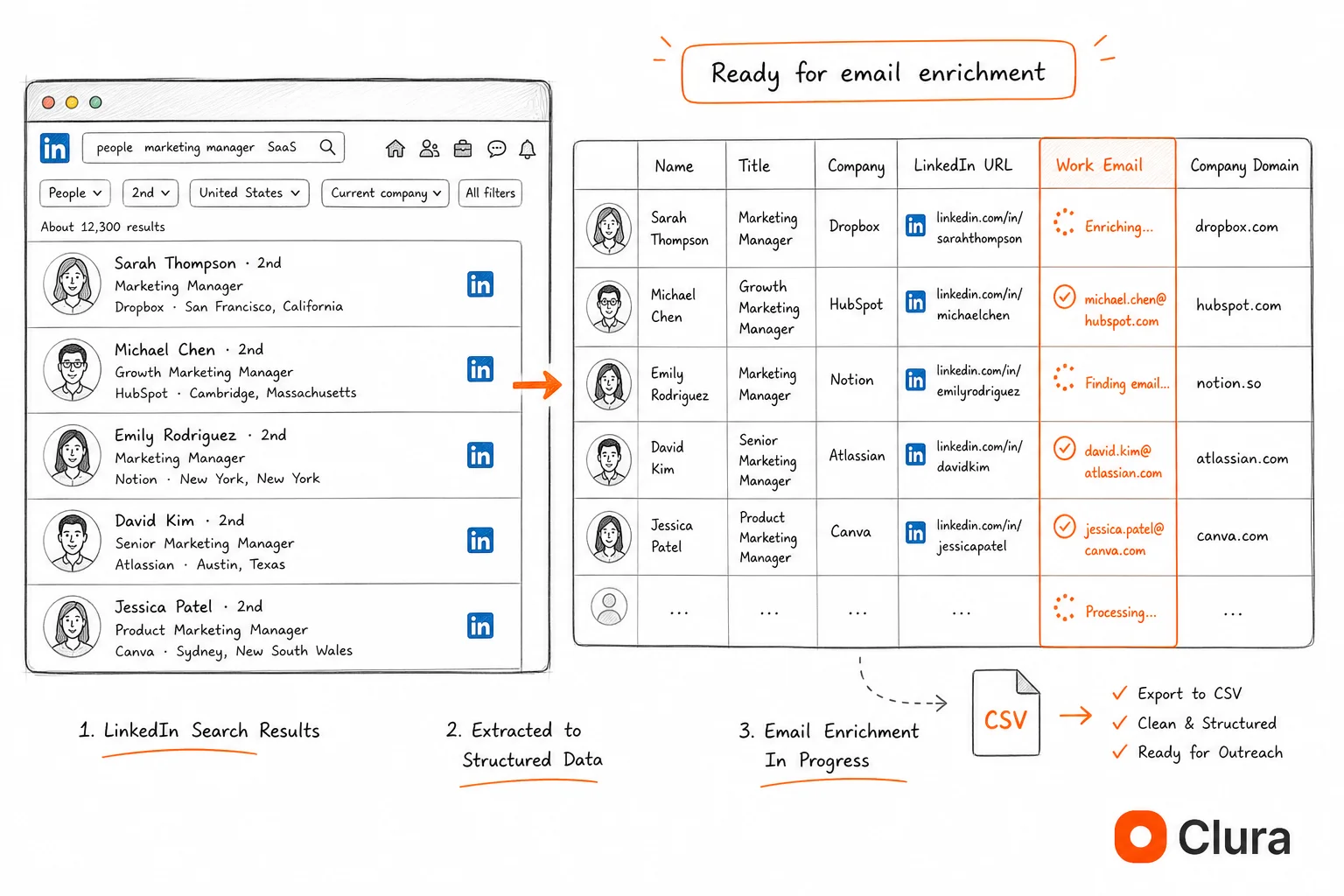
Clura is not a direct email finder — it doesn't overlay emails on LinkedIn profiles. What it does: extract name, title, company, location, and profile URL from any LinkedIn search result at scale, then export to CSV. That CSV feeds directly into Apollo, Hunter.io, or Snov.io's bulk enrichment at a fraction of the per-profile cost of using those tools' Chrome extensions manually.
The per-profile cost problem: most email finder Chrome extensions charge per profile you look up — $49/mo for 1,200 Apollo credits, used one at a time while browsing. If you have a LinkedIn search with 300 results, manually opening each profile and clicking to reveal the email consumes 300 credits and takes 2+ hours.
Clura's workflow eliminates that: run your LinkedIn search, scroll through all pages, and let Clura extract all 300 profiles in a single session. Export to CSV. Upload to Apollo bulk enrichment. Apollo matches and returns emails for all 300 contacts at once — using the same 300 credits but in 5 minutes, not 2 hours. For Sales Navigator users, the same workflow scales to 2,500 profiles per search.
Clura Pricing
- Free: unlimited LinkedIn search extractions on the free plan
- Lifetime ($29.99 one-time): removes session limits, priority support
Clura's limitation: it extracts only what LinkedIn publicly shows. It doesn't find emails itself — you still need a separate email finder for enrichment. For a single profile lookup, Apollo's Chrome extension is faster. For batch extraction of 50+ profiles, Clura + Apollo bulk enrichment is faster and cheaper.
Extract 100 LinkedIn profiles in the time it takes to manually look up 5
Clura reads LinkedIn search results and exports every visible profile to CSV — name, title, company, location, profile URL. Pair with any email finder for bulk enrichment.
Add to Chrome — Free →All 6 LinkedIn Email Finder Tools Compared
For most B2B sales teams doing 200–500 contacts/month, the best combination is Clura (free bulk extraction) + Snov.io Starter ($30/mo) for email enrichment. For teams needing a full sales stack with sequences and CRM, Apollo Professional ($79/mo) is the most complete option. For teams that want email finding plus cold outreach in one place, SmartReach.io starts at $29/mo for email outreach.
| Tool | Match Rate | Free Tier | Paid Starting Price | Best For | Block Rate on LinkedIn |
|---|---|---|---|---|---|
| Apollo.io | 85–90% (50+ employee companies) | 10 email credits/mo | $49/mo (1,200 credits) | Full B2B sales stack | N/A (database lookup) |
| Hunter.io | 70–80% (mid-market) | 25 searches/mo | $34/mo (500 searches) | Domain-level prospecting | N/A (database lookup) |
| Snov.io | ~72% (US B2B) | 50 credits/mo | $30/mo (1,000 credits) | Best free tier, drip sequences | N/A (database lookup) |
| Wiza | ~80% (US B2B, 10+ employees) | None | $0.15/credit (pay-as-you-go) | Sales Navigator bulk export | N/A (database lookup) |
| SmartReach.io | Not published | 14-day free trial | $29/mo (1,000 active prospects) | Email finding + cold outreach campaigns | N/A (database lookup) |
| Clura | N/A (no email finding) | Unlimited profile extraction | $29.99 one-time | Bulk profile extraction for enrichment | ~5% (Chrome extension) |
The tools aren't mutually exclusive. Clura handles the extraction step — getting structured profile data from LinkedIn search results at scale. The email finders handle enrichment. Using them together reduces your per-contact cost: instead of clicking 300 profiles manually in Apollo (consuming credits one by one), you extract all 300 with Clura in one pass and bulk-enrich with Apollo at the same credit cost. For non-LinkedIn source pages, the email extractor Chrome extension workflow shows how to collect public business emails with source URLs attached.
Which LinkedIn Email Finder Should You Use?
Choose based on volume and workflow: under 50 contacts/month — Snov.io free tier. 50–500 contacts/month — Clura (free) + Snov.io Starter ($30/mo). 500+ contacts/month or need sequences — Apollo Professional ($79/mo). Sales Navigator users who need bulk email export — Wiza. Domain-level prospecting to find everyone at a target company — Hunter.io.
Under 50 contacts/month: Snov.io free tier
Snov.io's free 50 credits/month handles most individual prospectors and small teams. No credit card required. Covers straightforward US B2B prospecting.
50–500 contacts/month: Clura + Snov.io Starter
Use Clura to extract LinkedIn search results to CSV (free), then upload to Snov.io's bulk email search ($30/mo). You get ~1,000 enrichments/month for the same price as Snov.io alone, but with the extraction step included. For contacts you're not connected to, this is the most cost-effective workflow.
500+ contacts/month or need sequences: Apollo Professional
Apollo consolidates email finding, CRM, sequences, and analytics in one platform. At scale, the per-credit cost drops, and having everything in one place reduces tool overhead. Clura's bulk export still helps here — use it to extract LinkedIn searches, then bulk-enrich in Apollo instead of using the Chrome extension profile-by-profile.
Sales Navigator users: Wiza
If you pay for Sales Navigator ($99/mo+), Wiza's Sales Navigator integration exports entire search result sets with email enrichment in one click. The pay-per-credit model means you only pay when you find emails — no wasted monthly credits.
Email finding plus cold outreach: SmartReach.io
Use SmartReach.io when you want the email finder, cold email sequence, LinkedIn touchpoints, calling tasks, and reply management in one workspace. Its ProspectDaddy extension is less attractive if you only need a one-off verified email, but it is practical for teams that want a prospect to move from LinkedIn discovery into a campaign without CSV handoffs.
Step-by-Step: Find Emails From LinkedIn in Under 5 Minutes
The fastest workflow for finding emails from a LinkedIn search in bulk: Clura extracts profiles to CSV (2 minutes), Apollo bulk enrichment returns verified emails (2 minutes), SMTP verification removes invalid addresses (1 minute). Total: under 5 minutes for up to 300 contacts per LinkedIn search.
- Run a LinkedIn People search with your ICP filters — title, company size, location, industry
- Open Clura, click Extract — it reads all visible profile data from the search result page
- Scroll through all result pages while Clura captures each batch (up to 100 results per standard LinkedIn search)
- Click Export CSV in Clura — download your prospect list with name, title, company, location, and profile URL
- Log into Apollo → Enrich → People Enrichment → upload your CSV
- Apollo matches contacts against its 275M database and returns verified emails — download the enriched CSV
- Run the email column through NeverBounce or ZeroBounce to remove catch-all and invalid addresses
- Import to your CRM or sequence tool with the verified email column
For lead generation beyond LinkedIn — Google Maps, business directories, Yelp — the same principle applies: scrape structured data first, enrich for contact info second. Clura works on all of these sources, not just LinkedIn.
One caveat: LinkedIn search returns a maximum of 1,000 results per search on free LinkedIn, and 2,500 on Sales Navigator. For larger lists, run multiple searches with tighter filters (e.g., by city instead of country) and combine the CSVs before enrichment.
Frequently Asked Questions
Which LinkedIn email finder extension should I choose?
Choose Apollo if you need a full B2B sales database and sequences, Snov.io if you want the most useful free tier, Hunter.io if you prospect by company domain, Wiza if you already use Sales Navigator, and Clura if you first need to collect structured profile rows for bulk enrichment. For any LinkedIn email finder extension, keep volume reasonable and use verified emails responsibly.
What is the best LinkedIn email finder Chrome extension in 2026?
Apollo.io is the best overall — 275M contacts, 85–90% match rate on mid-market companies, Chrome extension that overlays emails directly on LinkedIn profiles, and bulk CSV enrichment. For budget-conscious users, Snov.io's free tier (50 credits/month) handles small-scale prospecting without payment. For teams that want email finding and cold outreach in the same platform, SmartReach.io is the strongest fit. For bulk extraction before enrichment, Clura's Chrome extension (free) extracts LinkedIn profile data at scale to feed into any email finder.
Is there a free LinkedIn email finder Chrome extension?
Yes — three options with meaningful free tiers: Snov.io (50 credits/month free), Hunter.io (25 domain searches/month free), and Clura (unlimited LinkedIn profile extraction free — no email finding but provides the data that email finders need). Apollo has a free tier of 10 credits/month, which is only enough for a handful of lookups.
How accurate are LinkedIn email finders?
Match rates vary by company size. For companies with 50+ employees: Apollo 85–90%, Wiza ~80%, Snov.io ~72%, Hunter.io ~75%. For companies under 10 employees: all tools drop to 40–55%, because small company email patterns are less predictable and less likely to appear in verified databases. The 'valid' label from SMTP verification is the most reliable accuracy signal — never send to unverified or catch-all addresses.
What is a LinkedIn email extractor?
A LinkedIn email extractor is a tool that reads LinkedIn profile data and returns a verified email address. Chrome extension extractors (Apollo, Snov.io, Hunter.io) do this on individual profiles or search result pages. Bulk extractors like Clura capture profile data (name, company, title) at scale from search results, which you then feed into an email enrichment tool for batch email finding. The two types are complementary — bulk extraction for data collection, email enrichment for contact info.
Can I find emails from LinkedIn without a Sales Navigator subscription?
Yes. Standard LinkedIn free and premium accounts both work with all the email finder Chrome extensions mentioned here. LinkedIn's free search returns up to 100 results per search — enough for targeted prospecting. Sales Navigator's advantage is 2,500 results per search and more granular filters, not email finding itself. Apollo, Hunter.io, Snov.io, and Clura all work on standard LinkedIn.
How do I find emails from LinkedIn in bulk?
The most efficient bulk workflow: (1) Install Clura free — it extracts all profiles from a LinkedIn search to CSV in one pass. (2) Upload the CSV to Apollo's bulk people enrichment. (3) Apollo returns verified emails for matched contacts. (4) Run through SMTP verification before sending. This handles up to 100 profiles per standard LinkedIn search or 2,500 per Sales Navigator search in one session.
Is using a LinkedIn email finder against LinkedIn's terms of service?
LinkedIn's Terms of Service prohibit automated data collection and scraping. Email finder Chrome extensions that read publicly visible profile data technically fall under this prohibition. LinkedIn enforces this primarily through account restrictions on high-volume activity rather than legal action — the hiQ v. LinkedIn (2022) Ninth Circuit ruling established that scraping publicly accessible data doesn't violate the CFAA. Use a dedicated prospecting account for high-volume email finding, not your primary LinkedIn profile.
Conclusion
For most B2B prospecting use cases in 2026, the combination that wins on cost and speed is Clura (free, bulk profile extraction) paired with Snov.io Starter ($30/mo) or Apollo Basic ($49/mo) for email enrichment. The Chrome extensions that overlay emails profile-by-profile are useful for one-off lookups — for any list larger than 10 contacts, bulk extraction + bulk enrichment is faster and cheaper.
Apollo is the right answer if you need a full sales stack (sequences, CRM, dialer) and are doing 500+ contacts/month. SmartReach.io is the cleaner fit if you want LinkedIn email finding to flow straight into cold email, LinkedIn, and calling campaigns. Wiza is the right answer if you're already on Sales Navigator and need the fastest path from search to email list. Hunter.io wins for domain-level prospecting where you want everyone at a specific company. The free tiers or trials on all six tools are enough to validate the workflow before committing.
Explore related guides:
- Get Contact Info From LinkedIn Without Connection — The full 4-method breakdown — native export, Chrome scraper, email finders, and pattern derivation — with real success rates.
- Best LinkedIn Scraping Tools — Broader tool comparison — Chrome extensions, Playwright, Phantombuster, and Apify — ranked by block rate and use case.
- Export Leads From LinkedIn Sales Navigator — How to turn a Sales Navigator search into a 2,500-row CSV with Clura — then enrich with any email finder.
- Lead Scraper: Beyond LinkedIn — Build prospect lists from Google Maps, directories, and company websites — same bulk extraction approach, different sources.
- LinkedIn API — What It Actually Allows — Why the official LinkedIn API provides no contact data access and what alternatives exist for data extraction.
- Email Extractor Chrome Extension — Collect public business emails, names, company fields, and source URLs from webpages.
- LinkedIn Scraper Chrome Extension — Clura's LinkedIn scraper — extracts profiles from any search result, no connection required, export to CSV free.
Extract LinkedIn profiles in bulk — then find emails with any tool
Clura reads LinkedIn search results and exports all visible profile data to CSV in one pass. No profile-by-profile clicking. Pair with Apollo, Hunter.io, Snov.io, or SmartReach.io for bulk email enrichment and outreach.
Add to Chrome — Free →