
Apollo.io Scraper Chrome Extension: Export Leads
Use Clura's Apollo.io scraper Chrome extension to review visible lead data and export CSV or Excel. Separate from Apollo's official extension.
Run this templatePaid Plan
Full workflow, one-time payment
$29.99 one-time
Scrape, enrich, automate, and sync
- All Free plan features, plus:
- Unlimited exports to CSV and Excel
- Unlimited image exports
- Unlimited connector exports
- Enrichment — Coming soon
- Agents — Coming soon
- Bulk extract page data from similar URLs
- Connectors for Notion, HubSpot, Airtable, and webhooks
- Priority support
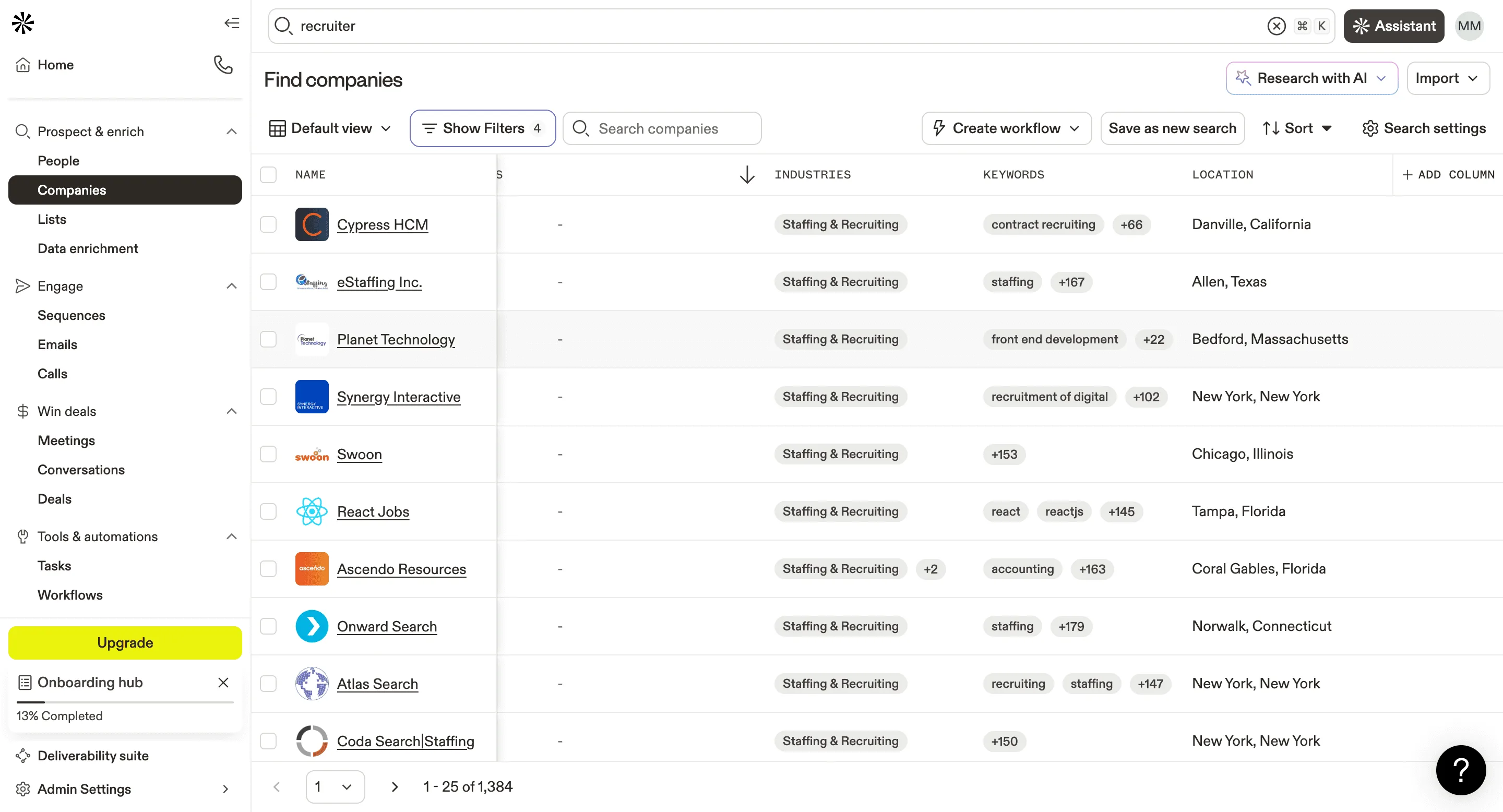
For sales and RevOps teams reviewing Apollo People Search, this Clura template turns visible prospect records into a table you can check before export. It is separate from the official Apollo.io extension for Chrome, which brings Apollo data and prospecting actions into supported websites and tools.
Use the template after filtering the Apollo page to your target role, location, or company profile. Collect names, roles, company names, locations, and source URLs; include email or phone only when the value is actually displayed and you are authorized to use it. Keep hidden or unavailable fields blank.
Clura does not unlock restricted Apollo contact details, bypass plan credits, or replace your Apollo account permissions. If you need Apollo database lookups or its prospecting actions, use Apollo's official extension. If you need a reviewed spreadsheet from the page already open, use this template and verify a sample of rows.
Clura Free includes unlimited local scraping and one full export every 24 hours. Paid access removes the export limit. Check Apollo's own terms and your account allowances separately before collecting or reusing records.
Relevant For
Sales Development Representatives
After applying ICP filters in Apollo, scrape qualified leads from the results page and upload them into outreach tools or CRM for cold email and LinkedIn sequences
Founders / Early-stage Sales Teams
Review a filtered set of visible prospect records and keep a source-linked research sheet for account qualification.
Recruiters / Talent Sourcers
Extract candidate profiles based on role, company, and experience filters while browsing Apollo’s people search.
Growth & RevOps Teams
Create clean prospect datasets for experiments, segmentation, enrichment, or routing without clutter from irrelevant leads.
How to Use
- 1
Open Apollo and apply filters
Navigate to Apollo People Search or a lead profile page and apply filters relevant to your ICP.
- 2
Select fields to extract
Choose visible fields such as name, job title, company, website, and location. Only include contact details displayed on the page.
- 3
Run the Apollo leads scraper template
Click the Clura Chrome extension icon. It automatically detects Apollo and extracts lead and company data from the open page.
- 4
Save and export
Compare three sample rows with Apollo before exporting CSV or Excel. Check names, company matches, missing contact fields, and source URLs.
Fields Scraped
| Field | Type |
|---|---|
| Full Name | Text |
| Text | |
| Phone | Text |
| Job Title | Text |
| Company Name | Text |
| Website | URL |
| Location | Text |
| Industry | Text |
| Linkedin Profile | URL |
Export Formats
Example Output
| Full Name | Phone | Job Title | Company Name | Website | Location | Industry | Linkedin Profile | |
|---|---|---|---|---|---|---|---|---|
| Emily Torres | emily@techwave.io | +1-628-555-0312 | Director of Sales | TechWave | techwave.io | Austin, TX | SaaS | https://linkedin.com/in/emily-torres |
| David Kim | david@growthlab.com | +1-415-555-0771 | VP of Marketing | GrowthLab | growthlab.com | San Francisco, CA | Marketing Technology | https://linkedin.com/in/david-kim |
Frequently Asked Questions
Is this the official Apollo.io extension for Chrome?
No. This is a Clura extraction template for visible Apollo pages. Apollo's official Chrome extension provides Apollo data and prospecting actions on supported websites and tools. The two products serve different workflows.
What data does this scraper extract from Apollo.io?
It can collect visible names, job titles, company names, websites, locations, industries, and profile URLs. Email and phone are included only where displayed; missing source fields should remain blank.
Is this an Apollo scraper Chrome extension?
Yes. Clura runs as a Chrome extension, reads the Apollo.io page you already have open, and exports the visible lead and company rows to CSV, Excel, Google Sheets, or JSON.
Do I need an Apollo.io account to use this?
Yes. You must be logged into Apollo.io and have your search results page open in Chrome before activating the Clura extension.
Can I target contacts by job title or seniority?
Yes. Apply Apollo's native filters for job title, seniority, industry, company size, or geography before running the scraper to get precisely targeted results.
Does Clura verify the email addresses it collects?
Clura captures exactly what Apollo displays on the page. Email verification quality depends on Apollo's data quality and your subscription tier.
Can I sync leads to my CRM or outreach tool?
Yes. Export to CSV from Clura and import into Salesforce, HubSpot, Outreach, Salesloft, or any platform that accepts CSV files.
Does this template reveal hidden emails or avoid Apollo credits?
No. The template extracts information displayed in the page you can access. Hidden contact details stay unavailable, and Apollo permissions, plan rules, and credits still apply.
Related Scrapers
LinkedIn Profiles Scraper
Extracts structured profile data from LinkedIn People Search result pages using pagination and saves it to your Clura account with CSV export.
LinkedIn Companies Scraper
Extracts structured company data from LinkedIn Company Search result pages using pagination and saves it to your Clura account with CSV export.
ZoomInfo Contacts Scraper
Scrape contact and company data from ZoomInfo People Search result pages, with results saved to your Clura account and exportable as CSV or JSON.