
Craigslist Scraper: Export Listings to Excel & CSV
If your agency is researching local services, copying listing titles and neighborhoods into a spreadsheet makes every market review repetitive. A Craigslist scraper turns repeated listing cards into rows: choose the city and category, review the detected fields and pagination, then export a checked table to Excel or CSV. Clura’s browser workflow lets you inspect those records as they arrive.
Use Craigslist listing extraction to research local services such as cleaning, landscaping, moving, and repairs. Collect listing titles, locations, images, descriptions, and source URLs in one spreadsheet, then filter the results to compare offers across your chosen area. The video below uses automotive services as an example.
Review local-service listings as spreadsheet rows
Preview titles, locations, images, and links with Quick Scrape before choosing a CSV or Excel export.
Add to Chrome — Review Listing Data →What Is a Craigslist Scraper Used For?
A Craigslist scraper converts selected listing content into a structured table for review. A local-service research file can include titles, locations, source URLs, images, and visible description text. Choose the city and category before collection, and retain that context with the export. Use the resulting spreadsheet to compare service offers, organize listings by location, and keep source links handy for follow-up research.
For an agency, a useful first question is which services are advertised in a particular area and how those listings describe their offers. You can review cleaning, moving, landscaping, repair, and other local-service listings using the same workflow. The recording uses automotive services as an example. Listing records still need review before you draw conclusions about business identity, contact accuracy, service quality, or provider counts.
- Keep the selected city, category, search terms, filters, and capture date in the research file.
- Treat each listing URL as a listing identifier, not proof of a unique business.
- Review repeated ads before counting providers or comparing the language of offers.
- Separate observed listing text from any interpretation you add during analysis.
The web scraping guide explains field selection and output validation. For a broader agency research process, the lead scraper guide covers source-backed qualification; listing records alone are not a verified outreach list.
How Do You Scrape Craigslist Listings Without Code?
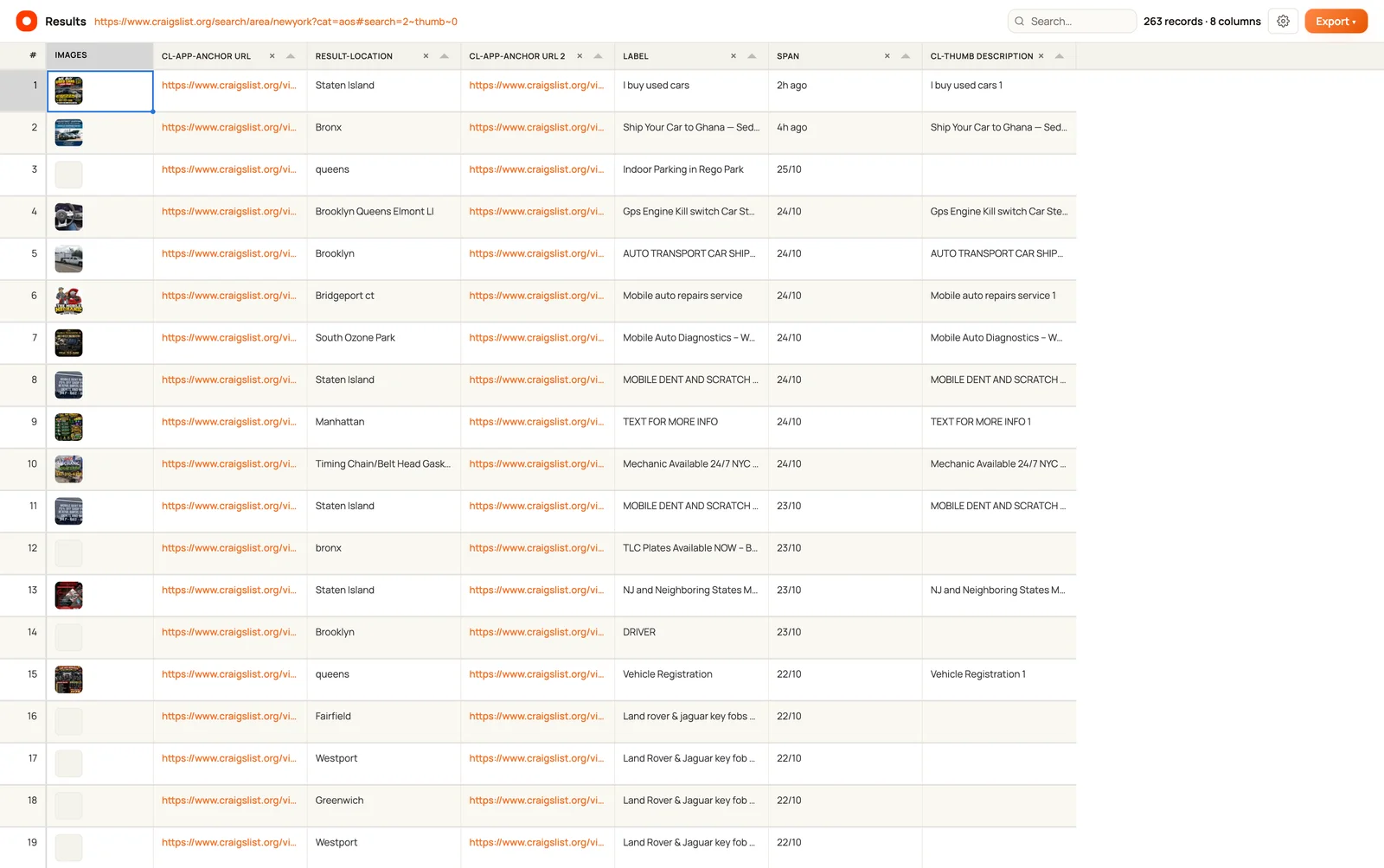
Open the selected Craigslist results in Chrome and run Clura’s Quick Scrape. Review the detected listing list, remove irrelevant columns, and check pagination before starting. Inspect the live table against the visible listings, then export the reviewed rows. Choose the local-service category relevant to your research and review its available fields; automotive services are just the recorded example.
- Choose the listings. Open the relevant Craigslist city, category, and search in Chrome. Set filters and sort order before detection.
- Run Quick Scrape. Open the Clura Chrome extension and choose Quick Scrape after the listing cards have loaded.
- Review the detected list. Select the listing list and check that titles, locations, images, and links belong to the same records. Remove repeated or irrelevant columns.
- Review pagination. Continue to pagination and check the detected next-page or loading behavior before starting collection.
- Inspect the live results. Start extraction and compare at least five available rows with their source listings. Check that additional pages contribute new listing URLs.
- Export the reviewed table. Export to CSV or Excel, retaining source URLs and capture context. Deduplicate by listing URL before counting unique listings.
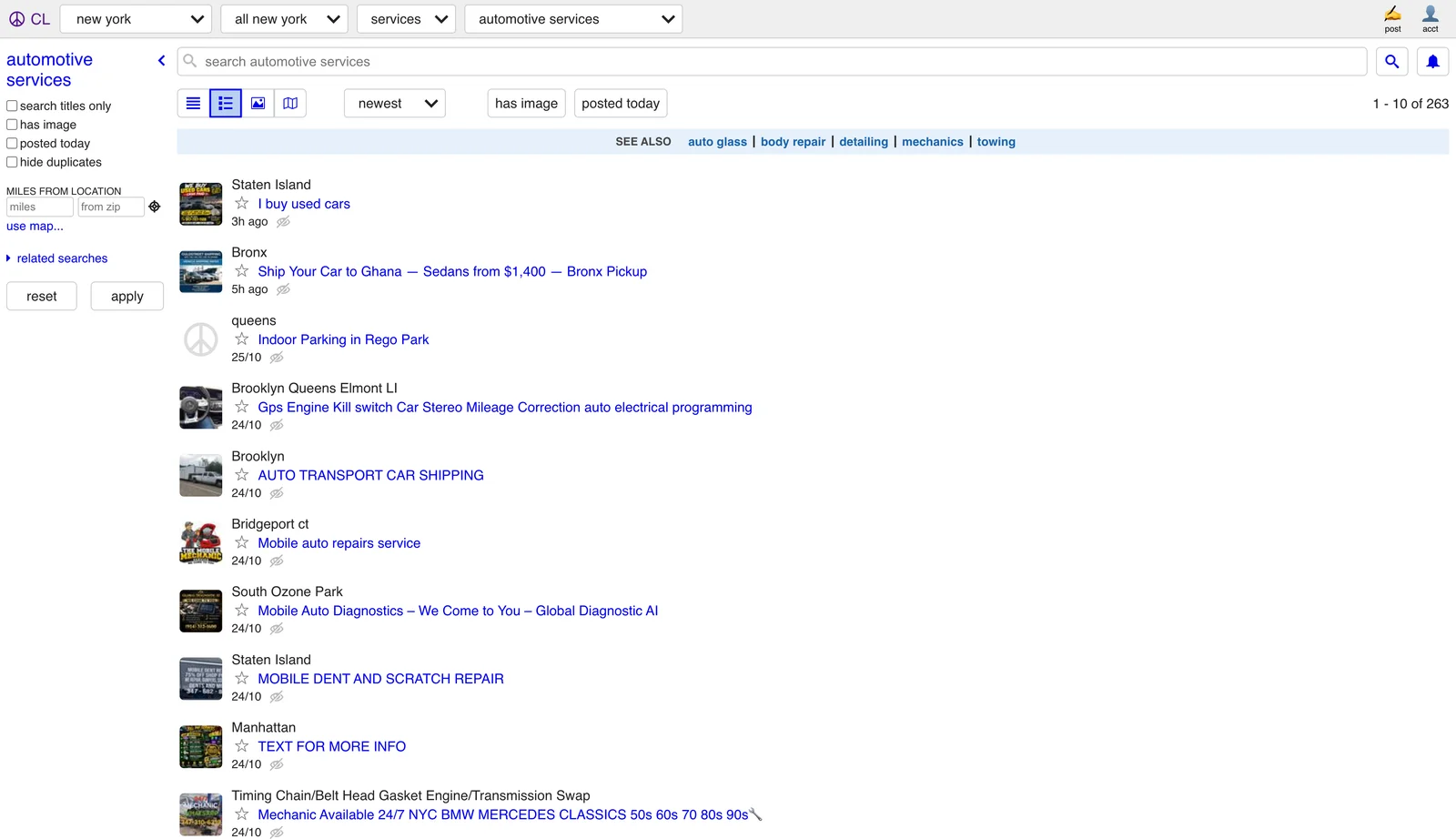
The recording is a demonstration of one page layout. When choosing another service category, use Quick Scrape to inspect its repeated lists first. A menu, related-search group, or repeated navigation element can also be detected as a list; confirm the preview represents actual ads.
Check the listing preview before collecting more rows
Select the repeated listing cards, compare their titles and links, and review pagination. Keep only the columns your local-service research needs.
Add to Chrome — Preview Listing Records →What Data Can You Extract From Craigslist Listings?
Local-service listings can expose titles, location text, listing links, images, posted-time text, and description text. The recorded example detects eight columns. Some detected columns repeat links or reflect page markup rather than useful business fields. Review and rename them before export. The demo does not demonstrate a price column, verified phone numbers, email addresses, or complete listing-detail coverage.
| Field | What to check | How to use it |
|---|---|---|
| Listing title | Match the text to the same card as the URL | Group service offers for manual review. |
| Location | Preserve the displayed wording | Compare advertised areas without inventing an address. |
| Listing URL | Open a sample link and check its destination | Keep source evidence and deduplicate listings. |
| Image | Check that it belongs to the same listing | Compare the imagery used to present each service. |
| Posted-time text | Distinguish displayed text from an absolute timestamp | Add a separate capture date for interpretation. |
| Description text | Check whether the card contains a truncated preview | Compare visible wording without assuming the full ad was collected. |
Available fields differ across local-service categories. A cleaning, moving, landscaping, or repair ad may describe the service without a numeric price. Do not create a price field from a number embedded in a title, and do not interpret an asking price in another category as a completed transaction price.
If a needed field exists only on a detail page, inspect the listing detail page before expanding collection. Bulk extract page data covers detail-page workflows. The video here demonstrates listing-level extraction and does not verify every detail-page field.
How Do You Export Craigslist Listings to Excel or CSV?
Export the reviewed Clura results to CSV or Excel after checking sample rows and removing duplicate columns. Retain the listing URL, displayed location, and capture date so the file stays traceable. Use Excel filters to group listings by neighborhood or service type, add research notes, and compare offers in your selected area.
| Output | Useful for | Review first |
|---|---|---|
| CSV | Sharing a plain research table or importing rows | Preserve source URLs and remove duplicate fields. |
| Excel | Filtering service offers and adding review notes | Keep raw displayed text separate from normalized values. |
| Image ZIP | Reviewing images collected with the records | Check that the images match their listing records. |
| Configured connector | Sending reviewed records to HubSpot, Notion, or Airtable | Authorize the destination and map only necessary fields. |
Clura Free includes unlimited local scraping and one full export every 24 hours. Paid access removes that export-frequency limit. Check current pricing and connector options before choosing your output.
Should You Use a Browser Extension or Python for Listing Research?
Use a browser extension when you want to review detected lists and exported rows without maintaining a parser. Use Python when your project requires custom transformations and you can maintain the collection code. Clura combines a detected-list preview, pagination controls, and a live results table in one browser workflow, making it a practical choice for teams that want to review listings and export a spreadsheet.
| Method | Review workflow | Known allowance / cost | Best fit | Limitation |
|---|---|---|---|---|
| Clura Quick Scrape | Detected-list preview and live table | Free: 1 full export per 24 hours | Reviewed no-code listing exports | Fields and pagination still need validation. |
| Python HTML parser | Inspect returned HTML and write field selectors | Implementation cost varies; not measured here | Custom parsing and transformations | Initial HTML may differ from the rendered browser page. |
| Browser automation script | Write browser actions and extraction logic | Development and infrastructure vary; not measured here | Custom workflows requiring browser interactions | Page controls and selectors require maintenance. |
Python requests and BeautifulSoup parse the response you receive; they do not execute page JavaScript. If visible cards are missing from that response, inspect the difference before changing selectors. The dynamic website guide explains rendered content.
Why Does a Craigslist Scraper Return Missing or Duplicate Rows?
Missing or duplicate rows can come from selecting the wrong list, collecting before cards load, revisiting the same page, or retaining repeated link columns. Compare five available records with their source cards, then inspect one pagination transition. Deduplicate by listing URL before measuring coverage, and keep reposted ads separate from an assumption that every row represents a different business.
| Symptom | Inspect | Practical check |
|---|---|---|
| Navigation text appears as records | Selected repeated list | Switch to the actual listing cards and compare five rows. |
| Only the first results view appears | Pagination or loading control | Confirm a transition adds different source URLs. |
| Two URL columns contain the same link | Detected field selection | Retain one canonical listing-link column. |
| Several ads look like one provider | Reposts and repeated advertising | Deduplicate exact URLs first; review business identity separately. |
| Blank prices or contacts | Whether those fields appear in the selected cards | Keep missing values unknown; the service demo does not establish those fields. |
The pagination guide covers next-page controls, load-more buttons, and scrolling. A rising record counter is useful feedback, but it does not establish full coverage: check that the scope, filters, and source URLs match what you intended to collect.
Before sharing the spreadsheet, save its capture date, city, category, and unresolved gaps. For a later comparison, use the same city, category, and filters so you can compare listings across research sessions.
Frequently Asked Questions
Can I use a Craigslist scraper without coding?
Clura’s Quick Scrape workflow detects repeated listing cards in Chrome, lets you review columns and pagination, and exports the results without writing a parser.
How can agencies use Craigslist listing data?
Agencies can organize local-service listings by category and location, compare advertised offers, and review how providers describe their services. Keep listing URLs in the spreadsheet so your team can revisit the source while adding research notes.
Can I export Craigslist listings to Excel or CSV?
Clura offers CSV and Excel exports of reviewed results. Keep listing URLs and capture context, remove duplicate fields, and check sample rows. Use the spreadsheet to filter offers, compare locations, and add research notes.
Is the Craigslist scraper workflow free with Clura?
Clura Free includes unlimited local scraping and one full export every 24 hours. Paid access removes the export-frequency limit. Check current pricing to choose the export plan that fits your workflow.
How do I organize local-service listings after export?
Filter your CSV or Excel file by location, group similar service offers, and add columns for research notes. Use listing URLs to identify repeated records and revisit ads when comparing the wording, images, or services being advertised.
Can I download listing images with the results?
Yes. Clura offers an image ZIP export for images collected with your listing records. Keep the listing URLs in your CSV or Excel file so you can match the images to their source ads during research.
Why does my Craigslist scraper stop after one page?
Check whether the selected results use a next-page control, scrolling, or another loading behavior, then review the pagination settings. Verify that a transition adds new listing URLs.
Can I use this workflow for other local-service categories?
Yes. Choose the relevant city and local-service category, then use Quick Scrape to review its listing cards, available fields, and pagination. Automotive services are just the video example. Check each category’s preview before collecting; the available fields and page layout can vary.
Conclusion
Choose a city and local-service category, then turn listing titles, locations, images, and URLs into a spreadsheet you can filter and review. Use it to compare offers, understand how services are advertised, and organize your market research.
Review the list preview, inspect pagination, and compare sample rows before exporting. A smaller table with traceable records is more useful for market research than a larger count whose scope and duplicates remain unexplained.
Explore related guides:
- Lead Scraper Guide — Qualify source-backed records before treating them as prospects.
- Yellow Pages Scraper — Compare a directory-based local-business research workflow.
- Facebook Marketplace Scraper — Explore the separate workflow for local for-sale listing research.
- Web Scraping Guide — Choose useful fields and validate a source-backed export.
- Pagination Guide — Verify that additional pages contribute new records.
- Quick Scrape — Preview repeated lists and inspect fields before exporting.
Turn local-service listings into a research spreadsheet
Use Clura to preview local-service records, check the listing fields and pagination, and export the rows you have verified to CSV or Excel.
Add to Chrome — Export Reviewed Listings →