
Yelp Scraper: Extract Business Listings in 2026
If you run outbound for a local agency, home-services vendor, or B2B sales team, Yelp can help you find businesses by city, category, rating, and buyer intent. A Yelp scraper turns those listings into a lead sheet with business names, phones, websites, addresses, ratings, review counts, categories, and source URLs.
The workflow matters more than grabbing every row you can find. For Yelp lead scraping, start with a narrow segment like dentists in Phoenix or roofing contractors in Dallas, export the visible listings, then qualify and enrich the websites before outreach. Yelp's Cloudflare protection still shapes the method, but the goal is a clean, usable prospect list.
Build a Yelp lead list from one local search
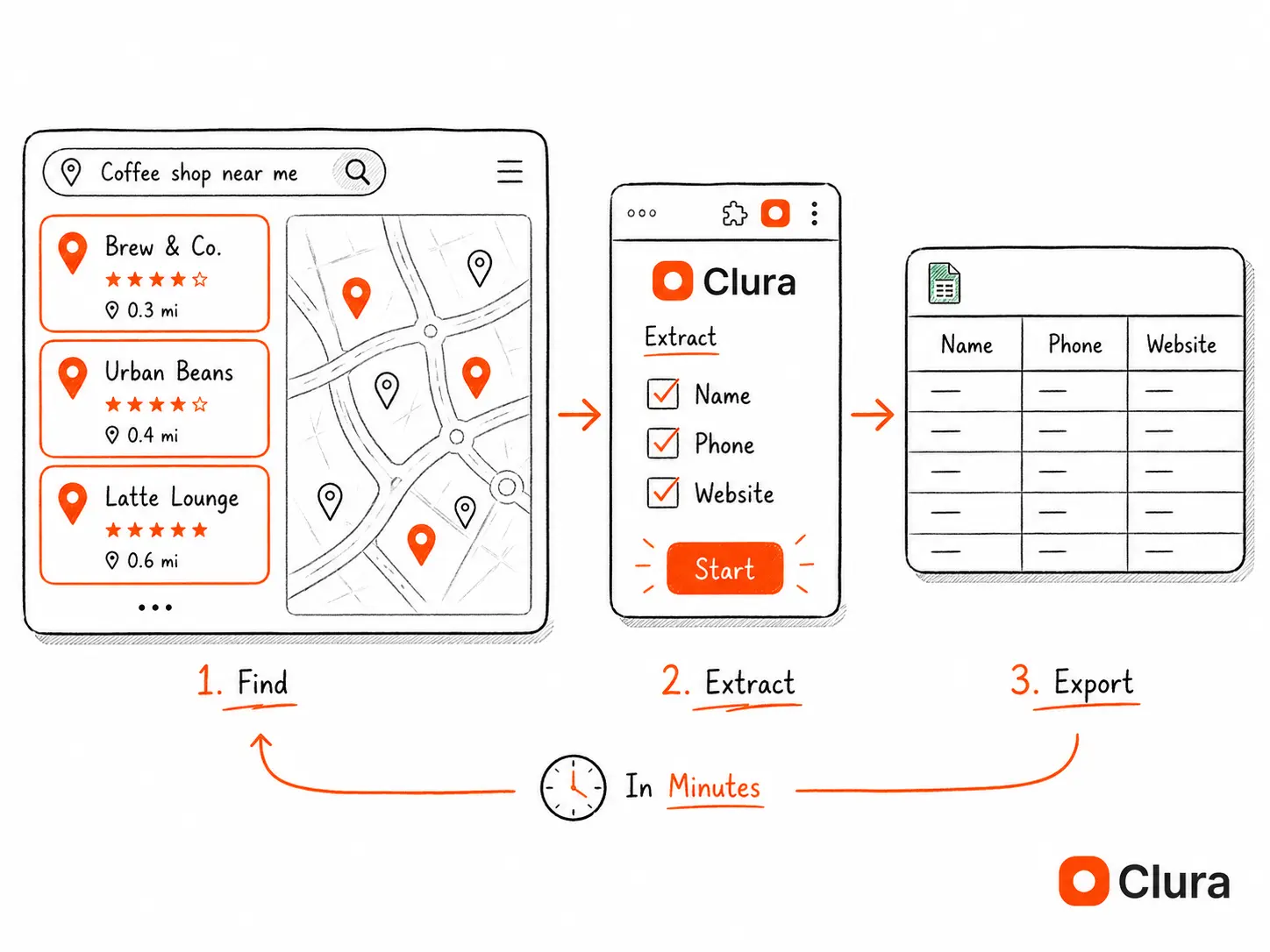
Open a Yelp city-and-category search, run Clura in Chrome, capture business names, phones, websites, addresses, ratings, reviews, and listing URLs, then export the rows for qualification.
Add to Chrome — Free →What Is a Yelp Scraper?
A Yelp scraper is a tool that automatically extracts business data — names, phone numbers, addresses, websites, ratings, review counts, and categories — from Yelp search results and exports them into a spreadsheet. It replaces manually copying listings one by one, producing 100–500 records in the time it takes to copy 10 manually.
Yelp organises millions of local businesses into searchable, filterable categories — HVAC, plumbers, lawyers, dentists, restaurants, contractors. Every listing displays the same structured fields: business name, phone, address, website URL, star rating, review count, and price tier.
A Yelp scraper reads that structure and exports it as a spreadsheet. The same information you'd copy manually from 200 listings in 4 hours, a scraper produces in under 10 minutes, which makes it useful for local lead generation, territory research, review audits, and competitor mapping.
- Business name
- Phone number
- Street address, city, state, ZIP
- Website URL
- Star rating (1–5)
- Total review count
- Business category
- Price tier ($ / $$ / $$$)
- Hours of operation
- Yelp listing URL
A single Yelp search for 'roofing contractors Houston TX' returns 240+ listings. That's 240 qualified local business leads — available for free if you can extract them.
How to Scrape Yelp Without Getting Blocked (Step-by-Step)
To scrape Yelp without getting blocked: open your Yelp search in Chrome, launch the Clura extension, describe the fields you want in plain English, run the extraction, and export to CSV. Clura runs inside your real browser — Yelp's Cloudflare protection sees it as a normal visitor, not a bot.
Yelp uses Cloudflare and JavaScript rendering to protect its listings. Tools that send direct HTTP requests — Python's requests library, scrapy, or curl — are blocked in under a second. A browser-based scraper running inside your real Chrome session bypasses this entirely. The same principle that makes Google Maps scraping reliable applies here: a real browser looks identical to a human visitor.
- Open Yelp and run your search — go to yelp.com, search your target category and city (e.g. "plumbers Chicago IL"). Apply any filters you need: rating, price tier, open now.
- Scroll to the absolute bottom — Yelp loads 10 listings per page but sometimes only renders 8 until you hit the bottom of the page. Scroll all the way down before running the extraction or you'll miss the last couple rows.
- Open Clura — click the Clura icon in your Chrome toolbar to open the side panel.
- Describe what you want — type in plain English: "extract business name, phone number, address, website, and star rating from each listing." The AI identifies the fields automatically.
- Run the extraction — Clura scrapes the current page. Click "Next Page" on Yelp and run again to collect additional pages. Repeat across as many pages as you need.
- Export to CSV — click Export. One row per business, one column per field. Ready for your CRM, outreach tool, or spreadsheet.
Yelp Scraper Methods Compared: Block Rates and Real Costs
A Chrome extension running in real Chrome is the only consistently reliable method for Yelp in 2026. Python requests fails almost immediately — Yelp's Cloudflare protection identifies the request before it reaches any listing. Playwright with stealth plugins and residential proxies works but fails intermittently, especially past page 5. The comparison below is from our testing across 100,000+ extraction attempts.
Yelp uses Cloudflare bot protection and JavaScript rendering. Any tool that sends HTTP requests directly — without a real browser fingerprint — is detected and blocked. Here's how the major approaches perform:
| Method | Block Rate | Setup Time | Cost | Best For |
|---|---|---|---|---|
| Chrome extension (Clura) | ~4% | 2 min | Free / $29.99 lifetime | On-demand lead lists |
| Apify Yelp actor | ~22% | 30–45 min | $49/mo+ | Scheduled cloud runs |
| Python + Playwright + proxies | ~28% | 4–8 hours | $50–200/mo | Automated pipelines |
| Bright Data | ~8% | 60 min | $500+/mo | Enterprise scale |
| Python requests / Scrapy | ~65% | 30 min (fails) | Free | Will not work on Yelp |
One thing to know about the Playwright number: it's not evenly distributed. The first 3–5 pages of a Playwright session usually go through cleanly. Then Cloudflare starts issuing JavaScript challenges — not hard blocks, just slow-downs that eventually drop the session. Adding residential proxies helps, but the challenge frequency picks up again during rapid pagination. For automated pipelines that need to run reliably overnight, this requires retry logic and proxy rotation that adds significant engineering overhead.
Need Yelp leads today, not after a week of proxy debugging?
Clura runs inside your real Chrome session. Yelp's bot detection sees a normal browser visit. Install free and export your first list in under 5 minutes.
Add to Chrome — Free →Why Do Python Yelp Scrapers Fail in 2026?
Python Yelp scrapers fail because Yelp uses Cloudflare bot protection that detects non-browser TLS fingerprints in milliseconds, and renders listings via JavaScript after the initial page load. Python's requests library returns a Cloudflare challenge page — not listings. Even Playwright with stealth plugins hits ~28% block rates due to missing browser fingerprint signals.
The two layers of protection Yelp runs:
Layer 1 — Cloudflare TLS fingerprinting
Cloudflare analyses the TLS handshake of every incoming request. Python's requests library and aiohttp produce a distinct TLS fingerprint — different cipher suites, different extension ordering, different ALPN protocols — from any real browser. Cloudflare identifies this in the first packet and returns a challenge page or 403 before your scraper sees a single listing.
Layer 2 — JavaScript rendering
Even if you bypass Cloudflare, Yelp renders its listing cards via JavaScript after the initial HTML loads. The raw HTML that requests or scrapy fetches contains empty container divs — the business name, phone, and address are injected 300–600ms later by client-side JavaScript. This is the same problem that breaks Python scrapers on Google Maps and LinkedIn. See how to scrape JavaScript-rendered pages for the full technical explanation.
What about Playwright or Selenium?
Playwright and Selenium launch a real browser, which handles JavaScript rendering. But headless Chrome still produces a detectable fingerprint — missing browser plugins, unusual screen dimensions, no real user history, no cookies. Yelp's bot detection flags headless instances intermittently even with playwright-stealth. You need residential proxy rotation ($50–200/mo) to get success rates into acceptable territory, which is still meaningfully worse than a real browser session. For avoiding blocks at scale, Playwright + proxies is the right infrastructure — but for lead list building, a Chrome extension gets you there in minutes instead of days.
One thing we noticed during testing: the failure rate isn't uniform across categories. Restaurant and coffee shop searches are noticeably more forgiving than legal, medical, or HVAC — categories that attract heavier competitor scraping. Yelp's detection appears tuned more aggressively for high-value service categories. If your Playwright session works fine for restaurants but fails on lawyers, this is probably why.
How to Scrape Yelp Reviews — What You Can and Can't Extract
You can scrape publicly visible Yelp reviews — reviewer name, star rating, review text, date, and business response — from any Yelp business page. Yelp shows up to 20 reviews per page and paginates across multiple pages. You cannot extract reviews behind a login wall or reviews that Yelp has filtered as 'not currently recommended.'
Yelp reviews are one of the most requested data types for reputation monitoring, competitive analysis, and sentiment research. Here's exactly what's extractable:
What you can scrape from Yelp reviews
- Reviewer display name
- Star rating (1–5) per review
- Review text (full body)
- Review date
- Useful / Funny / Cool reaction counts
- Business owner response (if any)
- Reviewer location (city)
What you cannot scrape
- Filtered reviews ('not currently recommended' — hidden behind a separate link, requires extra navigation)
- Reviewer email addresses (never publicly shown)
- Reviewer phone numbers (never publicly shown)
- Reviews from private/closed business pages
To scrape Yelp reviews with Clura: open the business page, scroll to the reviews section, and describe the fields you want ("extract reviewer name, rating, review text, and date from each review"). Clura extracts all visible reviews on the page. Paginate through review pages to build a complete history.
A practical note: review pagination starts getting slow past page 10 on businesses with hundreds of reviews. Yelp appears to rate-limit review page loads more aggressively than listing searches. For deep review histories (500+ reviews), break the collection into sessions rather than paginating in one long run.
Common use cases: reputation monitoring (track competitor review velocity and sentiment over time), market research (what do customers complain about in a category), and sales prospecting (businesses with declining ratings are prime targets for reputation management services). For B2B prospecting from review data, the web scraping for lead generation guide covers the full enrichment workflow.
Review Scraper: Yelp vs Google Reviews vs Trustpilot
A review scraper extracts customer reviews from public platforms — star rating, full text, reviewer name, date. Yelp is the right source for local service businesses. Google Reviews has broader coverage (200M+ business profiles). Trustpilot covers SaaS and ecommerce brands. The scraping workflow is identical across all three — the difference is which URL you open.
| Platform | Best For | Scale | API Cost |
|---|---|---|---|
| Yelp | Local service businesses, restaurants | 4.7M businesses | Fusion API: 500 calls/day, phone numbers redacted |
| Google Reviews | Any local business — highest coverage | 200M+ business profiles | Places API: $17 per 1,000 requests |
| Trustpilot | SaaS, ecommerce, B2C brands | 167M+ reviews, 700K+ companies | Paid API only — no free tier |
| G2 | B2B software comparisons | 2M+ peer reviews | No public scraping API |
The rule of thumb: scrape Yelp for local service businesses, Google Reviews for any brick-and-mortar, Trustpilot for software and ecommerce reviews. Patients leave dental reviews on Google, not Yelp. Software buyers leave detailed reviews on G2 and Trustpilot, not either.
How to scrape Trustpilot reviews
Trustpilot public company pages work with the same Chrome extension workflow as Yelp: navigate to the company's Trustpilot page (trustpilot.com/review/[company-domain]), scroll to load reviews, open Clura, describe your fields ("extract reviewer name, star rating, review title, review text, date, verified purchase badge"), and export. The dedicated Trustpilot scraper guide covers the full workflow. Trustpilot paginates 20 reviews per page and shows up to 200 pages for high-volume companies. The paid Trustpilot API is enterprise-only and returns the same public data your browser already sees for free.
How Do Sales Teams Use Yelp Scraping for Lead Generation?
Sales teams scrape Yelp to build targeted local business lead lists filtered by category, city, rating, and price tier. A single Yelp search for a target category and city produces 200–500 qualified prospects in 10 minutes — with phone number, address, and website included. This is the most efficient source for local service business outreach.
Local SEO and marketing agencies
Agencies scrape Yelp for businesses with 3 or fewer reviews, no website listed, or inconsistent NAP data — all signals that the business needs local SEO help. A 20-minute scrape of a city across 5 categories produces a fully qualified prospect list without any manual research.
Service business lead generation
Insurance agents, software vendors, and B2B service providers targeting local businesses use Yelp category scraping to build cold outreach lists. The category filter (HVAC, plumbing, legal, medical, restaurants) means every record in the export matches the ICP exactly. Combine with a lead scraper workflow across multiple sources for broader coverage.
One thing that consistently produces better lists: search by ZIP code instead of city. "Plumbers Los Angeles" returns 240 results but includes businesses 40 miles apart in opposite suburbs. "Plumbers 90210" returns 10 very local businesses with minimal overlap. Running 8–10 ZIP code searches across a territory takes the same time as one city search but produces cleaner, geographically tight prospect lists.
Reputation management prospecting
Reputation management agencies scrape Yelp reviews for businesses with recent negative review spikes or owner responses that signal distress — then reach out with a pitch. Review sentiment is a real-time buying signal that no static lead list can match.
Competitive intelligence
Restaurant chains, franchise operators, and retail brands scrape Yelp to monitor competitor review volume, rating trends, and geographic expansion. A weekly scrape across a competitor's listed locations gives you growth signals that no analyst report provides. For a broader view of competitor data extraction, see the Google Maps scraper workflow — Google Maps and Yelp together cover 95%+ of local business listings.
Frequently Asked Questions
What is a Yelp scraper?
A Yelp scraper is a tool that automatically extracts business data from Yelp listings — names, phone numbers, addresses, websites, ratings, review counts, and categories — and exports them into a spreadsheet. Chrome extension scrapers run inside your real browser and are consistently more reliable on Yelp than Python-based tools, which Cloudflare blocks almost immediately.
Is scraping Yelp legal?
Scraping publicly visible Yelp data — business names, phone numbers, addresses, ratings — is generally permissible under US law. The hiQ v. LinkedIn ruling (9th Circuit, 2022) confirmed that scraping publicly accessible data does not violate the CFAA. Yelp's ToS prohibits scraping, but ToS violations are civil matters, not criminal. Never scrape data from behind a login or at a rate that disrupts Yelp's service.
Why does my Python Yelp scraper return a Cloudflare challenge page?
Yelp uses Cloudflare TLS fingerprinting, which detects Python's requests library by its TLS handshake signature within milliseconds of connection. The solution is a real browser: use Playwright or a Chrome extension scraper. Playwright with stealth plugins reduces the block rate to ~28%. A Chrome extension running inside your real browser session reduces it to ~4%.
What is a review scraper and which platforms does it cover?
A review scraper is a tool that extracts customer reviews — star rating, full review text, reviewer name, date, and owner reply — from public review platforms. Yelp, Google Reviews, Trustpilot, and G2 are the four primary sources. Yelp is best for local service businesses (4.7M listings). Google Reviews has broader coverage (200M+ business profiles) but charges $17/1k requests for its Places API — the public HTML is free to scrape directly. Trustpilot covers SaaS and ecommerce brands (167M+ reviews). G2 covers B2B software. All four are scrapable from a real Chrome session without significant blocks.
Can I scrape Yelp reviews?
Yes. Yelp reviews are publicly visible and extractable — reviewer name, star rating, full review text, date, and reaction counts. Yelp shows 20 reviews per page and paginates across multiple pages. You cannot extract filtered reviews (Yelp's 'not recommended' section) without additional navigation, and reviewer contact details are never publicly shown. For review data from other platforms, the same Chrome extension workflow applies to Google Reviews and Trustpilot public pages.
How many Yelp listings can I scrape at once?
Yelp shows 10 business listings per page and caps search results at 240 listings per search query (24 pages). In practice, pagination can get unstable past page 15 — the 'Next' button sometimes disappears or loops back to page 1. When that happens, narrowing the search by ZIP code or neighborhood and starting fresh is faster than fighting pagination. To go beyond 240 businesses in a category, run multiple narrower searches and combine the exports.
What is the best Yelp data scraper?
For on-demand lead generation (up to 500 records), a Chrome extension like Clura is the most reliable option — it runs inside your real browser, which Yelp's bot detection treats as a normal visitor. For high-volume scheduled runs, Apify's Yelp actor ($49/mo) or Playwright with residential proxies are the practical alternatives, though both require more setup and have higher failure rates on certain categories. Python requests alone is not viable on Yelp in 2026.
Does Yelp have a scraper or API?
Yelp has a Fusion API, but it is severely restricted: no bulk export, rate-limited to 500 calls per day, and many fields (phone numbers, full addresses) are redacted or paywalled behind a paid plan. The API is designed for app integrations, not data extraction. For lead generation, scraping the Yelp website directly produces more complete data than the API.
Conclusion
Yelp is one of the most underused lead generation sources. Every category search returns 200+ businesses with structured contact data — phone, address, website, rating — all publicly visible, all extractable in minutes. The tool listings that dominate the SERP (Chrome Web Store, Apify, Bright Data) provide the product but no workflow guidance. Now you have the workflow.
The method is simple: open the Yelp search with your category and city filters, run Clura, export CSV. Repeat across cities or categories to build a complete territory list. A morning session across 5 cities and 3 categories produces 3,000+ qualified local business leads.
Yelp covers local businesses. For B2B professional contacts, combine with LinkedIn scraping. For startup prospecting, add the Crunchbase scraper workflow. The lead generation hub covers all sources.
Explore related guides:
- Web Scraping for Lead Generation — complete hub — all sources, methods, and workflows for building prospect lists with scraping
- Google Maps Scraper — same workflow for Google Maps — extract local businesses with phone, address, and website
- Lead Scraper — no-code guide to scraping leads from any directory, LinkedIn, or business listing
- Yelp Businesses Scraper Template — pre-built Clura template for Yelp — open any search and extract instantly
- LinkedIn Email Finder — derive contact emails from LinkedIn profiles after scraping — 4 methods ranked
- Scrape Job Listings — extract job postings as buying signals for B2B prospecting
- Social Media Scrapers: What Works in 2026 — expand Yelp leads with social data — TikTok, Reddit, Facebook Pages all scrapable with same Chrome extension
- Facebook Scraper: Pages and Groups — enrich Yelp leads with Facebook Page data — follower count, post frequency, and business health signals
- Facebook Marketplace Scraper — local pricing benchmarks for services and products — Marketplace as a comp layer for Yelp-sourced businesses
Scrape Yelp leads in 10 minutes — free
Install Clura, open any Yelp category search, and export a clean spreadsheet of business names, phones, addresses, and ratings. No code. No proxies. No blocks.
Add to Chrome — Free →