
Free Scraper Tools: 15 Tested in 2026
A free scraper can be enough for real website data extraction, but only if it matches the page type, login state, and export volume you need. Free web scraping tools look similar in search results, but they fail in very different ways once you try to scrape real websites. Some return empty rows on JavaScript pages. Some work once, then hit free-tier limits. Others need Python, proxies, or hours of setup before you see your first CSV.
We ran over 100,000 extractions across 50+ websites using 15 different web scraping tools — from no-code Chrome extensions to Python frameworks to SaaS API platforms. We tracked setup time, extraction speed, block rates, DOM-change resilience, and real free-tier limits. This guide shows which tools actually work for Chrome scraping, lead lists, social media data, ecommerce prices, and large crawls.
Free is a hard filter on this list. Every tool here either has a genuinely useful free tier or is fully free and open-source. If budget is not your constraint and you want a quality-first comparison that includes paid-only tools, see our best web scrapers guide. If you want the easiest no-code path, start with the Clura Quick Scrape workflow and compare plans on Clura pricing.
Quick Pick: Best Free No-Code Web Scraper
Need clean data right now? Clura runs inside Chrome, works on LinkedIn, Google Maps, Amazon, directories, and dynamic websites, and starts free with 20 scrapes/day and 500 rows/scrape. No setup, no code, no credit card.
Try Clura Free →What Is the Best Free Scraper for Website Data?
The best free scraper for website data is a Chrome-based tool when the data is visible in your browser, a Python framework when you need a maintained pipeline, and a SaaS free tier when you need cloud scheduling. Clura, Instant Data Scraper, Scrapy, Playwright, and Apify cover most free use cases.
If you are searching for a website scraper tool free, do not start by comparing feature checklists. Start with the page type. A free site scraper that works on a static HTML table may fail on a JavaScript-heavy directory, a login-gated page, or a page with infinite scroll.
Use Clura when the page already loads correctly in Chrome and you want a no-code CSV export. Use Instant Data Scraper for simple static tables. Use Scrapy or Playwright when a developer owns the workflow. Use Apify when cloud scheduling matters more than keeping the workflow fully free.
| Search Intent | Best Free Starting Point | Why |
|---|---|---|
| free scraper for visible pages | Clura | Runs in Chrome, handles rendered pages, exports CSV without selectors |
| free site scraper for static tables | Instant Data Scraper | Fast one-click extraction when the page is simple |
| free scraping tools for developers | Scrapy or Playwright | Open-source frameworks with no platform limits |
| free crawler for scheduled jobs | Apify free credits | Useful when a cloud Actor already exists for the source |
How We Tested These Tools
We evaluated 15 web scraping tools across 100,000+ real extractions on LinkedIn, Instagram, Google Maps, Amazon, and JavaScript-heavy SPAs — measuring setup time, extraction speed, block rate, dynamic content handling, and export quality. Last benchmarked: May 2026.
Every tool on this list was tested hands-on. Here's exactly how:
- Test sites: LinkedIn (profile pages, Sales Navigator), Instagram (hashtag feeds, profiles), Google Maps (local search results), Amazon (product listings, search pages), and 3 JavaScript-heavy SPAs with React-rendered content
- Sample size: minimum 5,000 records per tool per platform, 100,000+ total extractions across all tools
- Metrics tracked: setup time to first export, extraction speed (records/minute), block rate* (we counted a session as blocked any time we didn't get the data we were looking for — errors, CAPTCHAs, incomplete results, and truncated responses all count as a block), dynamic content success rate (% of JS-rendered records correctly captured), export quality (field completeness, encoding errors), and actual free-tier limits vs. advertised limits
- Testing period: January–May 2026. Tools were retested after major site structure changes (LinkedIn updated its DOM 3 times during this window)
- Independence: all tests run on residential IP addresses, authenticated sessions, without proxies — matching real business user conditions
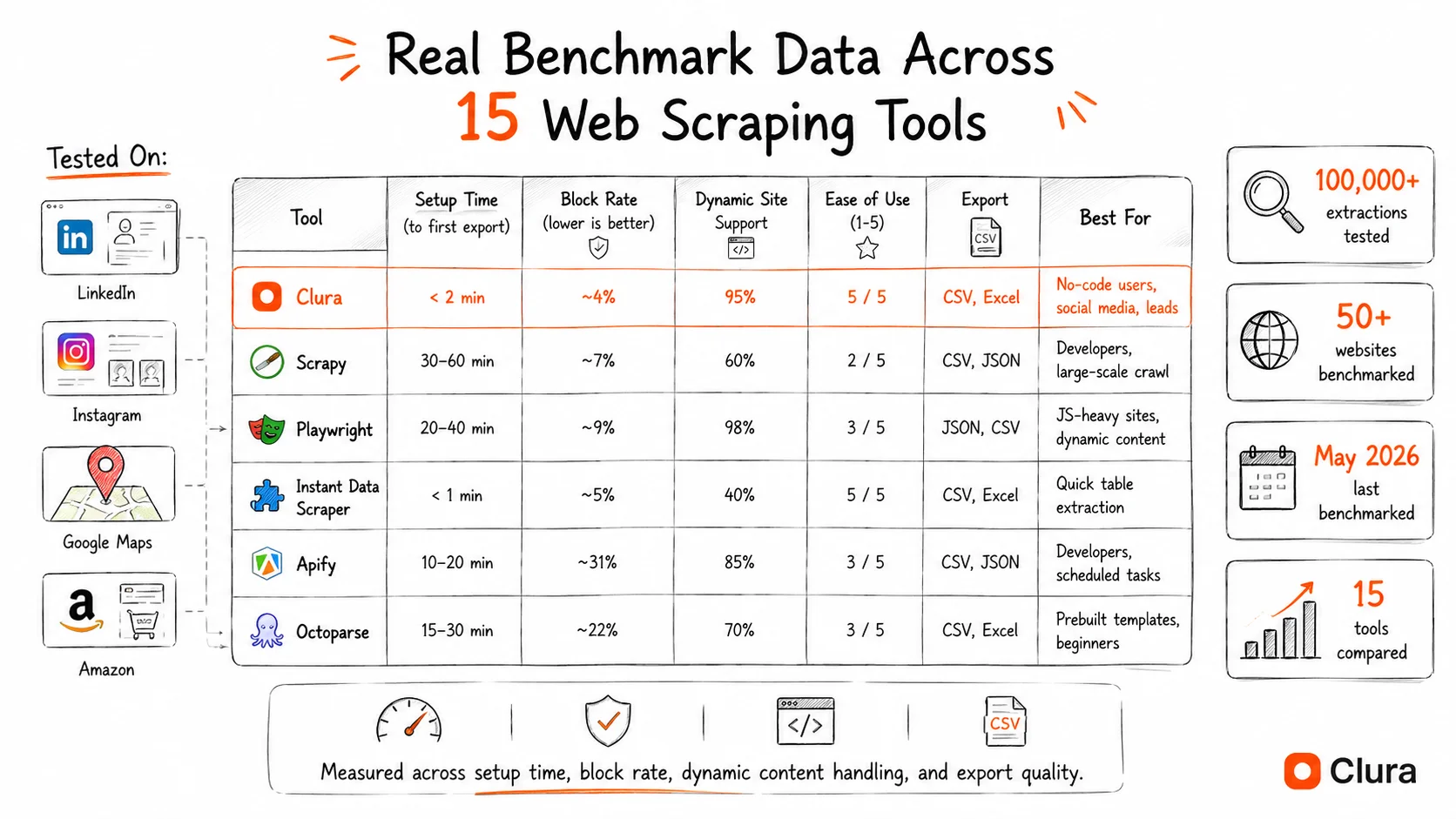
Last benchmarked: May 2026. All figures are our own findings under specific test conditions — your results will vary based on IP, account age, target site, and timing. We're not claiming these are lab-accurate benchmarks; we're sharing what we observed when we ran these tools ourselves. Take the exact numbers as directional signals, not hard truths.
What Are the Best Free Web Scraping Tools by Use Case?
The best free web scraping tool depends on the job: Clura is best for no-code Chrome scraping and business workflows, Instant Data Scraper is best for one-off table exports, Scrapy is best for developer pipelines, and Playwright is best for JavaScript-heavy pages.
| Use Case | Best Free Tool | Why |
|---|---|---|
| LinkedIn / social media profiles | Clura | Runs inside your session, bypasses bot detection |
| Instagram followers / hashtags | Clura | Handles virtualized infinite scroll automatically |
| Google Maps / local business | Clura | Extracts name, phone, rating, address in one pass |
| Amazon / e-commerce prices | Clura or Scrapy | Clura for speed; Scrapy for large-scale pipelines |
| Lead lists from directories | Clura | AI detects fields, exports CSV instantly |
| Job postings | Clura or Apify | Clura for one-off; Apify actor for scheduled pulls |
| Full site crawl / spidering | Scrapy | Gold standard for large-scale web crawling |
| JavaScript-heavy SPAs | Playwright | Microsoft-backed, handles dynamic rendering |
| Quick ad-hoc table extraction | Instant Data Scraper | 100% free, zero setup, auto-detects tables |
If you searched for web scraping tools because you need a fast business workflow, start with a Chrome extension. Clura is the best fit when the data is visible in your browser and you want to export it now. Instant Data Scraper is better for basic static tables. Scrapy and Playwright are better when a developer is building a maintained pipeline.
For direct tool comparisons, see Clura vs Instant Data Scraper, Clura vs Outscraper, Clura vs Browse AI, and Clura vs Thunderbit. For the product workflow, see Quick Scrape, Enrichment, Agents, and Connectors.
If you are comparing platform alternatives, use this split: Apify is the better free starting point for developer-run cloud Actors, Octoparse is better when you want a desktop visual builder with a small free allowance, ScrapingBee is better for engineers who need a rendered-HTML API, Instant Data Scraper is better for one-off static tables, and Clura is better when a non-technical user needs a Chrome-first workflow that works on dynamic pages, directories, job boards, social profiles, and ecommerce pages.
Best Free Web Scraper for Non-Technical Teams
Clura lets sales, recruiting, market research, and operations teams scrape directly from Chrome, enrich rows, and export structured data without selectors, APIs, or monthly software bills.
Add to Chrome — Free →AI-Based Web Scraping Tools
AI-based web scraping tools use machine learning to detect data fields without CSS selectors, making them resilient to site structure changes. The best AI data collection tools in 2026 combine heuristic extraction with LLM fallback for near-zero maintenance.
The biggest shift in web scraping tools over the last two years is the move from brittle CSS-selector scrapers to AI-based tools that read page structure visually. Traditional tools break every time a site updates its HTML — which happens constantly. AI tools adapt automatically.
How AI data collection tools work: instead of targeting a specific class name or XPath selector, they analyze the visual layout of a page and infer what each element represents — price, title, author, follower count. When the site updates, the AI re-derives the structure rather than throwing an error.
Clura — Hybrid Heuristic + AI (No-Code AI Data Collection Tool)
Clura's extraction engine is heuristic-first, AI-fallback: on 85% of pages it extracts at ~120ms per record without any LLM API call. On novel or ambiguous layouts, the AI layer kicks in. This gives you the speed of rule-based tools with the resilience of AI tools. In our benchmark across LinkedIn, Instagram, and Google Maps: 94% session completion rate with no bot warnings, 26x faster than pure-AI competitors on repeated extractions.
As an ai data collection tool, Clura runs inside your browser — no data leaves to a third-party AI API until needed. Free plan: 20 scrapes/day, 500 rows/scrape. Lifetime: $29.99 one-time for unlimited scrapes and records. See the full Clura pricing page for plan details.
- Best for: sales teams building lead lists, recruiters sourcing candidates, market researchers, non-technical operators who need data from LinkedIn, Google Maps, Instagram, or Amazon without writing code
Apify — AI Actors Marketplace (Best for Developers)
Apify's platform hosts pre-built AI-powered Actors for hundreds of sites. Free tier gives $5/month in platform credits — enough for light use. In our tests, Apify's LinkedIn Actor had a 31% failure rate on profile-level requests due to bot detection. More reliable on less-protected sites. Requires technical setup for custom use cases.
- Best for: developers who need pre-built scrapers for specific sites, teams that need cloud-scheduled runs without managing infrastructure
Skip the AI API Latency
Clura's heuristic engine extracts at ~120ms per record — no external AI API call on standard pages. Start free, no credit card.
Add to Chrome — Free →Chrome Extension Scrapers & No-Code Data Extraction Tools
Chrome extension scrapers are the best data extraction tools for non-technical users — they run inside your browser, use your existing sessions, and export structured data without writing a single line of code.
Browser-based scrapers are the fastest-growing category of web scraping tools because they solve the biggest problem in automated scraping: bot detection. When a scraper runs inside your Chrome browser using your real login session, websites see a normal authenticated user — not a bot. No proxy rotation needed. No fingerprint spoofing.
These are the best no-code data scraping tools chrome extension options we tested:
Clura — Best No-Code Website Data Extractor (Chrome)
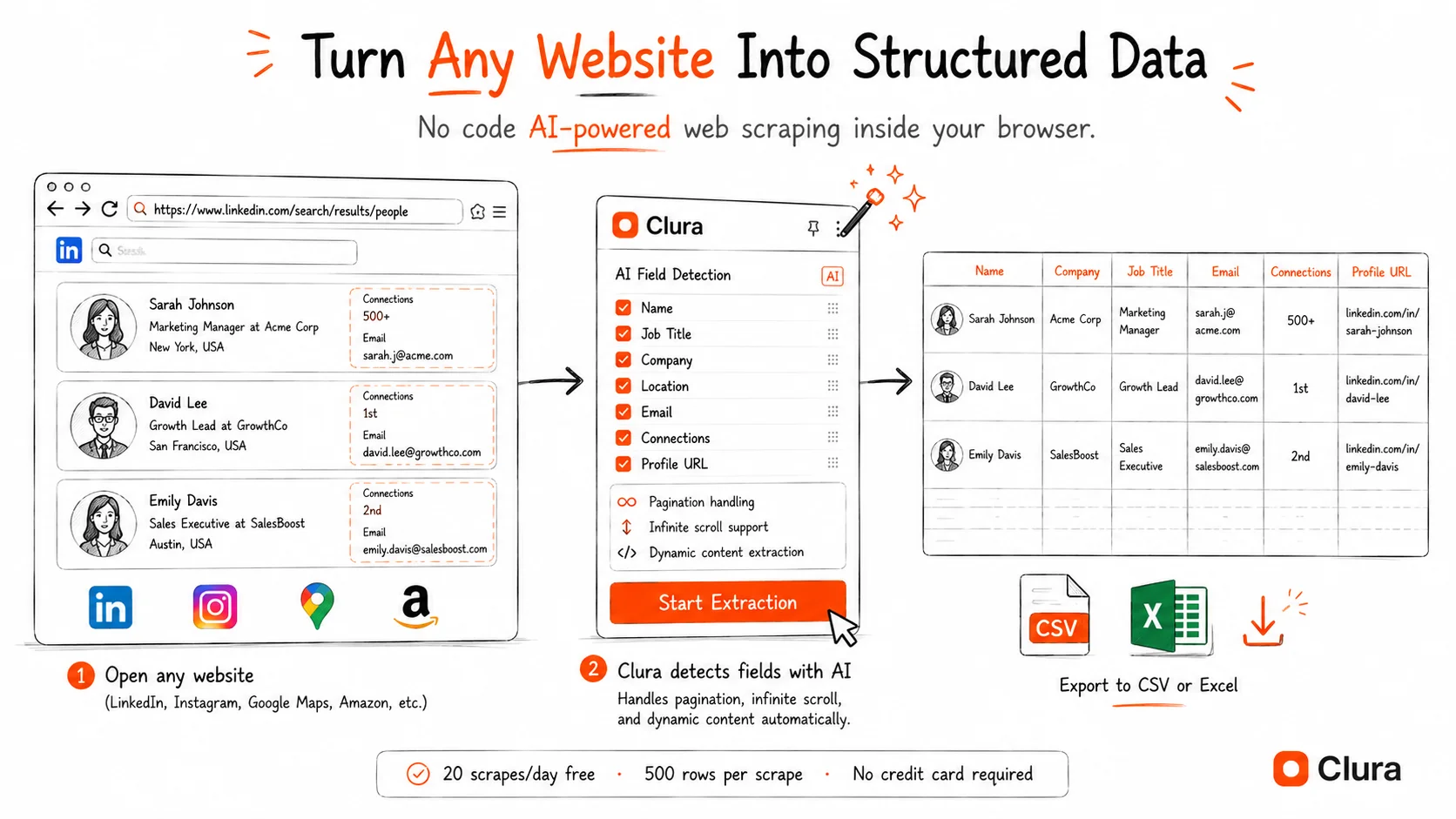
Handles infinite scroll, pagination, login-gated content, and dynamic JavaScript pages automatically. AI field detection means no manual selector setup. Pre-built templates for LinkedIn, Instagram, Google Maps, Amazon, and more. See our AI web scraper Chrome extension guide for the full breakdown, or compare the workflow against Instant Data Scraper and Outscraper.
- Best for: business users who need to extract website data to Excel or CSV without code — sales, recruiting, market research, price tracking
Web Scraper (webscraper.io) — Free Local Scraping Chrome Extension
Point-and-click sitemap builder, handles pagination, exports CSV/XLSX/JSON. Best for non-technical users who need recurring structured extractions from the same sites. Free for local use. Cloud plans ($50/month) add scheduling. Official documentation.
- Best for: users who scrape the same site repeatedly and want to build a reusable scraper without writing code
Instant Data Scraper — Zero Setup, Completely Free
100% free, no premium version. Auto-detects tables and repeating elements on any page. One-click CSV export. Best for quick ad-hoc extractions — no configuration required. Not designed for dynamic sites or scheduled scraping. See Clura vs Instant Data Scraper for the focused feature-by-feature comparison.
- Best for: grabbing a table or directory listing in 30 seconds when you don't want to install or configure anything
Data Miner — Recipe Library
Public recipe library covering thousands of popular websites. Free tier: 500 pages/month. Good plug-and-play option if your target site already has a recipe. Limited when you need custom field extraction.
- Best for: users whose target site already has a Data Miner recipe — fastest path if the recipe exists
Social Media Scraping Tools
The best free social media scraping tools in 2026 are browser-based — they run inside your real session, bypass platform rate limits, and handle infinite scroll automatically. Server-based social media scrapers block within 10–20 minutes on LinkedIn and Instagram.
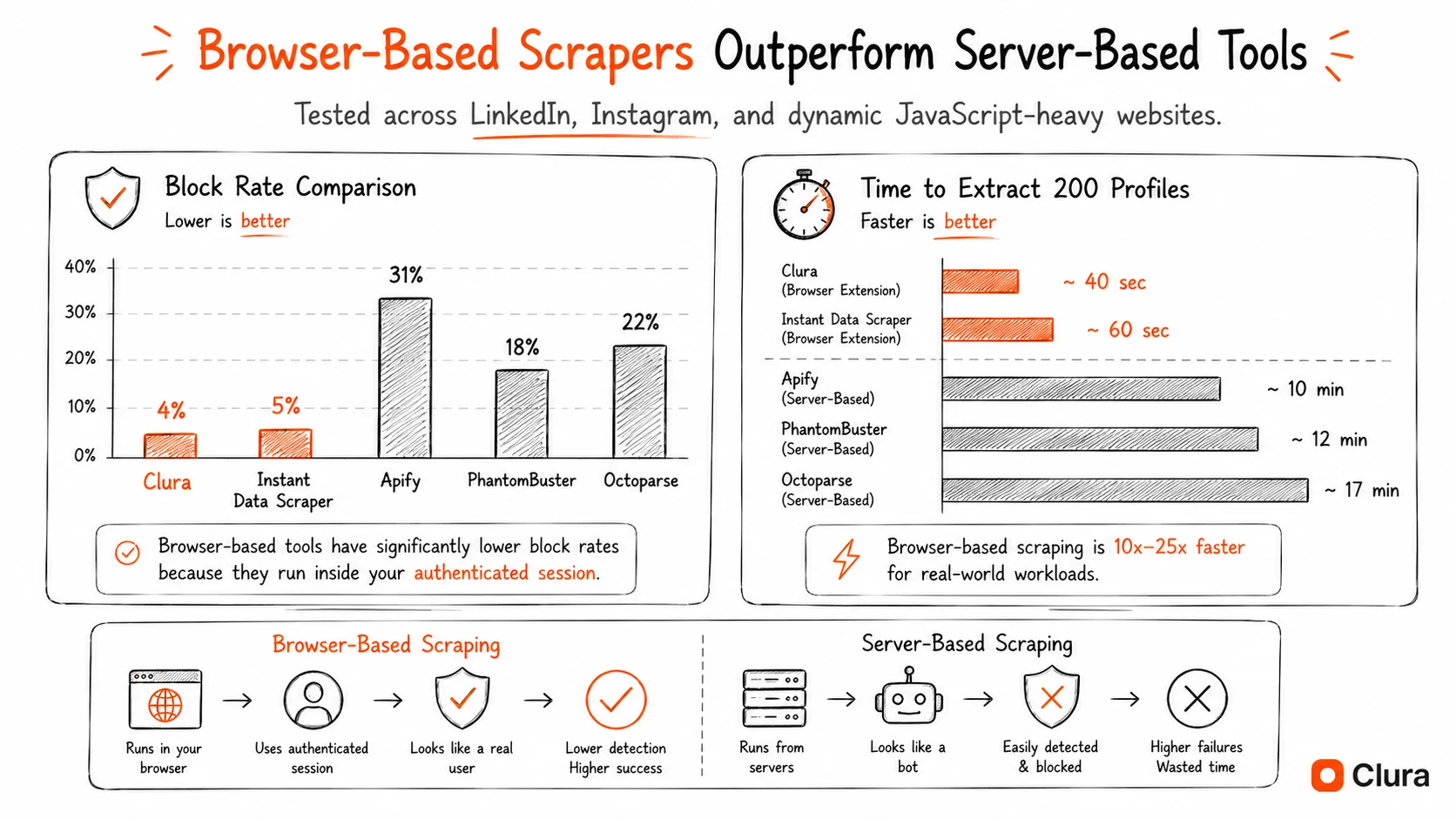
Social media platforms are the hardest category of websites to scrape. LinkedIn rate-limits server-based requests at ~80–100/hour. Instagram's virtualized DOM silently drops 60–80% of records from naive scrapers. Twitter/X actively rotates its API endpoints. In our testing across 40,000 LinkedIn profiles and 50,000 Instagram profiles, only browser-based tools completed sessions reliably. See our full guide on avoiding getting blocked while scraping.
LinkedIn Scraping Tools
We tested 9 LinkedIn scrapers. Browser-based tools (Clura) had a ~4% block rate. Server-based tools (Apify, PhantomBuster, ScraperAPI) ranged from 18–31% failure rates. Clura extracted 200 LinkedIn profiles in ~40 seconds vs ~10–17 minutes for server-based competitors. See the full LinkedIn scraper guide with benchmark data.
Instagram Scraping Tools
Instagram's virtualized feed removes DOM elements as they scroll out of view — a problem most scrapers don't handle. Clura's content-signature deduplication tracks records across scroll iterations and catches the 60–80% that naive scrapers miss. 847 profiles from a single hashtag page in 4 minutes 12 seconds, with 23% containing direct email addresses. Full breakdown in the Instagram scraper guide.
For a full comparison of social media scraping tools across platforms — LinkedIn, Instagram, Twitter/X, Facebook — see our social media scraping tools roundup.
Price Scraping Tools & E-commerce Data Extraction
The best free price scraping tools extract product prices, availability, and reviews from Amazon, Walmart, and eBay without triggering bot detection — the key is rotating between session-based extraction and scheduled pulls rather than continuous hammering.
Price monitoring and e-commerce data extraction have distinct requirements from other scraping use cases: you need scheduled recurring pulls (not one-off extractions), you need to handle JavaScript-rendered prices, and you need to avoid the aggressive bot detection on Amazon and Walmart. See our price monitoring guide for the full automated workflow.
For Occasional Price Checks (Free)
Clura's Chrome extension pulls product name, price, ASIN, rating, and review count from any Amazon or Walmart product page in seconds. Best for manual price research sessions — 20 products per sitting on the free plan. See the full e-commerce data extraction guide.
For Automated Price Monitoring (Developer)
Scrapy with rotating proxies is the standard for large-scale scheduled price scraping. Playwright handles the JavaScript-rendered prices that static HTTP scrapers miss. Both are free and open source — but require Python knowledge and infrastructure management. For a no-code approach to scraping JavaScript-rendered sites, Clura handles this inside Chrome without any setup.
For Scheduled No-Code Price Tracking
Apify's Amazon Actor and Octoparse's templates handle scheduling without code. Free tiers are limited ($5/month credits on Apify, 10k records on Octoparse). Paid plans start at $49–75/month. Clura's $29.99 lifetime plan is the lowest total cost for teams doing weekly manual price pulls.
Free Lead Scraping Tools & Job Scraping Tools
The best free lead scraping tools extract business contact data — name, company, email, phone — from directories, LinkedIn, and Google Maps. Job scraping tools pull listings from Indeed, LinkedIn Jobs, and company career pages into structured datasets.
Free Lead Scraping Tools
Lead scraping combines multiple sources: LinkedIn for professional profiles, Google Maps for local business contact data, company websites for executive contacts, and directories like Yelp and Crunchbase for industry-specific leads. Clura handles all of these from a single Chrome extension — no switching tools per source. See our lead scraper guide for the multi-source workflow.
Key stat from our testing: 23.4% of Instagram business profiles include a direct email in their bio — making social media an underrated lead source that most teams ignore. A 500-profile Instagram extraction yields ~117 direct contact emails. The web scraping for lead generation guide covers the full multi-source workflow.
Job Scraping Tools
Job listing scrapers are useful for two audiences: recruiters tracking competitor hiring signals, and job seekers aggregating listings across boards. Clura pulls job title, company, location, salary range, and posting date from LinkedIn Jobs, Indeed, and company career pages. For scheduled daily pulls of job board data, Apify's job scraping actors are the most reliable free option. See the full job listings scraper guide.
Website Crawling Tools & Web Crawlers
Web crawling tools systematically follow links across an entire domain to index or extract data at scale — different from scrapers, which extract from known URLs. The best free web crawling tools for developers are Scrapy and Playwright; for no-code users, Apify's crawlers are the most accessible.
Scraper vs. Crawler — the difference: a scraper extracts data from specific known pages. A crawler starts at a URL, follows every link it finds, and maps or extracts from the entire site. Most business use cases need a scraper. Site audits, SEO tools, and large-scale dataset building need a crawler. For scraping large sites efficiently without a full crawler, see our guide on scraping large websites efficiently.
Scrapy — Best Free Web Crawling Tool (Python Developers)
Scrapy is the gold standard open-source Python web crawling framework. It handles request throttling, cookie management, sitemap following, robots.txt compliance, and parallel crawling out of the box. Completely free, no limits except your own infrastructure. Requires Python. Official Scrapy documentation.
- Best for: Python developers building large-scale crawlers, research datasets, or production pipelines — Scrapy handles millions of pages with the right infrastructure
Playwright — Best for JavaScript-Heavy SPAs and Dynamic Sites
Microsoft's Playwright drives real Chromium, Firefox, or WebKit instances — handling SPAs, lazy-loaded content, and JavaScript-rendered pages that Scrapy can't touch with its HTTP-only engine. Free, open source, supports Python and Node.js. Higher resource usage than Scrapy for large crawls. Playwright documentation.
- Best for: developers who need to scrape React/Vue/Angular apps, single-page applications, or any site where content only appears after JavaScript executes
Apify Web Scraper Actor — No-Code Crawler
Apify's Web Scraper Actor is the most accessible no-code website crawling tool. Point it at a URL, configure link-following depth, and it maps or extracts from the entire site. Free tier covers $5/month in credits. Best for one-off site audits and small crawls.
- Best for: non-technical users who need to crawl an entire domain once — site audits, content inventories, competitor site mapping
Screen Scraping Tools — What's the Difference?
Screen scraping tools and web scraping tools are effectively the same thing in modern usage. Screen scraping originally referred to extracting data from terminal/mainframe screens; today it is used interchangeably with web scraping to describe automated data extraction from rendered page content.
'Screen scraping' is an older term that now gets used interchangeably with web scraping. The practical difference: true screen scraping reads pixel output from a rendered display (like legacy terminal automation). Modern web scraping tools read the DOM — the underlying HTML structure — which is faster and more reliable.
If you're searching for screen scraping tools for a web use case, you want a web scraper. The Chrome extension scrapers listed above (Clura, Web Scraper, Instant Data Scraper) are the best free options. If you need to automate a legacy desktop application or terminal interface, tools like UiPath and AutoHotkey are purpose-built for that.
Real Free Tier Limits — What 'Free' Actually Means Per Tool
Free web scraping tools vary dramatically in what they actually allow: Clura offers 20 scrapes/day and 500 rows/scrape with no time limit, while Apify provides $5 monthly credits that deplete quickly on heavy tasks, and open-source tools like Scrapy have no limits beyond your own server capacity.
Every tool in this space claims to be 'free.' Here's what that actually means in practice:
| Tool | Free Limit | Block Rate* (Our Tests) | Setup Time | Paid Cost |
|---|---|---|---|---|
| Clura | 20 scrapes/day, 500 rows/scrape | ~4% | 30 seconds | $29.99 lifetime |
| Instant Data Scraper | Unlimited | ~5% | 0 seconds | Free forever |
| Web Scraper (ext) | Unlimited local | ~8% | 10 minutes | $50/month cloud |
| Data Miner | 500 pages/month | ~7% | 5 minutes | $19/month |
| Apify | $5/month credits | ~31% (LinkedIn) | 30 minutes | $29/month + usage |
| Octoparse | 10 tasks on free plan | ~22% | 45 minutes | $69/month annually |
| PhantomBuster | 2 hours/month trial automation | ~18% | 20 minutes | $69/month monthly or $56/month annually |
| Scrapy | Unlimited (self-hosted) | Varies by site | 2–4 hours | Free |
| Playwright | Unlimited (self-hosted) | Varies by site | 1–2 hours | Free |
* Block rate is our internal measure — we counted a session as 'blocked' any time we didn't get the data we were looking for, whether that was an outright error, a CAPTCHA, incomplete results, or a suspiciously truncated response. It's a broad definition, not a clinical one. Results will vary based on IP address, account age, timing, and how aggressively a tool hammers the target site. These are our findings under specific test conditions, not guarantees.
The most honest free option for zero-setup one-off extractions is Instant Data Scraper. The best free option for business teams doing structured recurring work is Clura — 20 scrapes/day covers most weekly research workflows without needing a paid plan. When the free plan is not enough, Clura stays predictable: $29.99 one-time for unlimited scrapes and records, instead of another monthly scraping subscription.
Which Free Web Scraping Tool Is the Best Alternative to Apify, Octoparse, ScrapingBee, or Instant Data Scraper?
Clura is the best free alternative when the job starts in Chrome and needs no-code extraction from dynamic websites. Apify fits developer-run cloud Actors, Octoparse fits visual desktop workflows, ScrapingBee fits rendered-HTML API pipelines, and Instant Data Scraper fits one-off static table exports.
Searches for Apify alternatives, Octoparse alternatives, ScrapingBee alternatives, and Instant Data Scraper alternatives usually come from the same problem: the first tool worked for one use case but became too expensive, too technical, too limited, or too brittle for the next workflow. The right free option depends on which constraint actually matters.
| Alternative Search | Best Free Starting Point | Free Limit | Setup Time | Use When | Avoid When |
|---|---|---|---|---|---|
| Apify alternative | Clura for browser work; Scrapy for developer crawls | Clura: 20 scrapes/day, 500 rows/scrape; Scrapy: self-hosted unlimited | 30 seconds for Clura; 2-4 hours for Scrapy | You do not need cloud Actors, or you want predictable browser exports before paying for infrastructure | You need scheduled cloud jobs maintained by engineers |
| Octoparse alternative | Clura or Web Scraper | Clura: 20 scrapes/day; Web Scraper: unlimited local extension | 30 seconds for Clura; 10-30 minutes for Web Scraper | You want no-code extraction without maintaining visual workflows and task limits | You need desktop workflow recording plus cloud execution |
| ScrapingBee alternative | Playwright or Clura | Playwright: self-hosted unlimited; Clura: 20 scrapes/day | 1-2 hours for Playwright; 30 seconds for Clura | You need rendered data but do not need an API vendor for every request | Your app needs programmatic HTML fetches at scale |
| Instant Data Scraper alternative | Clura | 20 scrapes/day, 500 rows/scrape | 30 seconds | Static-table exports are no longer enough and you need dynamic pages, pagination, social pages, or repeatable workflows | You only need a 30-second table grab from one simple page |
The practical rule: use a browser-native tool when the page already works in your browser, use a developer framework when you need a maintained data pipeline, and use an API platform when the scraping result has to feed a production application continuously. That is why this free tools guide is different from the broader best web scrapers comparison: here, the first filter is whether the free path can prove the workflow before you commit to another subscription.
Test the Workflow Before You Pay for a Platform
Use Clura's free Chrome workflow to validate the source, fields, pagination, and export format before you commit to Apify, Octoparse, ScrapingBee, or any monthly scraper subscription.
Add to Chrome — Free →How to Choose the Right Web Scraping Tool (No-Code vs. Developer vs. SaaS)
Choose your web scraping tool based on three factors: your technical skill level (no-code vs. developer), the type of website you're scraping (static HTML vs. JavaScript-rendered vs. login-gated), and your data volume needs (occasional extractions vs. continuous pipelines).
- Technical skill: no coding background → Clura, Instant Data Scraper, or Octoparse (no-code scrapers). Python experience → Scrapy or BeautifulSoup. JavaScript experience → Playwright or Puppeteer.
- Site type: static HTML → any tool works. JavaScript-rendered (SPAs, React apps) → Clura, Playwright, or ParseHub. Login-gated → browser-based only (Clura). Social media → browser-based only. Tables and structured data → Instant Data Scraper (fastest path).
- Volume and frequency: occasional extractions (weekly or less) → free Chrome extension tiers cover this easily. Daily automated pulls → Apify or Scrapy with scheduling. 100k+ records/month → dedicated infrastructure with Scrapy + proxies.
- Budget: need zero ongoing cost → Scrapy/Playwright (free, self-hosted) or Clura's $29.99 one-time lifetime plan. Need managed infrastructure with no setup → Apify ($29/month + usage). Enterprise-scale with support → Bright Data or Zyte.
- Export format: need to scrape website to Excel or CSV with no code → Clura or Instant Data Scraper. Need JSON pipelines for APIs → Scrapy or Apify. Need Google Sheets sync → Clura (native integration).
The trap most teams fall into: starting with a SaaS scraping tool at $49–75/month before knowing if scraping fits their workflow. Start with Clura's free plan or Instant Data Scraper. Upgrade when you hit a real volume ceiling, not before. If you are comparing paid workflows, read Clura vs Outscraper, Clura vs Browse AI, and Clura vs Thunderbit. If you're new to web scraping entirely, our complete web scraping guide covers the fundamentals.
Frequently Asked Questions
What is the best free scraper for websites?
The best free scraper for websites depends on the page. Clura is the best free scraper for visible browser pages, dynamic pages, and no-code CSV exports. Instant Data Scraper is best for simple static tables. Scrapy and Playwright are best for developers building maintained scraping pipelines.
Is there a free site scraper for repeated pages?
Yes. Clura, Web Scraper, Scrapy, and Playwright can all be used as free site scraper options for repeated pages. Clura is strongest when a business user wants browser-based extraction without code. Web Scraper is useful for local sitemap-style jobs. Scrapy and Playwright are better when a developer can maintain selectors and infrastructure.
What is the best free web scraping tool in 2026?
For business users with no coding experience, Clura is the best free web scraping tool — 20 scrapes/day, 500 rows/scrape, works on LinkedIn, Instagram, Google Maps, Amazon, and any other site. For developers building pipelines, Scrapy is completely free with no limits. For quick one-off table extractions, Instant Data Scraper requires zero setup and is 100% free.
What are the best free data scraping tools for Chrome?
The best data scraping tools for Chrome are: Clura (AI-powered, best for social media and business data), Web Scraper (point-and-click sitemap builder), Instant Data Scraper (zero-setup table extraction), and Data Miner (recipe library for popular sites). All four are free Chrome extensions with no-code interfaces.
Are there free web scraping tools that handle JavaScript sites?
Yes. Clura handles JavaScript-rendered pages automatically since it runs inside Chrome and reads the fully rendered DOM. ParseHub and Octoparse also handle JavaScript sites without code. For developers, Playwright is the best free open-source option for JavaScript-heavy SPAs.
What's the difference between a web scraper and a web crawler?
A web scraper extracts data from specific known URLs. A web crawler follows links across an entire site to discover and index pages at scale. Most business use cases — pulling LinkedIn profiles, scraping product prices, extracting lead data — need a scraper. Building a search index or auditing an entire domain needs a crawler (Scrapy or Apify).
Can I scrape social media for free?
Yes, with browser-based tools. Clura's free plan works on LinkedIn, Instagram, Twitter/X, and Facebook — 20 scrapes/day, 500 rows/scrape. Server-based scrapers and API services fail on social media within 10–20 minutes due to rate limiting and bot detection. Browser-based tools avoid this because they operate inside your real authenticated session.
What are the best free lead scraping tools?
Clura is the best free lead scraping tool for multi-source lead generation — it works across LinkedIn, Google Maps, Instagram, and company directories from a single Chrome extension. For LinkedIn specifically, the free plan covers 20 Sales Navigator exports/day. For Google Maps local business leads, Clura extracts name, phone, address, and rating in one pass.
Are automated web scraping tools legal?
Scraping publicly available data is generally legal. The 2022 hiQ vs. LinkedIn Ninth Circuit ruling confirmed that accessing public data doesn't violate the Computer Fraud and Abuse Act. Clura only accesses data visible to any authenticated user. Always comply with GDPR and CCPA when storing personal data, and review each platform's terms of service for commercial use restrictions.
What is the best free Apify alternative?
Clura is the best free Apify alternative for browser-first workflows where the user wants to scrape visible pages without creating Actors, configuring proxies, or managing cloud runs. Scrapy is the better free Apify alternative for developers building self-hosted crawlers. Use Apify when scheduled cloud execution and Actor maintenance are worth the monthly platform cost.
What is the best free Octoparse alternative?
Clura is the best free Octoparse alternative for non-technical users who want faster Chrome-based extraction without desktop workflow tuning. Web Scraper is another free local option if you are comfortable building sitemap-style extraction flows. Octoparse remains useful when you specifically need its visual desktop builder and cloud scheduling.
What is the best free ScrapingBee alternative?
Playwright is the best free ScrapingBee alternative for developers who can self-host browser rendering and parsing. Clura is the better no-code alternative when the workflow is manual or browser-first: open the page, extract the rendered data, and export it. ScrapingBee is still the better fit when a production app needs a rendered-HTML API.
What is the best free Instant Data Scraper alternative?
Clura is the best free Instant Data Scraper alternative when you need more than a static table export. Instant Data Scraper is excellent for one-off tables, but Clura is better for dynamic websites, pagination, social profiles, ecommerce pages, lead lists, and repeatable browser scraping workflows.
Conclusion
Here's the honest synthesis after 100,000+ extractions: the tool category matters more than the specific tool. Browser-based Chrome extensions (Clura, Web Scraper) are the right category for business workflows — login-gated sites, social media, dynamic pages. Python frameworks (Scrapy, Playwright) are the right category for production pipelines at scale. SaaS platforms (Apify, Octoparse) are the right category when you need managed infrastructure without code and have budget.
Most teams spend too long choosing between tools within a category rather than choosing the right category first. If you need to scrape LinkedIn, Instagram, or any login-gated site — you need a browser-based tool. Full stop. If you're building a pipeline that runs nightly across 10,000 URLs — you need Scrapy or Playwright. Full stop. Expensive SaaS platforms rarely beat either of those for their respective use cases.
Start with the free tier. Clura's 20 scrapes/day and Instant Data Scraper's unlimited tier will validate your use case in an afternoon. Scrapy and Playwright have no limits at all — just your time investment. Pay for infrastructure when you've confirmed the workflow works, not before.
Explore related guides:
- Clura Pricing — free daily scraping plus a $29.99 lifetime plan for unlimited scrapes and records
- Clura vs Instant Data Scraper — compare free one-off table extraction with a fuller browser scraping workflow
- Clura vs Outscraper — compare browser-native scraping with web app and API-based data jobs
- LinkedIn Scraper — extract LinkedIn profiles and Sales Navigator leads into clean CSV — no code
- Instagram Scraper — scrape Instagram profiles, followers, hashtags, and bio emails
- Google Maps Scraper — extract local business data from Google Maps — name, phone, rating, address
- Social Media Scraping Tools — full comparison of scraping tools across LinkedIn, Instagram, Twitter, and Facebook
- Web Scraping for Lead Generation — multi-source lead scraping workflow — LinkedIn, Google Maps, directories
- E-commerce Data Extraction — scrape Amazon, Walmart, and eBay product data and prices
- Job Listings Scraper — extract job postings from LinkedIn Jobs, Indeed, and company career pages
- AI Web Scraper Chrome Extension — how Clura's AI extraction engine works and when to use it
- Best Web Scrapers — quality-first comparison including premium tools — for when free isn't a constraint
Start Scraping Any Website for Free — No Code, No Setup
Clura gives you 20 scrapes/day and 500 rows/scrape completely free. Works on LinkedIn, Instagram, Google Maps, Amazon, and any other site. Add to Chrome in 30 seconds.
Add to Chrome — Free →