
Amazon Product Scraper Guide
If you are an ecommerce operator, marketplace seller, or product researcher comparing prices across a category, an Amazon product scraper turns search results into a spreadsheet you can sort, filter, and revisit. Instead of copying product names, prices, ASINs, ratings, review counts, images, and URLs one by one, you can export the visible product grid and analyze the market in minutes.
The common trap is starting with a Python tutorial before defining the workflow. For Amazon product data scraping, the real job is usually competitor pricing, assortment research, sponsored-listing checks, or product gap analysis. Amazon's JavaScript rendering and bot detection still matter, but the best method is the one that gives your team clean rows it can actually use.
Build an Amazon product research sheet from Chrome
Open an Amazon search, category, or bestseller page, run Clura, capture products, prices, ASINs, ratings, images, and URLs, then export the rows for pricing and assortment analysis.
Add to Chrome — Free →What Is an Amazon Scraper?
An Amazon scraper is a tool that automatically extracts product data — names, prices, ASINs, ratings, review counts, and URLs — from Amazon search results and product pages. It replaces manual copy-pasting for product research, competitor analysis, and price tracking.
An Amazon scraper reads the structure of an Amazon page and pulls out the data fields you care about — the same information you would copy manually, but across hundreds of listings at once.
The most common fields an Amazon scraper extracts:
- Product name / title
- Price (current, original, discounted)
- ASIN (Amazon Standard Identification Number)
- Star rating
- Review count
- Product URL
- Product image or image URL
- Brand
- Prime eligibility
- Best seller rank (BSR)
Amazon scrapers are used by ecommerce sellers to monitor competitor pricing, product researchers to identify gaps in a niche, agencies to build client product catalogs, and analysts tracking price trends across categories. The cleanest workflow starts from the business question — price gap, assortment overlap, review density, or sponsored placement — and then extracts only the fields needed to answer it.
How to Scrape Amazon Without Code (Step-by-Step)
To scrape Amazon without code: open an Amazon search page, click the Clura Chrome extension, let it detect the product listing pattern, and export to CSV. The whole process takes under 5 minutes and works on search results, category pages, and best seller lists.
The no-code path to Amazon product data uses a browser extension that reads the fully rendered page — no API key, no Python, no proxy setup. Here is the exact workflow:
- Open Amazon and run your search. Go to Amazon.com and search for the product category or keyword you want to scrape (e.g. "wireless earbuds under $50" or "kitchen knives"). The search results page is your starting point.
- Open Clura from the Chrome toolbar. Click the Clura extension icon. It opens as a side panel and detects the repeating product card structure on the page.
- Check the detected fields. Clura shows a preview — product name, price, rating, review count, ASIN, and URL. Confirm the fields look correct.
- Export to CSV or Excel. Click Export. You get a clean spreadsheet with one row per product and one column per field.
- Paginate if needed. For more results, Clura handles pagination automatically — no clicking through pages manually.
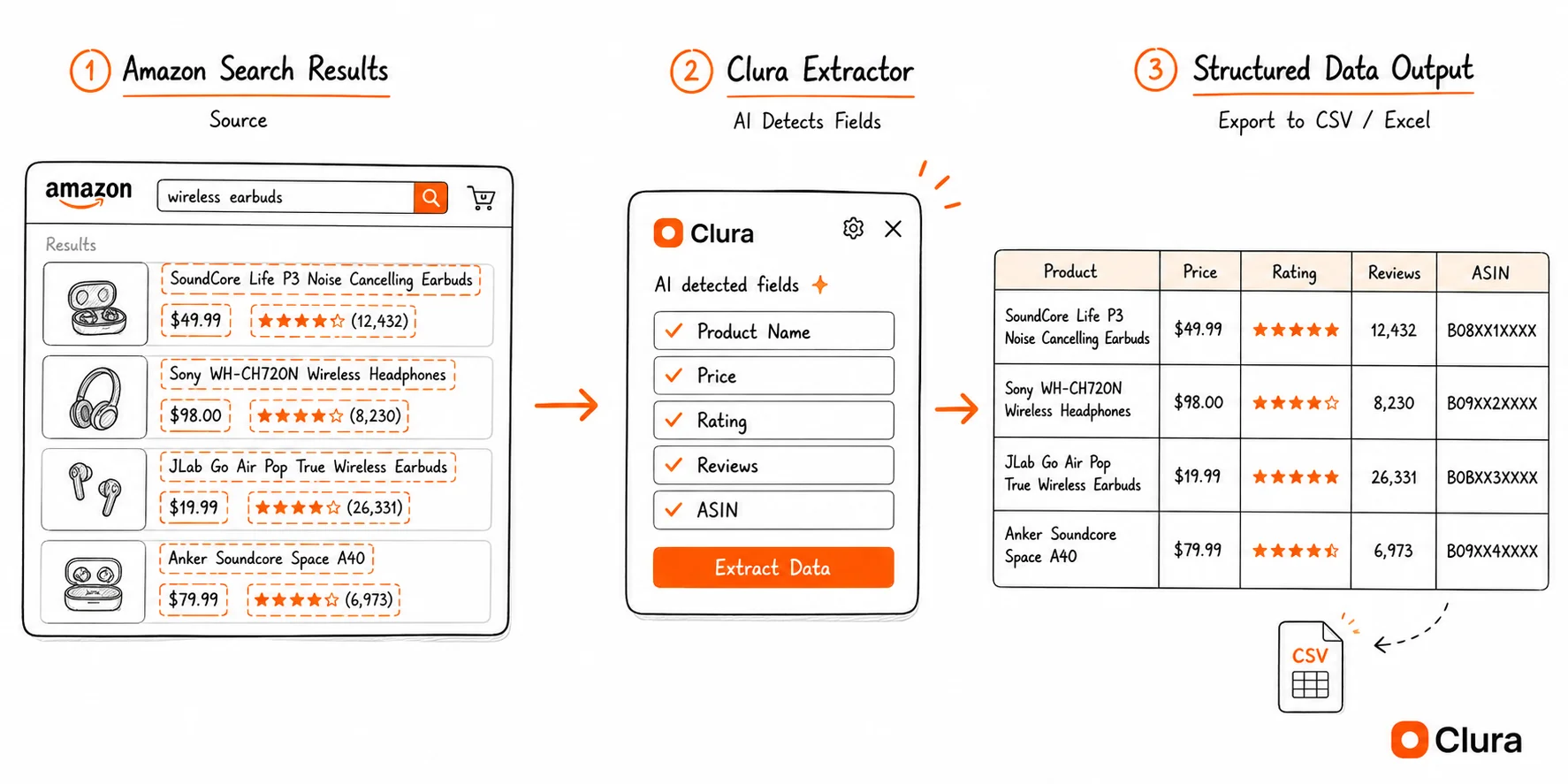
A 200-product Amazon category export that would take 3 hours manually takes under 10 minutes with a browser extension.
What Data Can You Extract from Amazon?
From Amazon search result pages, you can extract product name, price, ASIN, star rating, review count, brand, and product URL. From individual product detail pages, you can also extract description, specifications, and seller information.
The data available depends on which type of Amazon page you scrape:
| Page Type | Key Fields Available |
|---|---|
| Search results page | Product name, price, rating, review count, ASIN, product URL, Prime badge, sponsored flag |
| Category / bestseller page | BSR position, product name, price, rating, ASIN, category |
| Product detail page | Full title, all price variants, full review breakdown, specs, seller info, description |
For most use cases — competitor research, price tracking, product catalog building — the search results page gives you everything you need. A single search returns up to 60 results per page, and Amazon allows pagination to 400+ results per keyword.
ASINs are especially valuable: once you have a list of ASINs, you can cross-reference them with other tools, look them up in Seller Central, or pass them to a repricing tool. For daily price tracking across time, see the Amazon price scraper guide. To compare tools before committing, see the Amazon product research tools comparison.
Amazon Scraper Use Cases
Amazon scrapers are used for competitor price monitoring, product research (finding gaps in a niche), catalog migration, and bestseller tracking. Each use case maps to a specific type of Amazon page and data export.
Competitor price monitoring
Scrape a competitor's listings or your own category to get a price snapshot across hundreds of products. Export ASIN, product name, and current price for a point-in-time view. For daily automated tracking — Buy Box monitoring, price change alerts, repricing patterns — see the Amazon price scraper guide. To see how the same products are priced across Google's shopping results, see the Google Shopping scraper guide.
Product research and niche analysis
Search a keyword on Amazon, scrape all results, and sort by review count and rating. Low review count + high rating = early traction. High review count + low average = a market with quality problems you can solve. This analysis takes 30 minutes manually per keyword and 3 minutes with a scraper.
Catalog migration and data enrichment
Agencies and brand managers use Amazon scrapers to pull product catalog data into a spreadsheet for PIM systems, external marketplaces, or client reporting. Extracting 500 ASINs with titles, prices, and images is a one-time 20-minute job with a Chrome extension.
Bestseller and trend tracking
Amazon's Best Sellers lists are public and update hourly. Scrape the top 100 in any category to see which products are rising and which are dropping. This is how sourcing teams and private label sellers identify whitespace before it gets competitive.
| Use Case | Page to Scrape | Key Fields | Frequency |
|---|---|---|---|
| Price monitoring | Competitor search / ASIN list | ASIN, price, Prime flag | Daily |
| Product research | Keyword search results | Title, rating, review count, price | One-time |
| Catalog migration | Your own product pages | Title, ASIN, description, specs | One-time |
| Trend tracking | Bestseller category pages | BSR, title, price, brand | Weekly |
Is an Amazon Product Scraper Different from an Ecommerce Product Scraper?
An Amazon product scraper is a specialized ecommerce product scraper for Amazon search, category, bestseller, and product detail pages. The workflow is the same as broader ecommerce scraping: load a product listing page, extract repeated product cards, then export names, prices, images, ratings, and URLs to CSV.
An ecommerce product scraper works across product listing pages: Amazon search results, Shopify collections, Etsy categories, eBay listings, Walmart shelves, and competitor stores. Amazon is simply one of the highest-value sources because it exposes prices, ratings, reviews, Prime status, ASINs, product images, and URLs in a consistent card layout.
| Source | Best Fields | Best Use Case | Related Clura Guide |
|---|---|---|---|
| Amazon | ASIN, title, price, image, rating, reviews, Prime, URL | Product research and competitor price snapshots | /blog/amazon-scraper |
| Shopify stores | Title, price, image, variant, product URL, availability | Competitor catalog exports | /blog/shopify-scraper |
| Etsy | Listing title, shop, price, rating, image, URL | Marketplace niche research | /blog/etsy-scraper |
| eBay | Listing title, seller, price, sold signal, image, URL | Resale pricing and sold-listing research | /blog/ebay-scraper |
For a broader marketplace workflow, use the ecommerce data extraction guide. For paid-search visitors who want a product-listing demo first, the ecommerce product data scraper landing page shows the latest Amazon listing video and sample output.
Why a Chrome Extension Works Where Other Scrapers Fail
Amazon renders its product listings via JavaScript, which means server-side scrapers and simple fetch-based tools often return empty results. A Chrome extension reads the fully rendered page inside your browser — the same view you see — so it captures product data reliably.
Most scrapers read raw HTML. Amazon loads its product listings after the page loads, via JavaScript. So they scrape the page before the products exist — and return nothing.
A Chrome extension runs inside your browser and reads the page after JavaScript has fully executed. Amazon has already loaded all the product data by the time Clura reads it. No blocked requests, no empty rows.
There's a second advantage: your browser session. A server-side scraper hits Amazon cold — no account, no location, generic results. Clura reads what you see: your Prime pricing, your location's inventory, your personalized rankings.
Why not use an API or Python? APIs require keys, quotas, and approved access. Python scripts need proxies to avoid blocks, add hours of setup, and break on every Amazon layout update. A Chrome extension works now, in your browser, on the same page you're already viewing.
For a deeper look at why JavaScript rendering breaks most scrapers, see how to scrape dynamic websites. For the full picture of Chrome extension scrapers, see the web scraper Chrome extension guide.
Frequently Asked Questions
What is the best Amazon product scraper?
The best Amazon product scraper for non-technical users is a Chrome extension that reads the rendered search or category page and exports product rows to CSV. Clura works well because it extracts visible product names, prices, ASINs, ratings, review counts, images, and URLs without Python, proxies, or API access.
Can I use an Amazon product scraper with Python?
You can build an Amazon product scraper with Python, but it usually requires Playwright or Selenium, proxy handling, user-agent rotation, retry logic, and selector maintenance. For one-time product research or competitor price snapshots, a browser extension is faster because Amazon has already rendered the products in Chrome.
Is it legal to scrape Amazon?
Scraping publicly visible data from Amazon — product names, prices, ratings — is legal in most jurisdictions under the hiQ v. LinkedIn ruling and similar precedents that protect access to public data. Amazon's Terms of Service prohibit scraping, so there is a ToS risk. Operating through your browser at human-like speeds, rather than running bots, minimizes that risk significantly. For any commercial use, review your jurisdiction's applicable laws.
Does Amazon block scrapers?
Amazon aggressively blocks server-side bots that send high-volume requests. Browser-based scrapers that operate through a real Chrome session at human speeds are far less likely to be blocked — they look identical to normal browsing. Clura runs inside your Chrome session, which means your requests go through your browser exactly as they would if you were browsing manually.
What is the best free Amazon scraper?
Clura is a free Chrome extension that scrapes Amazon search results and category pages without code. It works on Amazon's JavaScript-rendered pages (which simpler tools miss), uses your browser session for personalized results, and exports to CSV or Excel in one click.
Can I scrape Amazon product prices?
Yes. Amazon product prices are visible in search results and on product detail pages, and Clura extracts them as part of the standard product data export. For ongoing daily price tracking — Buy Box monitoring, repricing alerts — see the Amazon price scraper guide.
Can I scrape Amazon reviews?
Yes, from individual product review pages. Navigate to a product's review page, open Clura, and it will detect the repeating review card structure — reviewer name, rating, date, and review text. Paginate through multiple pages and combine the exports for large review sets.
How many products can I scrape from Amazon at once?
A standard Amazon search results page shows up to 24–60 results. With pagination, a single keyword can return 400+ results across multiple pages. Clura handles pagination automatically.
Conclusion
Amazon scraping isn't a coding problem anymore. If you can open a page, you can extract the data.
Every Python tutorial adds proxies, CAPTCHAs, and rotating user agents before you see a single row. A Chrome extension skips all of that — your browser already handles rendering, authentication, and session management.
Open Amazon, run your search, click Export.
Explore related guides:
- Price Scraper Guide — why Python price scrapers break on e-commerce sites and how browser-native extraction fixes it
- Amazon Price Scraper Guide — how to track competitor prices daily, monitor Buy Box changes, and automate price intelligence
- Amazon Product Research Tools — compare Amazon scraping and research tools side by side
- Amazon API Scraping — the developer approach to Amazon data — when an API is the right tool
- Web Scraper Chrome Extension Guide — how browser-based scrapers handle dynamic content and JavaScript-heavy pages
- Facebook Marketplace Scraper — second-hand pricing data for categories Amazon doesn't cover — vehicles, local goods, FSBO listings
- Zillow Scraper Guide — apply the same browser-native scraping workflow to real-estate prices, listings, and property comps
- Etsy Scraper Guide — export Etsy listing titles, prices, shop names, ratings, images, and URLs to CSV
- eBay Scraper Guide — export eBay listings, sold prices, and seller data to CSV — same no-code workflow across marketplaces
Export Amazon product data to Excel in minutes — no code required
Install Clura, open any Amazon search page, and export product names, prices, ASINs, and ratings to a spreadsheet in one click.
Add to Chrome — Free →