
Real Estate Data · Updated August 2026
Zillow Scraper: Export Listings to CSV in 2026
A Zillow scraper should help you turn visible property listings into a clean CSV, not send you into proxy setup, Python 403 errors, or CAPTCHA loops. This guide shows how web scraping Zillow works in 2026, what data you can extract, and how to pull 100+ listings from Zillow-style search pages in under 2 minutes using your own Chrome browser.
Rohith
Updated August 21, 2026
Try Clura for Free
No code required. Extract data from any website and export to CSV, Excel, or Google Sheets in minutes.
Scrape Zillow listings for freeWatch Clura scrape real estate listing cards from a Zillow-style search page, detect property fields, paginate, and prepare the export.
Section 1
Why Do Traditional Zillow Scrapers Fail?
Traditional Zillow scrapers fail because Zillow runs PerimeterX, one of the most aggressive bot-detection systems on the web. The moment your scraper sends a request from a cloud server or data center IP, PerimeterX recognizes it for what it is: non-human traffic. You get a 403 Forbidden response before your code even touches the HTML.
This isn't a bug you can fix with better headers. PerimeterX fingerprints the entire request signature — the TLS handshake, the HTTP/2 frame ordering, the TCP window size, the timing between requests, and the absence of browser-specific DOM events. A Python requests library produces a fundamentally different signature than Chrome, even if you spoof every header perfectly.
Rotating proxies don't solve it either. Zillow specifically blocks residential proxy networks by detecting behavioral patterns: no mouse movement, no scroll events, page-to-page timing that's too consistent, and session IDs that don't persist the way a real browser session would. You can spend $200/month on premium residential proxies and still hit a wall. This is the same core problem covered in how to avoid getting blocked while web scraping — the root cause is always method, not effort.
Browser automation tools like Puppeteer and Playwright get slightly further — they use a real browser engine — but Zillow detects them through headless browser signals: missing GPU info, predictable viewport sizes, navigator.webdriver set to true, and automation-specific API behavior. Patches exist, but Zillow's detection evolves faster than the patches.
The only approach that consistently works is running the scraper inside a real Chrome session, on your own machine, with your own residential IP. That's not a workaround — it's the only logical architecture for a site with Zillow's security posture.
🔧 Developer Note
PerimeterX uses behavioral biometrics (mouse entropy, scroll velocity, focus/blur events) in addition to network fingerprinting. A request from an AWS or GCP data center has a TLS ClientHello with a cipher suite ordering that no real browser produces. This is detected in milliseconds — before your request is even parsed. No header spoofing fixes this at the network layer.
Section 2
From Zestimate to Tax History: What Data Can You Actually Extract?
Zillow packs a surprising amount of data into each listing card on the search results page, and even more inside the individual property detail view. Since Clura runs in your real browser, it sees everything a human sees — including data loaded dynamically in JavaScript, hidden behind tab clicks, or rendered only after scroll events. The same browser-native workflow also applies when you are scraping real estate listings across Redfin, Realtor.com, broker pages, and regional property portals.
Here's what's extractable from the search results page alone:
| Field | Location | Example Value |
|---|---|---|
| List Price | Search results card | $485,000 |
| Address | Search results card | 1234 Oak St, Austin, TX 78701 |
| Beds / Baths | Search results card | 3 bd / 2 ba |
| Square Footage | Search results card | 1,847 sqft |
| Price per sqft | Search results card | $263/sqft |
| Days on Zillow | Search results card | 12 days |
| Listing Status | Search results card | For Sale / Pending / Sold |
| Zestimate | Search results card | $491,200 |
| Agent / Broker | Detail page tab | Redfin Corporation |
| Property Type | Detail page tab | Single Family |
| Year Built | Detail page tab | 1998 |
| HOA Fees | Detail page tab | $120/month |
| Annual Tax | Detail page tab | $7,240 |
| Listing URL | Extracted automatically | https://zillow.com/homedetails/... |
For most real estate investors and agents, the search results fields (price, address, beds/baths, sqft, days on market, Zestimate) are enough for lead generation and market analysis. The detail-page fields require navigating into each listing individually — a workflow better suited for targeted research on a shortlist rather than bulk extraction.
💡 Key insight
Zillow's "Days on Zillow" field is one of the most valuable for investors. Properties sitting 30+ days with no price drop often signal a motivated seller. Filtering your extracted CSV by this column is faster than any Zillow UI filter.
Section 3
How Can You Scrape Zillow Without Proxies or CAPTCHAs?
You can scrape Zillow without proxies by running the extraction inside a real Chrome browser session instead of a cloud bot. The reason Clura can scrape Zillow reliably isn't clever engineering around Zillow's defenses — it's that there's nothing for Zillow to defend against. Clura runs entirely inside your Chrome browser as an extension. Every request goes out from your actual Chrome process, with your real residential IP, with all the browser events (scroll, mousemove, focus, visibility changes) that PerimeterX expects to see.
To Zillow's systems, Clura-powered extraction looks identical to you manually browsing the site. The TLS handshake is Chrome's. The IP is yours. The session cookies are real. The timing between page loads has natural variance because Clura includes configurable delays between actions.
Cloud Scraper vs. Browser-Native: What Zillow Actually Sees
| Signal | Cloud/Proxy Scraper | Clura (Browser-Native) |
|---|---|---|
| IP Type | Data center / proxy pool | Your home/office ISP |
| TLS Fingerprint | Mismatched (requests/axios) | Real Chrome fingerprint |
| Browser Events | None (HTTP only) | Full DOM event stream |
| Session Cookies | Fresh / none | Your real Zillow session |
| Request Timing | Machine-consistent | Natural variance |
| Viewport / GPU Info | Missing or spoofed | Real hardware values |
| Result | 403 / CAPTCHA loop | Clean HTML, every time |
This also means you don't need to buy proxy services. Residential rotating proxies cost $10–$25 per GB, and Zillow's pages are heavy — a search results page with 40 listings loads 3–5 MB of JS and API responses. Running 1,000 listings through proxies costs $30–$125 in bandwidth alone, before you account for the blocks and retries. With Clura, there's no proxy cost because you're using your own connection.
Section 4
How Do You Export 100+ Zillow Listings to CSV?
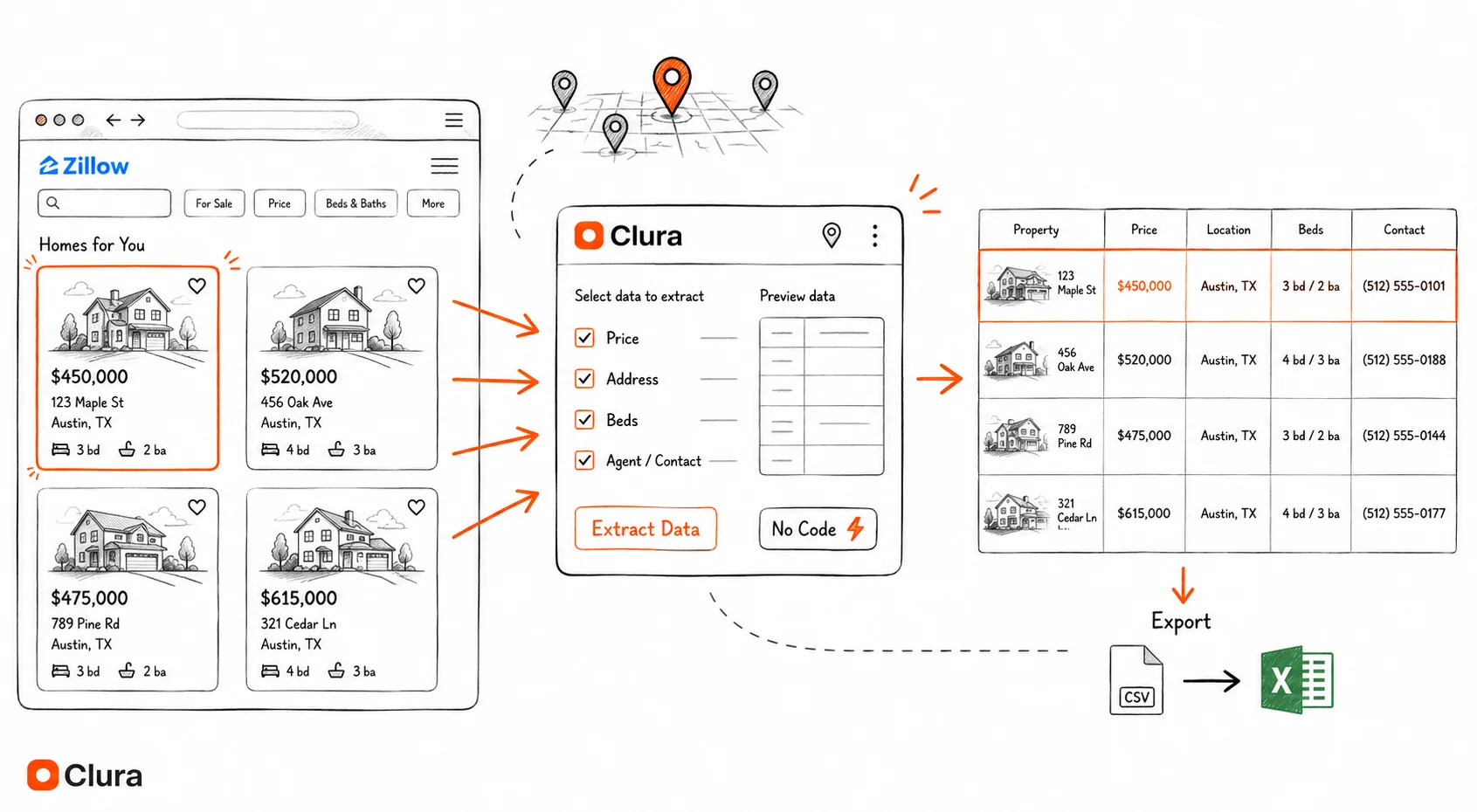
You export 100+ Zillow listings to CSV by opening the search results in Chrome, letting Clura detect the repeated property cards, choosing the fields you need, enabling pagination, and exporting the finished table. No setup, no API keys, no selectors to write.
Run your Zillow search
Go to Zillow and filter by city, zip, price range, beds/baths — whatever criteria matter for your deal flow. You're building the exact search you'd do manually.
Open Clura
Click the Clura extension icon. Within 1–2 seconds, Clura's heuristic engine scans the DOM and identifies every repeating list structure on the page. It detects the property cards automatically — no clicking or training required.
Select the listing pattern
Clura shows you the detected lists. Click the Zillow search results list. Clura immediately highlights every matching property card on the page, showing you exactly what it found.
Pick your fields
Click into one property card. Clura maps every extractable field: price, address, beds, baths, sqft, days on market, Zestimate. Check the fields you want and Clura locks in the pattern across all cards.
Enable pagination and extract
Toggle "Auto-paginate" and hit Extract. Clura pulls every listing on the current page, clicks Next, waits for the page to load naturally, and repeats — until you have all your listings or hit your target count.
Export to CSV or Excel
One click exports clean, structured data — no HTML fragments, no duplicate headers, no encoding issues. Open directly in Excel or upload to your CRM.
Older workflow demo: Clura scraping 95 Zillow listings in Denver, CO with field selection and CSV export.
Section 5
How Do You Handle Zillow Pagination and Load More Buttons?
Zillow pagination works best when the browser clicks the next page or load-more control naturally. Multi-page scraping is where most DIY approaches fall apart. Zillow shows about 40 listings per page and requires a click on Next or a scroll interaction to load more. Automated tools that fire off rapid page requests trigger Zillow's "suspicious activity" detection — you get rate-limited or temporarily blocked after 3–5 pages. The same principles that apply to scraping paginated websites hold here: the browser must handle navigation, not raw HTTP requests.
Clura's pagination agent handles this differently. Instead of firing HTTP requests programmatically, it clicks the Next button the same way you would — a real DOM click event on the real button element, from inside the page's own JavaScript context. The click triggers all the same browser events Zillow expects: a mousedown, a mouseup, a click, and then a navigation event that carries your session state forward.
Between pages, Clura waits for the full page load event (not just the initial HTML response, but the JavaScript rendering and lazy-loaded images too) before extracting data. This mimics reading time — the kind of timing PerimeterX uses to distinguish a human from a bot. You won't get blocked mid-extraction.
For Zillow specifically: a search with 200 results spans 5 pages. Clura processes all 5 pages in roughly 60–90 seconds, depending on your connection. The output is a single flat CSV with all 200 rows — no stitching files together manually.
⚠️ Warning
Zillow caps search results at 800 listings per search query. If your market has more than 800 active listings, split your search by zip code, price range, or property type — run each as a separate Clura extraction and combine the CSVs. This also improves data quality since narrower searches return more relevant results.
Section 6
Why Are Real Estate Investors Moving Away From Credit-Based Tools?
Most SaaS scraping tools sell you credits. One credit = one page scraped. Pricing starts around $50/month for 1,000 credits — which sounds like a lot until you realize a single Zillow search with 200 listings across 5 pages costs 5 credits (one per page), and you're probably running 20–30 searches per month across different markets, zip codes, and filters.
At 30 searches × 5 pages = 150 credits/month. That's fine. But add multi-family analysis, sold comps, price history pulls, and agent research — and you're at 500–800 credits/month before you've done anything sophisticated. At $50 for 1,000 credits, you're spending $25–$40/month on a workflow that needs to run indefinitely.
The deeper issue is that credit-based pricing scales against you as your operation grows. The more serious you get about real estate data, the more it costs — which is backwards. Data should be a fixed cost, not a variable one tied to activity.
Clura's local browser workflow runs on your machine, which keeps everyday property extraction predictable. A $29.99 lifetime purchase covers unlimited local extractions across sites such as Zillow, Redfin, Realtor.com, MLS aggregators, and county property portals. Cloud Agents are separate: they use AI add-on credits by row when you run automated cloud workflows.
💡 Key insight
At $50/month for a credit-based tool, you pay $600/year — every year. Clura's $29.99 lifetime deal breaks even after 18 days. For real estate investors running weekly market analyses, the ROI on the switch is usually visible within the first month.
Section 7
How Do You Use Zillow Data in Excel, Sheets, or a CRM?
Zillow data becomes useful when every listing lands in clean columns that can be filtered, sorted, enriched, and imported. Extracting data is only half the job. The data has to be usable — clean columns, consistent formatting, no HTML fragments, no escaped characters, no duplicate headers from each page of pagination.
Clura outputs a single flat file with one row per listing and one column per field you selected. Here's what a typical Zillow export looks like:
| # | Address | Price | Sq Ft | Type | Listing URL |
|---|---|---|---|---|---|
| 1 | 3115 W 25th Avenue, Denver, CO 80211 | $1,650,000 | 2,590 sqft | House for sale | zillow.com/…/3115-W-25th-Ave-Denver-CO-80211/13316134_zpid/ |
| 2 | 1499 Blake Street #4N, Denver, CO 80202 | $619,000 | 1,399 sqft | Condo for sale | zillow.com/…/1499-Blake-St-APT-4N-Denver-CO-80202/13318002_zpid/ |
| 3 | 1368 Ash Street, Denver, CO 80220 | $1,225,000 | 4,149 sqft | House for sale | zillow.com/…/1368-Ash-St-Denver-CO-80220/63360153_zpid/ |
| 4 | 17909 E 54th Avenue, Denver, CO 80249 | $545,000 | 2,332 sqft | House for sale | zillow.com/…/17909-E-54th-Ave-Denver-CO-80249/251840512_zpid/ |
| 5 | 1435 Quebec Street, Denver, CO 80220 | $479,000 | 1,464 sqft | House for sale | zillow.com/…/1435-Quebec-St-Denver-CO-80220/13318003_zpid/ |
| 6 | 9335 E Center Avenue #8C, Denver, CO 80247 | $249,900 | 1,470 sqft | Coming soon | zillow.com/…/9335-E-Center-Ave-APT-8C-Denver-CO-80247/13309273_zpid/ |
| 7 | 2401 Blake Street #2, Denver, CO 80205 | $389,000 | 1,100 sqft | Condo for sale | zillow.com/…/2401-Blake-St-2-Denver-CO-80205/13310101_zpid/ |
| 8 | 4800 Tennyson Street, Denver, CO 80212 | $875,000 | 2,841 sqft | House for sale | zillow.com/…/4800-Tennyson-St-Denver-CO-80212/13316201_zpid/ |
From here, the workflow depends on your use case. For lead generation, upload the CSV to your CRM (HubSpot, Follow Up Boss, LionDesk all accept CSV imports) and map the address/agent fields to your contact schema. For market analysis, open in Excel or Google Sheets and pivot by zip code, price range, or days on market. For wholesalers building cold outreach lists, filter for days_on_market > 30 and price_to_zestimate < 0.9 to surface potential motivated sellers. If you want a broader look at scraping real estate listings across Redfin, Realtor.com, and international platforms, that guide covers each source in detail.
The CSV also imports directly into Airtable, Notion databases, and most property management tools that accept standard column-mapped imports.
Section 8
Which Zillow Scraper Works Best in 2026?
The best Zillow scraper in 2026 is usually a browser-native Chrome extension for on-demand exports, because Zillow's anti-bot checks punish cloud requests and headless automation. Here's how the three most common Zillow scraping approaches stack up across the dimensions that actually matter when Zillow's anti-bot system is in the equation:
| Factor | Python / Scrapy | Browse.ai | Clura |
|---|---|---|---|
| Zillow block rate | ~95% (data center IPs) | ~60–70% (cloud browser) | ~0% (real Chrome + your IP) |
| Setup time | Hours to days | 15–30 minutes | Under 2 minutes |
| Proxy cost | $10–$25/GB | Included (cloud) | None (your IP) |
| Per-extraction cost | Infra + proxy fees | Credits ($0.01–$0.05) | $0 (lifetime deal) |
| Handles JS rendering | Needs Playwright/Selenium | Yes | Yes (native browser) |
| Handles login pages | Complex to implement | Yes | Yes (your session) |
| Handles pagination | Manual implementation | Yes | Yes (Pagination Agent) |
| Technical skill needed | High (Python, XPath, CSS) | Low | None |
| Maintenance needed | High (selectors break) | Low | None |
| Data export format | Custom code | CSV / JSON | CSV / Excel / Sheets |
🔍 Real example
A wholesaler running weekly market pulls across 8 zip codes in Phoenix was spending ~$180/month on a proxy-plus-scraper stack. After switching to Clura, the monthly cost dropped to $0 (post-lifetime-purchase), and the block rate went from sporadic to zero. Total time to switch: one afternoon.
FAQ
Frequently Asked Questions
- What is the best Zillow scraper Chrome extension?
- The best Zillow scraper Chrome extension is one that runs inside your real browser, detects listing cards automatically, supports pagination, and exports clean CSV or Excel files. Clura is built for that workflow: open a Zillow-style search page, choose the fields you want, preview the rows, and export the visible listings without proxy setup.
- Can I use a Zillow web scraper without writing Python?
- Yes. You can use a Zillow web scraper without Python by running a browser extension like Clura on the visible search results page. That avoids Python requests, selectors, proxy rotation, and headless browser setup while still capturing listing fields such as price, address, beds, baths, square footage, status, and URL.
- Is scraping Zillow legal?
- Scraping publicly visible Zillow listing data (prices, addresses, property details) is generally considered legal in the United States under the Van Buren v. United States and hiQ Labs v. LinkedIn precedents, which established that accessing publicly available information does not constitute unauthorized computer access. Zillow's Terms of Service restrict automated access, but ToS violations are civil matters, not criminal ones — and Zillow has not pursued legal action against individual users extracting public listing data for personal or business research. Always consult a lawyer before large-scale commercial use.
- Why does my Python Zillow scraper keep getting 403 errors?
- Zillow uses PerimeterX, which blocks requests from data center IP ranges and identifies Python libraries (requests, httpx, scrapy) by their TLS fingerprint. The ClientHello message your Python library sends has a different cipher suite ordering than a real Chrome browser — PerimeterX flags this before your request is processed. Rotating proxies help but don't fully solve the behavioral fingerprinting. The only reliable fix is running the scraper inside a real Chrome session from a residential IP, which is what browser-native tools like Clura do.
- What does Zillow press and hold mean for scrapers?
- Zillow press and hold is an anti-bot challenge shown when Zillow suspects automated traffic. It usually appears after cloud requests, headless browser signals, proxy traffic, or unusually fast page navigation. If you see it, slow down, avoid data-center proxies, use a normal Chrome session, and extract only the visible listing data you actually need.
- Can I scrape Zillow search results across multiple pages?
- Yes. Clura can scrape Zillow search results across multiple pages by using browser-level pagination rather than raw HTTP requests. It extracts the current page, clicks the next-page control, waits for the new listing cards to render, and appends the next batch of rows into one export.
- How many Zillow listings can I scrape at once?
- Zillow caps search results at 800 listings per search query in the UI. Clura can extract all 800 across the paginated pages in a single run (roughly 4–6 minutes for 800 listings at 40 per page). For larger datasets, split by zip code, price band, or property type and merge the exported CSVs.
- Can I scrape Zillow for sold comps and off-market data?
- Yes. Zillow's sold listings and recently sold tabs are publicly accessible. Run your search with the 'Sold' filter enabled, and Clura will extract the same fields from sold listings — including the final sale price, the list-to-sale price ratio, and days on market before sale. This is directly useful for running ARV comps without a paid data subscription.
- Will Zillow ban my account if I use a scraper?
- Clura runs in your existing Chrome session without logging into Zillow programmatically. Most Zillow searches are accessible without an account. If you are logged in, Clura uses your existing session the same way you would while browsing manually — there is no separate API call or authentication event that Zillow could distinguish from normal browsing activity.
- How do I get Zillow data into my CRM?
- Export the Clura extraction as a CSV and use your CRM's import feature. HubSpot, Follow Up Boss, LionDesk, and Podio all support CSV import with column mapping. Match Address to your contact's property field, use the agent email column (if extracted from detail pages) as the contact email, and map Days on Zillow to a custom field for lead scoring. The Clura CSV has clean column names with no HTML artifacts, so no cleanup is needed before import.
Ready to Pull Zillow Listings Without Getting Blocked?
Install Clura, run your Zillow search, and extract your first listings in under 2 minutes. No proxies, no code.
Get Clura Free