
What Is a Social Media Finder and How Does It Work?
A social media finder is your secret weapon for web data. Think of it as a smart assistant that automatically finds and extracts public information from social networks like LinkedIn or X (formerly Twitter), then organizes that data into a clean spreadsheet you can actually use. There are over 5.4 billion people on social media, creating an enormous amount of public business intelligence — but sifting through it manually is completely unsustainable.
This guide explains exactly how social media finders work, walks through the most valuable use cases for sales, recruiting, and marketing teams, and shows you how to build your first automated prospect list in under five minutes. For a broader look at the tools available, see our guide to the top social media scraping tools.
Find and Extract Social Media Data in One Click
Clura is the AI-powered Chrome extension with pre-built templates for LinkedIn, X, and more. Build your first targeted prospect list in minutes — completely free.
Add to Chrome — Free →Why You Need a Social Media Finder
A social media finder replaces hours of manual profile-by-profile searching with automated bulk extraction — turning scattered social data into a clean, structured spreadsheet ready for outreach or analysis.

Searching social media manually is like fishing with a single line, hoping for a random bite. Using a modern finder tool is like deploying a high-tech sonar and a massive net — letting you pinpoint and scoop up exactly who you are looking for with incredible speed and precision.
These tools do more than find profiles. They automatically collect structured data your business can use right away. Picture needing a fresh list of potential clients: instead of endless clicking and copying, you can pinpoint every marketing manager in a specific city on LinkedIn, automatically extract their names, company details, and job titles, and export the entire list into a clean CSV file with one click.
A social media finder is not just another search bar. It is an automation powerhouse that transforms messy, scattered information into structured data you can use for outreach, analysis, or research.
How a Social Media Finder Works
A social media finder works by running a browser extension that navigates social network pages at machine speed, identifies public data fields like names, job titles, and companies, and exports everything into a perfectly structured CSV — all without writing any code.
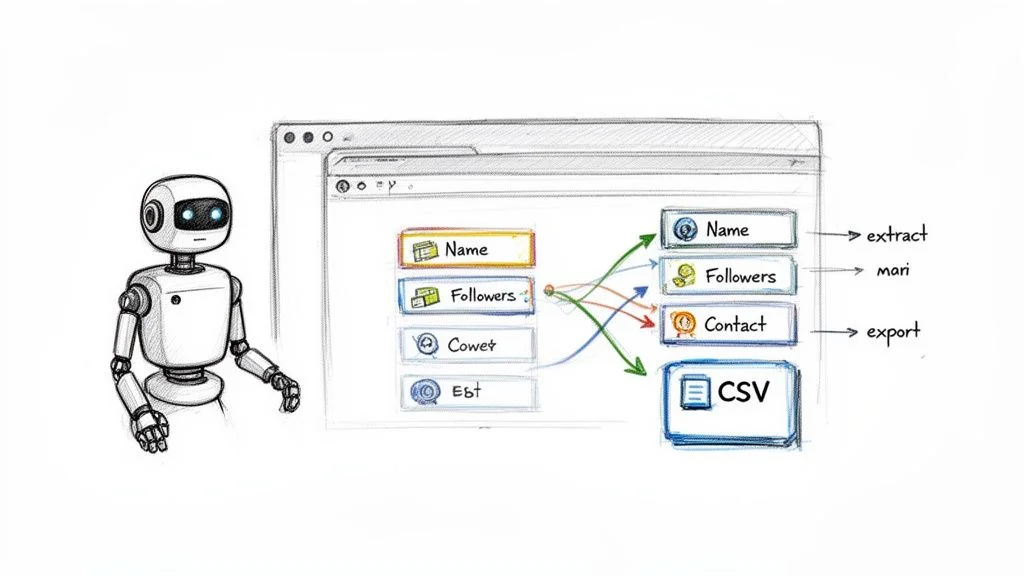
Modern tools like Clura use a simple browser extension paired with AI-powered templates. All the complicated work of figuring out what to grab from a page is already done for you. You just navigate to the social network, click the extension icon, pick a template, and hit Run.
The tool then zips through web pages just like a person would, but at a speed that is simply not humanly possible. It pulls the specific details you need and arranges them into a perfectly clean spreadsheet. What used to take hours of tedious work becomes a task you finish in minutes.
Practical Use Cases for a Social Media Finder
Social media finders deliver immediate value for four core use cases: building prospect lists for sales, sourcing candidates for recruiting, monitoring competitors for market intelligence, and tracking pricing and trends for e-commerce.

1. Sales and Lead Generation
For any sales team, a social media finder is a prospecting superpower. Instead of scrolling through LinkedIn manually, run a targeted search, launch Clura, and instantly get all public profile data — names, companies, job titles, and more — in a clean spreadsheet. You can build a list of 500 qualified prospects in the time it takes to drink your morning coffee.
2. Recruiting and HR
Recruiters can instantly pull specific skills from multiple candidate profiles, scrape job postings to analyze requirements and salary benchmarks, and monitor target company pages for new openings or hiring surges. This saves enormous time, letting HR professionals focus on connecting with amazing people rather than searching for them.
3. Market and Competitor Intelligence
Set up automations to monitor competitor activity on X or Crunchbase, tracking everything from product launches to new funding rounds. It is like having a real-time competitive intelligence feed delivered automatically without lifting a finger.
4. E-commerce and Product Research
E-commerce sellers can instantly pull structured data from review sites, monitor competitor prices, or analyze product trends on social platforms. This data-driven approach helps businesses stay competitive and spot new opportunities before rivals do.
| Role | Use Case | Key Benefit |
|---|---|---|
| Sales Rep | Build LinkedIn prospect lists | 500 qualified contacts in minutes |
| Recruiter | Aggregate candidate profiles | 360-degree view of candidates |
| Marketer | Monitor competitor social activity | Real-time market intelligence |
| E-commerce Manager | Track competitor pricing | Stay competitive and optimize pricing |
Build Your First Prospect List in 3 Steps
Install Clura, go to LinkedIn, choose the LinkedIn Search template, and click Run. Your first automated prospect list is ready in minutes — completely free.
Add to Chrome — Free →How to Choose the Right Social Media Finder
The best social media finder is easy to use out of the box, with AI-powered templates that eliminate manual field mapping, flexible CSV export, and reliable data accuracy across LinkedIn, X, and other major platforms.
The move away from clunky manual setup is the biggest game-changer when evaluating tools. The old way required painstakingly pointing and clicking on every field you wanted to extract. The new standard is AI-powered smart templates that instantly recognize all important data when you land on a page.
- Ease of Use: you should be up and running in minutes with pre-built templates that take the guesswork out of the equation.
- Data Accuracy: the tool must pull the correct information consistently — automation is useless if you spend hours cleaning up messy output.
- Flexible Exports: download results as a clean CSV that works with your CRM, outreach platform, or spreadsheet of choice.
- Works Across Platforms: your tool needs to operate reliably on LinkedIn, X, company websites, and e-commerce sites.
Get a Prospect List in 3 Simple Steps
Building an automated prospect list with a social media finder takes three steps: install the browser extension, run a search on LinkedIn and pick a template, then click Run and export the clean CSV result.
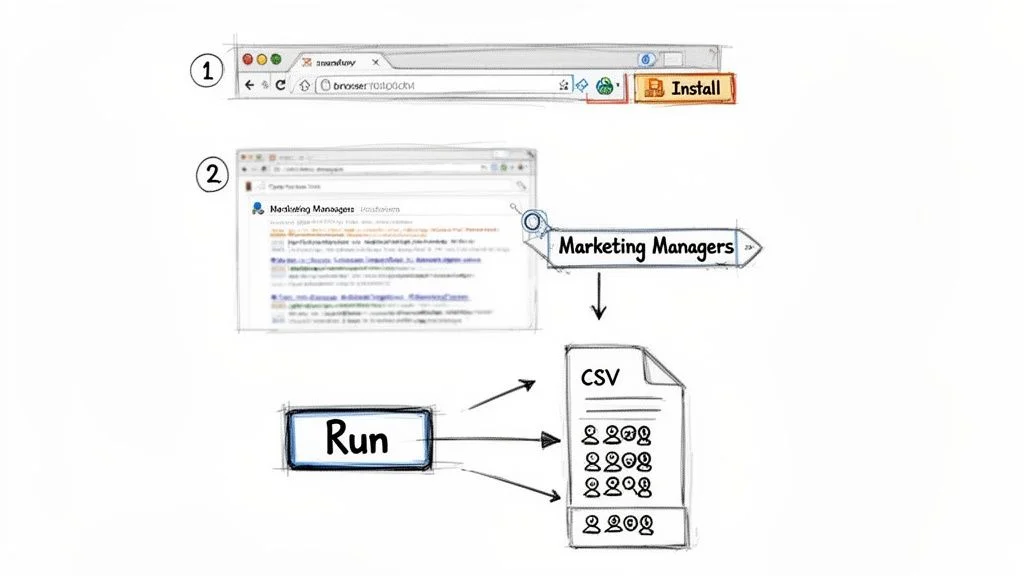
- Install the Clura Chrome extension — takes about 30 seconds. The icon appears in your browser toolbar instantly.
- Go to LinkedIn and search for your target audience (for example, Marketing Managers in California). When the results load, click the Clura icon and select the LinkedIn Search Results template.
- Click Run. Clura collects all public data — names, job titles, companies, and locations — then click Export to CSV for a clean spreadsheet ready for your sales outreach.
You just took a task that would have burned hours and finished it in minutes. For more on how to expand these workflows, see our guide on how to automate data collection.
Frequently Asked Questions
What is a social media finder?
A social media finder is an automated tool that extracts public information from social networks like LinkedIn and X, organizing names, job titles, companies, and contact details into a clean, structured spreadsheet. It replaces manual copy-paste with one-click bulk extraction.
Is using a social media finder legal?
Yes, when used responsibly. Scraping publicly available information is generally permissible. The golden rule is to use the data for legitimate business purposes like outreach or market research, never for spamming, and to respect each platform's Terms of Service.
Do I need coding skills to use a social media finder?
Not at all. Modern AI-powered tools like Clura are built to be no-code. If you know how to browse the internet and click a button, you can use them. Pre-built templates handle all the technical complexity for you.
How is a social media finder better than searching LinkedIn manually?
Scale and structure. Manual searching yields a handful of profiles per hour. A social media finder can extract hundreds or thousands of records in minutes, and exports them as a clean, organized CSV file ready for your CRM — not a mess of open browser tabs and copied notes.
Which social media platforms can a finder tool work with?
Leading tools like Clura work across LinkedIn, X (formerly Twitter), Crunchbase, company websites, and e-commerce platforms. Pre-built templates make extraction from these sources one-click simple without any configuration.
Conclusion
The daily grind of hunting for prospects and gathering market intelligence from social media is more than just slow — it is unsustainable at scale. A social media finder automates the tedious parts so you can focus on the strategic parts: connecting with people, analyzing insights, and growing your business.
Start today with one specific task: build a fresh prospect list, monitor a competitor's activity, or aggregate candidate profiles for an open role. The time savings are immediate, and the competitive advantage compounds every time you use it.
Explore related guides:
- Social Media Scraping Tools —
- Automate Data Collection —
- Scrape Data From Website Chrome Extension —
Stop Wasting Hours on Manual Social Media Research
Try Clura today. Explore our pre-built templates and get your first automation running in minutes — completely free.
Add to Chrome — Free →